AI video generation has become a crowded market. There are dozens of platforms offering impressive video models, but finding the right one can be surprisingly expensive. You might subscribe to Kling for character animation, Google Veo for cinematic scenes, Seedance for more complex video production, and Runway for editing. Before long, you are managing several subscriptions just to get through one creative project.
This is one reason the AI video aggregator category is becoming increasingly interesting. These platforms bring multiple generation models into a shared workspace, allowing creators to experiment with different engines, compare outputs and manage their creative work through a single account.
Some platforms concentrate on giving you access to a large catalogue of video models. Others combine generation with editing, audio production, image creation and automated workflows. The difference matters because having access to 100 models does not necessarily mean you have an efficient production environment.
For this comparison, we are looking at platforms that offer access to popular video generation technology, including Kling, Veo and Seedance, alongside their own creative tools. We will also consider pricing, generation costs, workflow capabilities and the practical limitations that can affect everyday production.
Which Option Is Best Overall, and for Whom?
For creators who want several premium video models under one subscription, OpenArt and Pixara are worth considering.
Google Veo is a compelling choice for people who prioritize cinematic generation and native audio, while Runway suits professional editing workflows. Kling remains attractive for motion focused projects. Your best option depends on model access, generation costs and the tools surrounding each model.
1. OpenArt: Best for Accessing Multiple AI Video Models

OpenArt is one of the more interesting options for creators who want to experiment with several AI video models without subscribing to every provider separately. Its video generation workspace brings different models together, including Google Veo, Kling, Seedance, Wan, Hailuo and PixVerse.
The biggest attraction is the ability to compare different generation engines through one interface. You can start with a text prompt, generate a video using one model, and then try another model with the same creative direction. This is particularly useful when you are still figuring out which engine produces the right combination of movement, visual quality, character consistency and prompt adherence.
For example, imagine you are creating a product advertisement for an ecommerce brand. You might want Kling for a dynamic product reveal, Veo for a cinematic lifestyle scene and Seedance for a more elaborate sequence involving multiple visual references. Having these options available through one workspace makes experimentation considerably easier.
Recommended Guides:
- Kling AI API Pricing 2026: Cost Per Second and Per Video
- OpenArt Pricing 2026: Plans, Credits and Cost Per Image
- Best Cyber Monday AI Deals 2026: Huge Savings on Creative Tools
- Best Black Friday AI Deals 2026 | Save on Creative Tools
- Luma Dream Machine Pricing 2026: Plans, Ray3 Credits & Free Tier
- Is PixVerse Free? Plans, Credits & V6 Costs
- LTX Studio Pricing & Review 2026: Plans, Storyboards and Who It's For
Video Generation and Creative Tools
OpenArt offers more than a collection of individual video generators. Its workspace includes several tools designed to support different stages of content production.
Some of its notable capabilities include:
Text to video and image to video: You can generate clips from written descriptions or use an existing image as the starting point. The latter is particularly useful for product marketing, character animation and branded content where you already have a visual reference.
Start and end frame control: This feature gives creators more control over how a clip begins and finishes. It can help produce smoother transitions and more deliberate visual sequences.
Video to video transformation: You can upload existing footage and modify its appearance through AI. This opens up possibilities for restyling scenes, changing visual treatments and creating alternative versions of existing content.
Motion transfer: Reference footage can help guide the movement in a generated scene. This is useful when you want a character or subject to follow a particular action rather than relying entirely on text instructions.
Character consistency: OpenArt includes character creation tools that help maintain a recognizable subject across different generations. This is particularly relevant for recurring characters, branded mascots and short storytelling projects.
Lip sync and conversational editing: Its additional tools support tasks such as synchronizing speech and making visual adjustments through conversational instructions. Creators can also work on elements such as backgrounds and lighting.
The platform also provides a shared creative library, allowing users to manage their generated assets without jumping between separate applications.
OpenArt Pricing and Credit Structure
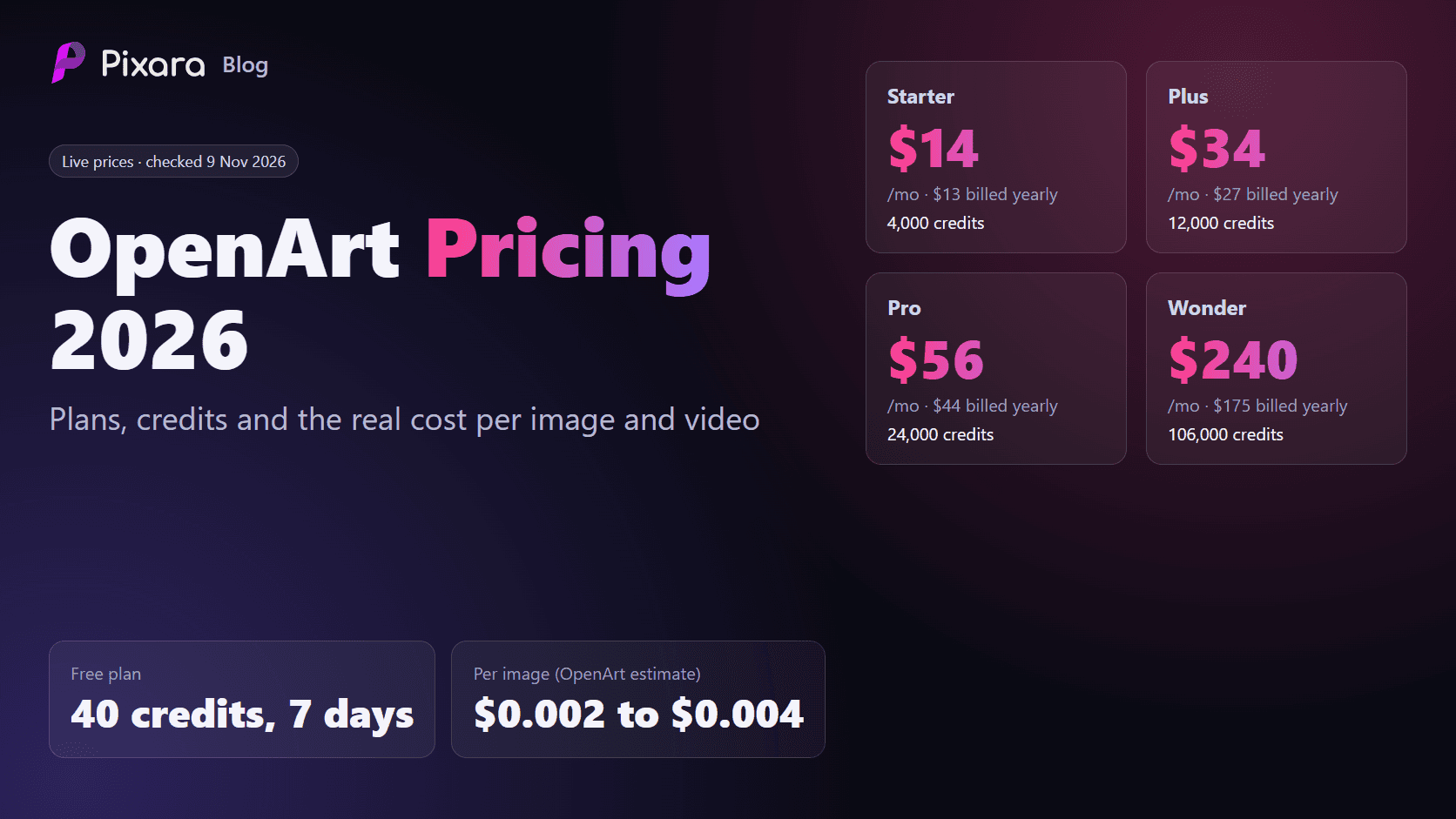
OpenArt follows a subscription and credit model, with access to more than 100 image, video and audio models. Each plan provides a different monthly credit allowance, giving users more generation capacity as they move to higher tiers.
Basic
- Price: Free
- Monthly credits: Limited
- Best for: Beginners who want to test the platform.
Essential
- Price: $7/month
- Monthly credits: 4,000
- Best for: Casual creators who need occasional image and video generations.
Plus
- Price: $27/month
- Monthly credits: 12,000
- Best for: Regular creators experimenting with multiple AI models.
Pro
- Price: $44/month
- Monthly credits: 24,000
- Best for: Creators and small teams with more frequent generation requirements.
Wonder
- Price: $175/month
- Monthly credits: 106,000
- Best for: High volume creators and production teams.
The important thing to understand is that these credits are shared across different creative activities. Image generation, video generation and more advanced tools can consume different amounts.
Consequently, the advertised number of potential videos should not be treated as a guaranteed monthly production allowance. The selected model, duration, resolution and generation settings all affect consumption.
What Does Each Video Cost?
There is no single fixed cost for an OpenArt video. A short generation using one model can consume considerably fewer credits than a longer generation using a premium model or its Director workflow.
This is where I would recommend testing a few representative prompts before committing to a higher subscription. Generate a short product clip, a character animation and a cinematic scene. Compare the credit consumption and output quality for each.
That gives you a much better idea of how far your monthly allowance will stretch during actual production.
Strengths and Limitations
OpenArt makes sense for creators who want a large selection of generation models and supporting creative tools in one account. The ability to experiment with different engines is particularly valuable for agencies and marketers who produce different types of visual content.
However, the shared credit system deserves attention. Premium generation workflows can consume credits quickly, and having access to a large model catalogue does not guarantee inexpensive production.
There are also user complaints worth considering. Some Reddit users have reported unexpectedly high credit consumption through Director, discrepancies between displayed estimates and final charges, inconsistent video quality and difficulties obtaining support. These are individual user reports, not independently established platform wide findings, but they are worth considering when evaluating the service.
Reddit+2
Best for: Creators, small agencies and marketing teams that want to compare multiple AI video models without maintaining separate subscriptions for every generation provider.
2. Google Veo: Best for Cinematic Video and Native Audio Generation

Google Veo deserves a place in this comparison because it represents a different kind of value. Rather than concentrating on aggregating models from multiple providers, Google offers its own video generation technology alongside a growing collection of creative and production tools.
The latest Veo 3.1 generation capabilities make it particularly interesting for marketers, filmmakers and creators who want more than a visually convincing silent clip.
One of its most useful features is native audio generation. Veo can create sound effects, ambient audio and dialogue alongside the video. This reduces the amount of separate audio work required for certain types of content.
Think about a cinematic product advertisement showing a luxury vehicle driving through a rainy city. You might want the sound of the engine, rainfall, distant traffic and atmospheric background audio to accompany the visuals. Generating these elements together can make the initial production process considerably more convenient.
What Makes Veo Worth Considering?
Veo offers several generation capabilities that make it suitable for more involved creative projects.
Text to video: Describe the scene, camera movement, subject and atmosphere, and the model generates a corresponding video.
Image to video: Upload a reference image and animate it. This is particularly useful for turning product photography, concept artwork and existing visual assets into moving content.
Native audio: Generate dialogue, sound effects and ambient audio as part of the video creation process.
Reference image support: Use visual references to help maintain the appearance of characters, objects and other important elements.
First and last frame control: Provide starting and ending visual references to guide a transition between two scenes.
Resolution options: Veo supports high quality output, including 1080p and 4K options through supported workflows.
Another advantage is its availability across different Google products. Users can access Veo through Google Flow, eligible Gemini subscriptions and the Gemini API. This gives both individual creators and developers several ways to incorporate the model into their workflows.
Google Veo Pricing and Generation Costs
Veo pricing depends on how you access it. Google Flow uses subscription based AI credits, while the Gemini API provides a more direct per second pricing structure.
For developers using the Gemini API, the published Veo 3.1 rates are:
Veo 3.1 Standard
- 720p and 1080p: $0.40 per second.
- 4K: $0.60 per second.
Veo 3.1 Fast
- 720p: $0.10 per second.
- 1080p: $0.12 per second.
- 4K: $0.30 per second.
Veo 3.1 Lite
- 720p: $0.05 per second.
- 1080p: $0.08 per second.
Source: Google AI for Developers.
Cost of an Eight Second Veo 3.1 Generation
To put these rates into perspective, here is what an eight second generation would cost through the API.
Veo 3.1 Standard, 1080p
- Cost per second: $0.40
- Eight second output: $3.20
Veo 3.1 Standard, 4K
- Cost per second: $0.60
- Eight second output: $4.80
Veo 3.1 Fast, 1080p
- Cost per second: $0.12
- Eight second output: $0.96
Veo 3.1 Fast, 4K
- Cost per second: $0.30
- Eight second output: $2.40
Veo 3.1 Lite, 1080p
- Cost per second: $0.08
- Eight second output: $0.64
Strengths and Limitations
Veo is particularly appealing when sound and visual storytelling need to work together. Its native audio capabilities can reduce the need for separate sound design during early production, while reference images and frame controls provide more creative direction.
The main limitation is that Veo is not a universal multi model workspace. You are primarily working within Google's generation ecosystem rather than switching freely between competing providers such as Kling and Seedance.
Clip duration and access also depend on the model and the product through which you generate. Some workflows require additional scene generation or editing to produce longer sequences.
Best for: Filmmakers, developers, advertising teams and creators who prioritize cinematic visuals, synchronized audio and access to Google's video generation technology.
3. Pixara: Best for an All in One AI Video and Creative Workspace

When you are comparing AI video platforms, having access to multiple models is useful. But there is another consideration that often gets overlooked: what happens after you generate the video?
You might need to create a product image, animate it with Kling, generate a voiceover, add background music, synchronize the audio and make a few edits before the clip is ready for publishing. Managing all these activities across separate applications can become unnecessarily complicated.
This is where Pixara takes an interesting position in the market.
Rather than limiting its offering to video generation, it brings image creation, video generation, audio production, voiceovers, AI workflows and video editing into one browser based creative workspace. More importantly, its model catalogue includes several popular generation engines, giving users access to Kling, Google Veo, Seedance and other AI models through a shared credit balance.
For creators who want an AI video aggregator that can handle more than just generating clips, this combination makes it worth considering.
Access Kling, Veo, Seedance and Other Video Models
The biggest attraction is having multiple video generation models available through one account.
You can experiment with different engines depending on the type of content you want to produce, without having to maintain separate subscriptions with every model provider.
Some of the notable video models available include:
Kling: The platform offers Kling models, including Kling 3.0, Kling 2.6 Pro and Kling O1. These are useful for cinematic scenes, realistic movement, character animation and product videos. Kling's motion capabilities make it particularly interesting for creators who want subjects to interact naturally with their surroundings.
Google Veo 3.1: Google's video generation model brings text and image based generation capabilities, with native audio support in compatible workflows. It is particularly useful for cinematic scenes, dialogue, environmental sounds and product storytelling.
Seedance 2.0 and 2.5: ByteDance's Seedance models are another important addition. Seedance 2.0 supports multimodal creative workflows, while Seedance 2.5 brings more advanced reference handling, longer single shot generation and audio capabilities. The platform's current model catalogue lists both generations, with availability depending on the active model listing.
Other models: The catalogue also includes options such as Minimax Hailuo, Luma Ray and Grok Imagine Video. This gives users more flexibility when a particular model produces better results for a specific creative requirement.
Suppose you are producing five short advertisements for a skincare brand. You could generate the initial product imagery, test different animation styles through Kling, create an alternative cinematic version with Veo and experiment with Seedance for a more elaborate sequence.
You can compare the results and decide which creative direction deserves further production.
You are not restricted to a single generation engine, and your creative workflow does not need to revolve around one provider's subscription.
Ara AI: A Copilot That Helps With Prompt Engineering
One challenge with multi model AI platforms is knowing which model to select and how to communicate your creative requirements.
A prompt that works beautifully with one video model might produce mediocre results with another. Some models respond better to detailed camera instructions, while others need clearer descriptions of subject movement, lighting, composition and environmental details.
This is where Ara AI comes in.
Ara is the platform's built in AI copilot, designed to help users move from a basic creative idea to a more structured generation prompt. It can assist with prompt refinement, model selection and creative direction.
For someone who is relatively new to AI video generation, this can make the initial learning process easier.
Consider a simple prompt:
"A luxury perfume bottle on a table with beautiful lighting."
It communicates the basic idea, but leaves many creative decisions unanswered.
You could ask Ara to develop it into a more detailed production prompt covering:
- Subject presentation: A premium glass perfume bottle with carefully rendered reflections, elegant packaging and visible product details.
- Environment: A sophisticated studio setting with a dark background and subtle atmospheric elements.
- Lighting: Soft directional lighting, controlled highlights and realistic shadows.
- Camera movement: A slow cinematic push in towards the perfume bottle.
- Visual style: High end commercial advertising with polished product photography aesthetics.
The resulting prompt gives the video model more information to work with.
Ara can also help users decide which generation engine is appropriate for their intended result. This is particularly helpful when you have several models available and are still learning their individual strengths.
Of course, AI generated prompts still need human judgment. A beautifully written prompt cannot guarantee a perfect video, and you will probably need several generations before getting the desired result.
Still, having prompt assistance and model selection support within the same workspace reduces some of the initial friction associated with using multiple generation engines.
Image Generation: Access Multiple Image Models Too
A useful addition is that the platform does not restrict its multi model capabilities to video.
It also brings together several image generation models, which means you can create visual assets before turning them into animated content.
Its image generation catalogue includes:
- Google Nano Banana Pro: Useful for detailed image creation, visual editing and maintaining subject integrity.
- Midjourney: A popular option for artistic imagery, creative concepts and visually distinctive compositions.
- ByteDance Seedream 4.5: Suitable for photorealistic imagery, advertising visuals and creative artwork.
- Ideogram: Particularly useful for designs involving typography, posters and text based visual compositions.
- Reve: Another option for producing photorealistic and editorial style images.
Why does image generation matter in a comparison of AI video platforms?
Because many video models require an image as their starting frame. You might want to create a product image, generate a particular character or establish a scene before asking a video model to animate it.
Having image and video generation available within one workspace makes this process more convenient.
For example, an ecommerce business can create a product hero image, generate a lifestyle setting, animate the product using a suitable video model and produce several variations for social media.
The same workflow can support fashion campaigns, promotional videos, YouTube content and branded social media posts.
AI Voiceovers, Music Generation and Audio Production
Video production rarely ends with the visuals. You still need suitable audio, and this can involve several separate tasks.
The platform's Voice Studio brings together voice generation, voice cloning, music creation, lip sync and sound effects.
Here are some of its notable capabilities.
AI Voiceover Generator
You can convert written scripts into spoken audio for advertisements, product demonstrations, tutorials, explainers and social media videos.
The platform provides access to different voice generation models, including ElevenLabs and Minimax Speech. This gives creators options for different speaking styles and audio requirements.
Voice Cloning
Voice cloning allows users to create a digital version of a voice from an audio sample. This can be useful for maintaining a consistent voice across recurring content, provided the necessary permission has been obtained from the voice owner.
AI Music Generator
Creators can generate music from text descriptions, making it easier to produce background tracks for advertisements, promotional clips and storytelling projects.
The listed models include Google Lyria and ElevenLabs Music, among other audio generation options.
Lip Sync
Lip sync tools help synchronize spoken audio with a character's or person's mouth movements. This can be useful for talking avatars, product presenters and short promotional videos.
Video Translation and Dubbing
The platform also offers video translation and dubbing capabilities, with support for more than 150 languages advertised on its website. This can help businesses prepare localized versions of their marketing videos for different audiences.
Sound Effects
You can generate and add sound effects to complement the visuals. For example, a product reveal might benefit from a subtle cinematic impact, while an outdoor scene could require environmental sounds that make the footage feel more complete.
The important advantage here is having several audio production capabilities alongside image and video generation. You can create the visuals, prepare the narration and work on the sound without maintaining a separate subscription for every creative task.
Built In Video Editor and Advertising Tools
Another useful component is the built in video editor.
AI generated clips frequently require some finishing work. You might need to trim an awkward opening, add subtitles, include a voiceover or prepare a different aspect ratio for Instagram, TikTok and YouTube.
Having editing capabilities within the same workspace makes these tasks easier to manage.
The available creative tools include:
- Video editing: Make adjustments to generated footage and prepare clips for publishing.
- Video subtitles: Add subtitles to make content easier to follow, particularly on social platforms where many viewers watch without sound.
- Video translation: Prepare localized versions of existing content.
- Video sound effects: Add suitable audio effects to generated footage.
- Video reframing: Adapt content for different aspect ratios and publishing formats.
- AI avatars: Create avatar based content for presentations, explainers and promotional videos.
- Product advertisement templates: Start with existing creative directions for product focused advertisements.
The Ad Studio is particularly relevant for ecommerce businesses and marketing agencies.
Rather than treating every advertisement as a completely new production project, users can work with product focused creative templates and generate different visual variations.
For example, an ecommerce marketer could produce a product demonstration, a lifestyle advertisement and a short promotional clip using different generation models. The same product imagery and brand direction can inform each creative variation.
There is an important limitation to keep in mind. A built in editor is convenient for everyday content production, but users working on complex timelines, detailed colour correction, advanced compositing or professional sound mixing may still need dedicated editing software.
For most short form marketing content, however, having basic editing and production capabilities close to the generation tools is a practical advantage.
Workflows and MCP: Automating Creative Production
One feature that deserves particular attention is the combination of visual workflows and MCP connectivity.
These capabilities take the platform beyond a conventional collection of AI generators.
Visual AI Workflows
The workflow builder allows users to connect image, video and audio generation tools through a visual interface.
You can create sequences that link different creative operations together without writing code.
For example, an ecommerce advertising workflow could look something like this:
- Start with a product image or written description.
- Generate several product photography variations.
- Select a preferred image and pass it to a video generation model.
- Generate a short product advertisement.
- Create a voiceover using the supplied advertising script.
- Add suitable audio and prepare the final video.
This is useful for agencies and businesses producing similar types of content regularly. Once a workflow is established, it can help reduce repetitive manual tasks.
Pixara MCP
The MCP integration is another interesting addition, particularly for people who already work with AI assistants and coding agents.
It allows compatible AI clients, including Claude, ChatGPT and Cursor, to connect with the creative workspace and access its generation capabilities.
Rather than opening the platform and manually configuring every generation, users can interact with supported tools through their connected AI client.
Some supported activities include:
- Generating images from written prompts.
- Creating videos using models such as Kling, Veo and Seedance.
- Producing product advertising visuals.
- Removing image backgrounds.
- Upscaling images.
- Generating voiceovers and synchronizing audio.
- Triggering saved creative workflows.
- Checking credit balances and usage.
The integration uses the user's existing account credits, so there is no need to maintain a separate generation wallet for every connected agent.
For agencies and technical teams, this opens up interesting possibilities. They can connect creative production with existing AI assisted workflows and reduce the amount of repetitive work involved in preparing marketing assets.
Pixara Pricing: How Much Does It Cost?
One of the interesting aspects of the pricing structure is that access to the model catalogue is included across the subscription tiers. Users do not need to purchase a separate subscription simply to unlock another model family.
The platform operates on a shared credit system. The number of credits you receive depends on your subscription, while individual generation costs vary according to the model and its settings.
Here is how the four main monthly plans compare.
Starter
$10/month
- 4,000 monthly credits.
- Up to 1,000 AI image generations, based on the listed allowance.
- Up to 222 seconds of generative AI video.
- Up to 666 minutes of AI voiceovers.
- 33 minutes of video rendering.
- 2 GB of storage.
- 2 concurrent generations.
- Access to Ara AI, MCP and workflows.
- Public generations shared with the community.
Hobby
$25/month
- 15,000 monthly credits.
- Up to 3,750 AI image generations.
- Up to 833 seconds of generative AI video.
- Up to 2,500 minutes of AI voiceovers.
- 125 minutes of video rendering.
- 25 GB of storage.
- 4 concurrent generations.
- Private generation options.
- Access to Ara AI, MCP and workflows.
Pro
$60/month
- 36,000 monthly credits.
- Up to 9,000 AI image generations.
- Up to 2,000 seconds of generative AI video.
- Up to 6,000 minutes of AI voiceovers.
- 300 minutes of video rendering.
- 50 GB of storage.
- 8 concurrent generations.
- Private and copy protected generations by default.
- Access to Ara AI, MCP and workflows.
Ultimate
$250/month
- 150,000 monthly credits.
- Up to 37,500 AI image generations.
- Up to 4,400 seconds of generative AI video.
- Up to 25,000 minutes of AI voiceovers.
- 1,250 minutes of video rendering.
- 100 GB of storage.
- 16 concurrent generations.
- Private and copy protected generations by default.
- Access to Ara AI, MCP and workflows.
What Does Each AI Video Output Cost?
This is where the shared credit system becomes important.
A subscription price alone does not tell you how many usable videos you can produce. Different models have different credit requirements, and resolution, duration, quality settings and additional features can affect consumption.
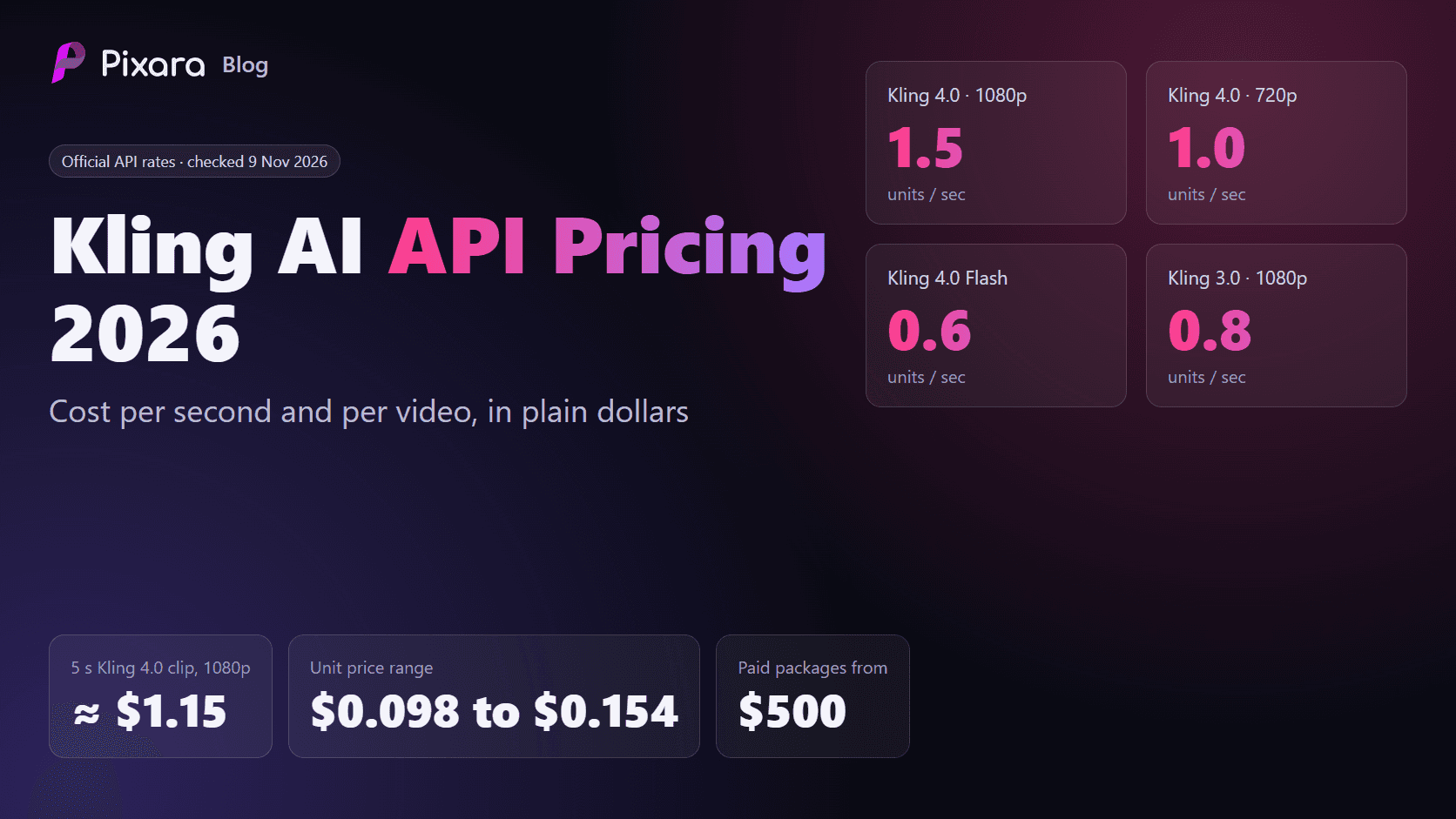
For a practical example, the platform has published its Kling 4.0 1080p generation rates at 235 credits per second.
A five second clip therefore consumes 1,175 credits.
Based on the published plan prices and assuming the entire monthly credit allowance is used for that model, the approximate cost would be:
- Starter: $2.94 per five second clip.
- Hobby: $1.96 per five second clip.
- Pro: $1.96 per five second clip.
- Ultimate: $1.96 per five second clip.
These are illustrative monthly billing calculations, not universal prices for all video models. The actual cost changes with the subscription, applicable billing discounts and model specific credit rates.
Pixara
For anyone planning regular video production, I would recommend checking the credit requirements of the specific models you intend to use before selecting a subscription.
A short social media clip and a high resolution cinematic generation can have very different production costs.
Where Does Pixara Fit in the AI Video Aggregator Market?
The value proposition becomes clearer when you look beyond the number of models available.
A creator might subscribe to one service for Kling, another for Veo, another for image generation and yet another for voiceovers. They would also need an editing application to prepare the final content.
The combined cost can add up, particularly for freelancers and smaller marketing teams.
Here, the idea is to bring those capabilities together through a shared subscription, credit balance and creative workspace.
It also offers a lower entry point for people who want to experiment before committing to a larger monthly plan. The current website advertises a $1 Starter trial for three days, after which the subscription renews at the regular $10 monthly price unless cancelled.
There are some limitations worth considering:
- Credit consumption: Premium video models can consume credits quickly, particularly when generating longer clips or higher resolution outputs.
- Model specific capabilities: Having access to a third party model does not necessarily mean every feature available on its native platform is supported through the integrated workspace.
- Creative revisions: AI generations still need human review. Product details, character consistency, motion, audio and captions can require multiple revisions.
- Professional finishing: The built in editor is convenient, but advanced video production may require specialist editing applications.
- Usage terms: Commercial rights, privacy settings and generation restrictions should be checked against the applicable plan and individual model terms.
Overall, the platform makes a compelling case for creators who want a single creative environment for image generation, video production, audio and editing. Its combination of premium video models, Ara AI, workflows and MCP connectivity gives it a broader role than a conventional AI video generator.
Best for: Solo creators, ecommerce businesses, freelancers, marketing agencies and small creative teams that want access to Kling, Veo, Seedance and other models while managing image, video and audio production through one workspace.
4. Runway: Best for Professional Video Editing and Creative Control

Runway has been part of the AI filmmaking conversation for quite some time. While several newer platforms concentrate on giving users access to as many generation models as possible, Runway has developed its own creative ecosystem around AI video production, editing and visual experimentation.
Its appeal goes beyond generating a clip from a text prompt. The platform offers tools for modifying footage, creating alternative scenes, controlling visual elements and preparing assets for professional production.
For video editors and creative agencies, this matters. Generating a visually impressive clip is one thing, but having enough control to turn it into a usable part of a larger project is another.
Runway's Gen-4.5 and Aleph models are central to its video offering, alongside third party model integrations and a collection of image, audio and editing capabilities.
Gen-4.5 and Aleph: What Can You Create?
Gen-4.5 is designed for high quality video generation, with an emphasis on visual realism, movement and prompt interpretation.
You can use text prompts to create scenes, establish camera movements and generate different visual treatments. It is particularly useful for short cinematic sequences, product visuals and creative advertising.
Aleph takes a slightly different direction. Its capabilities are geared towards editing and transforming existing footage.
For example, you might have a video of someone walking through a city and want to change the environment, modify visual elements or create an alternative version of the scene. Aleph offers a way to make these kinds of adjustments through AI assisted video editing.
Some of the notable capabilities include:
Text to video: Generate video sequences from written descriptions, including camera instructions, subjects and environmental details.
Image to video: Animate still images and turn existing artwork or product photography into moving footage.
Video to video: Transform existing footage while retaining important elements of the original composition.
AI video editing: Use AI tools to modify scenes and create alternative visual treatments without rebuilding every shot manually.
4K upscaling: Improve output resolution for projects that require higher quality visual assets.
Parallel generations: Run multiple generations simultaneously, which is useful when testing creative variations.
Third Party Models Within Runway
Runway has also expanded beyond its proprietary models. Its platform offers access to selected third party generation models, giving users more creative options within the same environment.
This is particularly useful for people who want to experiment with different video generation technologies without abandoning their existing editing workflow.
However, model availability, generation limits and credit consumption depend on the subscription and the individual model. It is worth checking the current model selector before purchasing a plan, particularly if you are subscribing primarily for access to Kling, Veo or Seedance.
Runway Pricing and Credit Structure
Runway uses subscription plans with monthly credit allowances. Higher tiers provide more credits, additional collaboration capabilities and greater access to professional production features.
Its main subscription options include:
Free
- $0 per month.
- Limited one time credits.
- Access to selected image and video generation features.
- Suitable for testing the interface and understanding the workflow.
Standard
- $15 per month when billed monthly.
- 625 monthly credits.
- Access to paid generation features.
- Suitable for occasional creative projects.
Pro
- $35 per month when billed monthly.
- 2,250 monthly credits.
- More generation capacity and advanced creative capabilities.
- Suitable for regular creators and freelancers.
Unlimited
- $95 per month when billed monthly.
- 2,250 monthly credits, alongside Explore Mode for eligible unlimited generation.
- Additional professional workflow capabilities.
- Suitable for users with heavier generation requirements.
Enterprise
- Custom pricing.
- Business oriented administration, collaboration and support options.
- Designed for larger production teams.
The credit allowance is important because premium video generations can consume credits quickly. For example, a creator experimenting with multiple variations of the same scene could exhaust a smaller monthly allowance much sooner than someone generating occasional clips.
Strengths and Limitations
Runway is particularly appealing to people who want AI generation and editing capabilities within a professional creative environment.
Its video modification tools, upscaling and editing capabilities give it a useful position for production teams that need more control over their footage.
However, it is worth considering the economics of repeated generations. Premium models can be credit intensive, and lower subscription tiers may not provide enough capacity for frequent production.
Another consideration is that Runway's primary identity remains its own creative ecosystem. Although third party models are available, users looking for a dedicated multi model catalogue should compare the available integrations carefully.
Best for: Video editors, filmmakers, creative agencies and professional content teams that want AI generation, footage modification and editing capabilities within one production environment.
5. Kling: Best for Realistic Motion and Character Animation

Kling has developed a strong reputation among AI video creators, particularly for its ability to produce convincing movement and character animation.
Developed by Kuaishou, the platform has evolved from a relatively straightforward text to video generator into a broader creative environment with video generation, image creation, motion control and workflow automation capabilities.
For anyone producing short form social content, product advertisements or character driven videos, it is worth considering.
The interesting thing about Kling is its emphasis on movement. A generated clip can look visually impressive in its opening frame, but maintaining natural motion throughout the sequence is a separate challenge.
Kling's generation models are designed to handle more complex movement, subject interactions and cinematic camera instructions.
Kling 4.0 and Its Creative Capabilities
The Kling model family offers several tools that support different production requirements.
Text to video: Describe the subject, environment and action you want to generate. The model interprets the instructions and produces a corresponding video.
Image to video: Animate a reference image while retaining important visual characteristics. This is useful for product imagery, characters and concept artwork.
Motion Control: Transfer movement from a reference video to a generated character or subject. This can be useful when creating dance sequences, character performances and other movement intensive scenes.
Video editing: Use AI assisted editing capabilities to modify generated content and create alternative versions of existing footage.
Canvas workspace: Work with visual elements in a more flexible creative environment, allowing you to manage different assets and generation tasks.
AI agent: Kling's agent capabilities help users work through creative tasks with additional AI assistance.
MCP and CLI: Batch generation and integration capabilities can help technical users incorporate video production into larger automated workflows.
For example, an agency producing promotional videos for a fashion brand could use reference images to establish the appearance of a model, generate movement sequences and produce different visual variations for social media.
Motion Control is particularly relevant here because it gives creators a reference based way to guide movement.
Kling Pricing and Credit Consumption
Kling operates on a credit based system, with generation costs varying according to the model, duration, resolution and selected features.
Its subscription options have included:
Free
- Limited free credits.
- Access to selected generation features.
- Suitable for initial testing.
Standard
- Entry level paid subscription.
- Monthly credit allowance.
- Access to standard generation models.
Pro
- Larger credit allocation.
- More generation capacity.
- Suitable for regular content creation.
Premier and Ultra
- Higher monthly credit allowances.
- Greater production capacity.
- Designed for users generating content more frequently.
Exact subscription prices and credit allocations can change between releases and regions, so check the official Kling pricing page before purchasing.
One important consideration is the cost of repeated generations. If you are trying to produce a specific movement or character interaction, you may need several attempts before getting an acceptable result.
This is particularly relevant for commercial production, where a single usable clip may require multiple rounds of testing.
Strengths and Limitations
Kling is a compelling option for creators who prioritize realistic motion, character animation and short cinematic sequences.
Its Motion Control capabilities offer additional creative direction, while the broader workspace provides more than basic text to video generation.
However, it remains a model centric platform rather than a complete multi provider aggregator. If you want to compare Kling against Veo and Seedance regularly, you may need another workspace that provides access to those competing models.
Credit consumption is another consideration. High quality generations and repeated experimentation can increase production costs.
Best for: Social media creators, ecommerce marketers, animators and video producers who prioritize realistic movement, character animation and visually engaging short form content.
6. Luma Dream Machine: Best for Camera Movement and Modifying Existing Footage

Luma Dream Machine is another interesting option for creators who want more control over how their video sequences look and move.
Built around the Ray family of video models, the platform has developed capabilities for generating new footage, modifying existing videos and creating more elaborate camera movements.
Its appeal is particularly relevant to filmmakers, designers and creative professionals who already have visual assets but want to transform them into something more polished.
For example, imagine you have recorded a basic product video for a furniture brand. You like the subject and composition, but the background is fairly ordinary. You might want to transform the setting into a premium interior, adjust the lighting and create a more cinematic presentation.
Luma's Modify Video capabilities are designed to support these kinds of creative tasks.
Ray Models and Video Modification
The Ray model family is central to the platform's video generation capabilities. Its newer releases offer improvements in visual quality, motion handling and control over generated footage.
Some of the notable features include:
Text to video: Generate scenes from written descriptions, including subjects, environments, lighting and camera instructions.
Image to video: Animate still images and transform static artwork into moving sequences.
Modify Video: Upload existing footage and use AI to change its visual appearance, restyle scenes or introduce creative modifications.
Camera movement controls: Guide the camera's movement to create more deliberate visual sequences. This is particularly useful for product shots, cinematic advertisements and storytelling.
Video extension: Extend existing footage to create longer sequences and continue visual actions.
Aspect ratio conversion: Reframe content for different publishing formats, including vertical social media videos and widescreen productions.
EXR export: Support for professional image sequences and production workflows where additional post production control is required.
The Modify Video functionality deserves particular attention because it gives the platform a useful role beyond text based generation.
A filmmaker can start with existing footage, experiment with alternative visual treatments and produce different versions of a scene without rebuilding the entire sequence from scratch.
Luma Dream Machine Pricing
Luma uses subscription plans with different monthly credit allowances and generation limits.
Its subscription structure has included:
Free and entry level access
- Limited generation credits.
- Access to selected video generation capabilities.
- Suitable for testing the platform.
Plus
- Approximately $30 per month on monthly billing.
- A larger credit allowance.
- Access to additional generation and editing capabilities.
- Commercial usage options subject to plan terms.
Pro
- Approximately $90 per month on monthly billing.
- Higher monthly generation capacity.
- More room for regular video production.
- Additional workflow capabilities.
Higher usage plans
- Larger credit allocations.
- More capacity for frequent generation.
- Designed for production teams and heavier users.
Strengths and Limitations
Luma is particularly interesting for users who want to modify existing footage rather than generate every scene from scratch.
Its camera controls, video extension and modification capabilities can be useful when building cinematic sequences or producing alternative versions of existing material.
The main consideration is its credit consumption. More demanding video generations can require a substantial allowance, making higher subscription tiers relevant for regular production.
It also does not offer the same broad multi provider model catalogue as a dedicated AI video aggregator. If your main objective is to compare Kling, Veo and Seedance within one subscription, you will need to look closely at the integrations available through your chosen platform.
Best for: Filmmakers, designers, creative agencies and video editors who want to generate, extend and modify footage with greater control over camera movement and visual presentation.
7. Adobe Firefly: Best for Creative Teams Already Working With Adobe

Adobe Firefly takes a slightly different position in the AI video market. Its appeal comes from combining AI generation with an established creative software ecosystem.
For people already working with Photoshop, Premiere Pro, Illustrator and other Adobe applications, this integration can make a considerable difference to everyday production.
You can generate new video clips, experiment with different generation models and continue working on your creative assets through familiar Adobe tools.
The platform also offers access to selected third party video models, making it relevant to the growing AI video aggregator category.
Firefly Video Model and Third Party Integrations
Adobe's native Firefly Video Model supports text to video and image to video generation.
It is particularly useful for creating supplementary footage, generating visual concepts and producing short clips that can be incorporated into larger editing projects.
However, one of its more interesting developments is the inclusion of partner models.
Depending on availability and the selected workflow, users can access models from providers such as:
- Google Veo 3.1: For cinematic generation and native audio capabilities.
- Kling: For realistic movement and character driven video sequences.
- Luma Ray: For video generation and modification.
- Runway Gen-4.5: For advanced video generation and creative workflows.
This provides an opportunity to compare different generation engines without leaving Adobe's creative environment.
The availability of individual models can depend on region, subscription and product interface, so it is worth checking the model selector before committing to a plan.
Video Editing and Production Tools
Firefly offers several capabilities that make it more than a basic generation interface.
Text to video: Generate footage from written descriptions and creative instructions.
Image to video: Animate still images and existing visual assets.
AI video editing: Modify and arrange generated footage through Adobe's editing environment.
Video extension: Extend clips to create additional footage for a project.
Audio generation: Add music, voiceovers and sound effects through supported creative tools.
Video assembly: Arrange different clips into a more complete sequence.
Creative Cloud integration: Move between Adobe applications when additional editing, compositing or design work is required.
The integration with Adobe's existing software is particularly useful for teams that already have established production processes.
For example, a marketing department could create product imagery in Photoshop, generate animated sequences through Firefly, assemble the footage in Premiere Pro and prepare final advertising assets for different channels.
This can reduce the number of separate applications required during production.
Adobe Firefly Pricing
Adobe's pricing structure is based on subscription access and generative credits. Different plans provide different monthly allowances, with premium generation models consuming more credits.
Its main options include:
Firefly Standard
- Entry level paid subscription.
- Monthly generative credit allowance.
- Access to selected image and video generation features.
Firefly Pro
- Larger monthly credit allocation.
- More capacity for image and video generation.
- Suitable for regular creative production.
Firefly Premium
- Higher generation allowance.
- Access to more demanding creative workflows.
- Designed for users with heavier generation requirements.
Creative Cloud subscriptions
- Firefly capabilities can also be accessed through eligible Creative Cloud plans.
- Additional applications such as Photoshop and Premiere Pro may be included.
- Generative credit allowances depend on the subscription.
Adobe also offers separate credit arrangements for some enterprise and business customers.
For the latest subscription rates and regional availability, visit the official Adobe Firefly pricing page.
What About Commercial Usage?
This is an important consideration for businesses using AI generated content.
Adobe states that its native Firefly models are trained using licensed content, Adobe Stock and public domain material that is no longer subject to copyright.
The company positions its Firefly generated content as suitable for commercial use under its applicable terms.
However, there is a difference between the native Firefly models and third party models available through the platform.
Partner models can have their own licensing conditions, usage restrictions and commercial policies. A business should check the terms associated with the specific model it uses rather than assuming that every output inherits the same licensing position.
Strengths and Limitations
Adobe Firefly makes sense for businesses that already depend on Creative Cloud applications.
Its combination of AI generation, editing tools and third party model integrations creates a convenient environment for teams producing professional marketing assets.
Its licensing position for native Firefly models is another consideration for companies with formal content approval processes.
The main limitation is the credit system. Premium video generation can consume credits quickly, particularly when producing multiple variations of a scene.
It is also worth remembering that access to partner models does not necessarily provide every feature available through their native platforms.
Best for: Marketing departments, designers, advertising agencies and professional creative teams that already use Adobe applications and want AI generation capabilities within their existing production environment.
Which Option Is Best Overall, and for Whom?
There is no single winner for every production requirement. OpenArt is a good choice for broad model experimentation, while Pixara offers a more complete creative workspace combining video, images, audio and automation. Google Veo suits cinematic production, Runway supports professional editing, and Kling is particularly useful for motion focused content.
Here is how I would rank the platforms based on their overall value propositions.
1. Pixara: Best overall creative workspace. Its combination of Kling, Veo, Seedance, image generation, voiceovers, audio production, Ara AI and MCP makes it useful for creators who need several production capabilities under one subscription.
2. OpenArt: Best for model experimentation. Its extensive collection of image and video models makes it appealing to people who want to compare generation engines and test different creative directions.
3. Google Veo: Best for cinematic generation. Its native audio capabilities, reference image support and high resolution output make it particularly interesting for filmmakers and advertising professionals.
4. Runway: Best for professional editing. Its video modification capabilities, editing tools and production features make it a good fit for established creative workflows.
5. Kling: Best for realistic movement. Its motion control and character animation capabilities make it particularly attractive for social media creators and product marketers.
6. Luma Dream Machine: Best for modifying footage. Its camera controls, video extension and modification capabilities make it useful for filmmakers and designers.
7. Adobe Firefly: Best for Adobe users. Its integration with Creative Cloud and licensing position for native Firefly models make it attractive to established marketing departments.