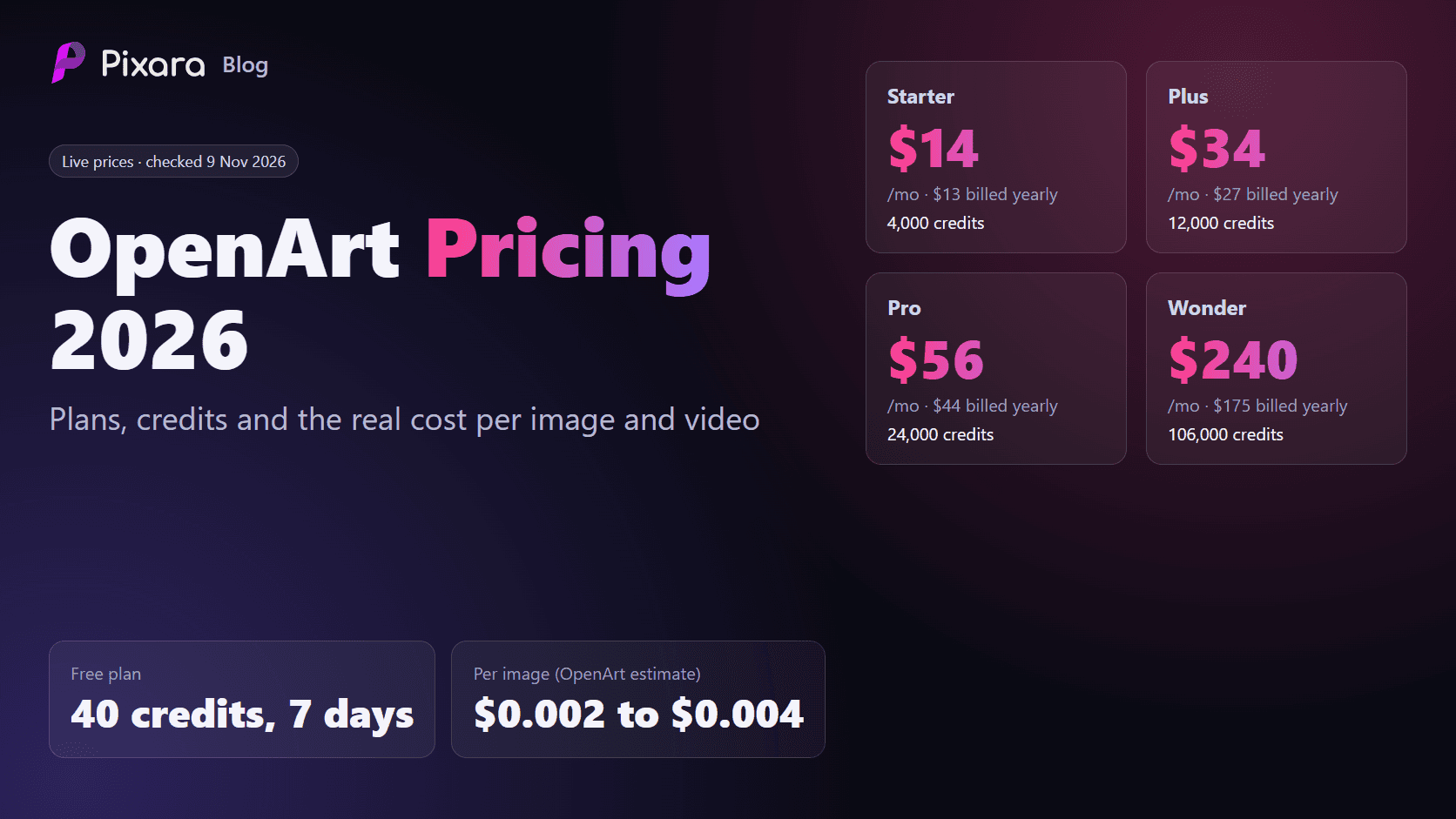
OpenArt is an AI creator studio that puts 100+ image, video and audio models behind one monthly credit plan. OpenArt pricing starts at $14 a month for the Starter plan, or $13 a month billed yearly, and goes up to $240 a month for Wonder. Every plan gives you a monthly pool of credits to spend across OpenArt's image, video and audio models. On OpenArt's own estimates, that works out to roughly $0.002 to $0.004 per image and $0.13 to $0.28 per video.
Updated 9 November 2026. We checked every price in this guide on OpenArt's pricing page and FAQ on 9 November 2026, in both the monthly and annual views. OpenArt runs frequent promotions, so confirm the live page before you subscribe.
How much does OpenArt cost per month?
OpenArt costs $14, $34, $56 or $240 per seat per month on monthly billing for its Starter, Plus, Pro and Wonder plans. Billed annually, the same plans cost $13, $27, $44 and $175 per month. Credits run from 4,000 to 106,000 a month, and the free plan gives 40 one-time trial credits for seven days.

What do you get on each OpenArt plan?
All four paid plans include access to more than 100 image, video and audio models, OpenArt's Director tool, consistent characters, OpenArt MCP and watermark-free downloads. What changes is the size of your credit pool, how many jobs you can run at once and, for Starter, commercial rights.
Free trial
New accounts get 40 one-time trial credits that last seven days. OpenArt estimates that covers about 40 images and no videos, with 4 parallel generations.
Starter: $14 a month ($13 yearly)
4,000 credits a month, which OpenArt estimates at up to about 4,000 images or about 50 videos, around 2 minutes of Director output and about 13 consistent characters. You get 8 parallel generations. The Starter card does not list commercial use rights.
Plus: $34 a month ($27 yearly)
12,000 credits a month, or up to about 12,000 images, 150 videos and 6 minutes of Director. You get 16 parallel generations, commercial use rights and the option to add extra credits.
Pro: $56 a month ($44 yearly)
24,000 credits a month, or up to about 24,000 images, 300 videos and 12 minutes of Director, with 32 parallel generations and commercial use rights. At the time of checking, Pro also carried 30% off GPT Image 2.6 (until 17 November) and 50% off Kling 4.0 generations.
Wonder: $240 a month ($175 yearly)
106,000 credits a month, or up to about 106,000 images, 1,300 videos and 50 minutes of Director, plus priority support and unlimited creation on selected models.
Extra credits
Plus, Pro and Wonder subscribers can add 5,000 credits for $15 a month, which is $0.003 per credit. OpenArt also lists separate Business plans for teams, which we have not covered here.
Why OpenArt pricing is built on credits
OpenArt pricing is built entirely around a monthly credit pool rather than a fixed number of generations per model. That has two practical effects. First, the headline "up to" image and video counts are averages, not promises, because a premium model can use many times the credits of a basic one. Second, the plan you need depends on your model mix as much as your volume. A creator making a few hundred images on fast, cheap models can live on Starter for months, while someone making the same number of premium video clips may need Pro. The sections below turn OpenArt pricing into real dollar costs so you can see which side of that line you fall on.
How much does one OpenArt image or video really cost?
On OpenArt's own estimates, one image costs about $0.0017 to $0.0035 and one video about $0.13 to $0.28, depending on the plan and billing cycle. Those are best case figures for basic models. Premium image and video models use more credits per output, so budget higher if you rely on them.
OpenArt does not price images and videos directly. It prices credits, and each model uses a different number of credits. The easiest honest way to convert that into dollars is to use OpenArt's own estimates: about one credit per image on its basic image models and about 80 credits per video.

- Per credit: $0.0035 on Starter, $0.0028 on Plus, $0.0023 on Pro and $0.0023 on Wonder with monthly billing. Annual billing brings that down to $0.0033, $0.0023, $0.0018 and $0.0017.
- Per 1,000 images: about $3.50 on Starter and $2.26 on Wonder with monthly billing, or $1.65 on yearly Wonder.
- Per video: about $0.28 on Starter, $0.23 on Plus, $0.19 on Pro and $0.18 on Wonder with monthly billing. On annual billing, Pro drops to about $0.15 and Wonder to about $0.13.
These are best case figures. Premium image models and newer video models such as Kling 4.0 or Veo use more credits per output, so your real cost per image or clip will be higher if you mostly use them. OpenArt shows the exact credit cost of each model inside its app after you sign in; we could not see per model costs while signed out.
The reason platforms price this way is sound. As Pixara founder Shahzeb Khalid explains, "AI generation does not have one universal cost. Generating a still image, producing a short video, creating a voiceover, and processing a high quality video can involve very different amounts of computing resources." Credits are how every multi-model platform, OpenArt included, accounts for that difference.
Is OpenArt free?
Only for a short trial. OpenArt gives new users 40 credits for seven days, enough to test a handful of images but not to make a video. After that, you need a paid plan. The cheapest is Starter at $14 a month, and the cheapest with commercial use rights listed is Plus at $34.
If you want to compare free options across tools, our guide to the best free AI video generators covers what each one really gives you.
How much does OpenArt's yearly plan save?
OpenArt's yearly billing saves 10% on Starter, 20% on Plus, 22% on Pro and 27% on Wonder, which is roughly $17 to $778 a year depending on the plan. Features are identical on both billing cycles, and credits still reset every 30 days on annual plans. Based on the percentages displayed on 9 November 2026:
- Starter: 10% off, about $17 saved over a year.
- Plus: 20% off, about $82 saved over a year.
- Pro: 22% off, about $148 saved over a year.
- Wonder: 27% off, about $778 saved over a year.
The features are identical on both billing cycles. OpenArt's own advice is to start monthly if you are still testing and switch to annual once your usage is predictable, and that is sensible: an annual plan locks you in, and the credits still reset every 30 days whether you use them or not.
What features come with every paid OpenArt plan?
Every paid OpenArt plan includes 100+ models, Director for multi-shot video, consistent characters, OpenArt MCP, watermark-free exports and parallel generations. The plans differ in how much of each you get: Director minutes, character slots and parallel jobs all scale up with the credit pool.
- 100+ models: premium image, video and audio models from different providers, all billed from one credit balance. You can browse the video tools in OpenArt's create video page.
- Director: OpenArt's tool for longer, multi-shot videos. Its allowance is measured in minutes: about 2 on Starter, 6 on Plus, 12 on Pro and 50 on Wonder.
- Consistent characters: saved characters you can reuse across images and videos, from about 13 a month on Starter to about 353 on Wonder.
- OpenArt MCP: a way to generate from AI assistants that support MCP, with a short-term 10% credit discount on Plus and higher.
- Parallel generations: how many jobs run at once, from 8 on Starter to 32 on Pro and Wonder. This matters more than it sounds if you batch product shots.
- Watermark-free exports on every paid plan.
Which OpenArt plan do you need?
Most hobby creators fit Starter, freelancers doing paid work need Plus for commercial rights, and heavy users or teams belong on Pro. To check, count about one credit per basic image and 80 credits per video, OpenArt's own estimates, then add a buffer if you use premium models. Three example budgets:
A hobby creator
200 images and 5 short videos a month comes to about 200 + 400 = 600 credits. Starter's 4,000 credits cover that several times over, so $14 a month (or $13 yearly) is plenty. The catch is that Starter does not list commercial use rights, so this only works for personal projects.
A freelancer doing client work
1,500 images and 60 videos a month is about 1,500 + 4,800 = 6,300 credits. Starter would run out, and it lacks commercial rights anyway. Plus, with 12,000 credits and commercial use, fits at $34 a month or $27 yearly, with room left for retries.
A three-person marketing team
Three people on Pro pay 3 x $56 = $168 a month, or 3 x $44 = $132 a month billed yearly, because OpenArt prices per seat. Each seat gets its own 24,000 credits. If only one person generates heavily, it can be cheaper to put that person on Wonder and keep the others on Starter or Plus.
What limits should you check before paying for OpenArt?
The key limits are credits that reset every 30 days with no rollover, no commercial rights listed on Starter, unlimited creation only on Pro and Wonder for selected models, per seat pricing for teams and no refunds for completed generations. Cancel at least five days before renewal to avoid the next charge.

- Credits do not roll over. OpenArt's example: a Plus subscriber who uses 6,000 of 12,000 credits still sees them reset to 12,000 on the 30-day mark, so the unused 6,000 are gone.
- Commercial use starts at Plus. The Starter plan card does not list commercial use rights, which matters if you sell what you create or make content for clients.
- Unlimited creation has conditions. It applies to Pro and Wonder, only on selected models and promotion periods, and not to generations made through MCP or the CLI. Heavy users may be moved to a slower queue.
- Cancel early. OpenArt asks you to cancel at least five days before renewal to avoid the next charge.
- No refunds for completed generations or active subscription periods.
- Downgrades take effect next cycle, and you lose the paid credits when the current cycle ends. Add-ons are cancelled too.
- Prices are per seat, so a three-person team on Pro pays three times $56.
- Read the terms for client work. If you sell what you make, check OpenArt's terms alongside the plan card before you deliver anything.
How can you make OpenArt credits go further?
Test prompts on cheaper models, batch variations in parallel, schedule big projects early in the 30-day cycle, add 5,000-credit packs instead of upgrading for one busy month, and reuse consistent characters. Each of these cuts wasted generations, which is where credits are easiest to lose.
- Test prompts on cheaper models first. Lock the composition on a basic image model, then switch to a premium model for the final render.
- Use the parallel slots on purpose. Generate several variations in one batch rather than one at a time, so you can pick a winner and stop.
- Plan video work around the 30-day reset. Credits vanish at the end of each cycle, so schedule larger video projects early in the cycle, not the last day before renewal.
- Add credits instead of upgrading when you only have a busy month. On Plus and higher, 5,000 extra credits cost $15, which is cheaper than jumping a full plan tier.
- Reuse consistent characters instead of regenerating a person from scratch for every scene. Fewer retries means fewer wasted credits.
Is OpenArt cheaper than Pixara?
It depends on what you make. Pixara starts lower, at $10 against $14, and its yearly Hobby and higher plans include unlimited use of selected image models. If most of your images come from Nano Banana, GPT Image 2 or Midjourney, Pixara can work out cheaper; for bulk images on basic models, OpenArt can.
Pixara is a multi-model creative workspace in the same category as OpenArt, so it is a fair comparison. Pixara gives you image, video and audio models, Ara (an AI co-pilot that helps you pick models and write prompts), workflows, a video editor and MCP on every plan.

Here is how the plans line up on 9 November 2026. Pixara's yearly prices below are the early Black Friday discount shown on its pricing page at the time of checking.
- Starter: Pixara $10 a month for 4,000 credits, against OpenArt $14 ($13 yearly) for 4,000 credits.
- Mid tier: Pixara Hobby $25 a month or $12 yearly for 15,000 credits, against OpenArt Plus $34 or $27 yearly for 12,000 credits.
- Popular tier: Pixara Pro $60 a month or $20 yearly for 36,000 credits, against OpenArt Pro $56 or $44 yearly for 24,000 credits.
- Top tier: Pixara Ultimate $250 a month or $75 yearly for 150,000 credits, against OpenArt Wonder $240 or $175 yearly for 106,000 credits.
Do not compare the credit totals directly. A Pixara credit and an OpenArt credit are not the same unit. For example, a Nano Banana image costs 39 Pixara credits, while OpenArt's basic image estimate is about one OpenArt credit. That is why Pixara's own estimate for Starter is about 1,000 images and 173 seconds of video, rather than 4,000 images.
What changes the maths is unlimited access. On yearly billing, Pixara Hobby includes unlimited use of two image models and Pro and Ultimate include all six: Nano Banana, Nano Banana 2.1, GPT Image 2, Seedream 5 Lite, Reve 2.1 and Midjourney. If most of your work is images on those models, your credits stay free for video. You can see what those models cost elsewhere in our guides to Midjourney pricing and Nano Banana pricing.
Pixara also states its privacy rules on the pricing page. Starter generations are public, Hobby lets you make them private, and Pro and Ultimate are private by default. OpenArt's pricing page does not state a privacy setting by plan.
As Shahzeb Khalid describes the goal behind Pixara: "A small ecommerce business should be able to create attractive product images and advertising videos without spending thousands of dollars on every production shoot."
Which plan should you pick?
- Testing AI images for fun: OpenArt's free trial or Pixara Starter. Remember Pixara Starter generations are public.
- Making lots of basic images: OpenArt Starter or Plus is efficient on cheap models, but you need Plus for commercial rights.
- Heavy image work on premium models: Pixara Hobby or Pro on yearly billing, because the unlimited image models remove most of the per image cost.
- Regular video work: Compare the credit cost of the exact video model you plan to use on each platform, then test a few clips in Pixara Create Video before you commit to a yearly plan.
- Teams: Remember OpenArt bills per seat, and check each platform's terms for commercial use before client work.
If you are weighing other image platforms too, our roundups of Leonardo AI alternatives, Krea AI alternatives and Midjourney alternatives compare several in the same price range.
Who is OpenArt for, and who should skip it?
OpenArt suits individual creators who want many models and tools such as Director and consistent characters in one place, as long as they pick the right tier. It is a weaker fit for teams, because every seat is billed, and for anyone who needs private generations by default.
Starter is good value for personal experiments, Plus is the realistic entry point for anyone doing paid work because it adds commercial rights, and Pro is the sweet spot for heavy users who want the current Kling 4.0 and GPT Image 2.6 discounts. Wonder only makes sense if you generate at studio volume.
It is less of a fit if you work in a team, because every seat is billed separately, or if you want your work kept private by default, because the pricing page does not say how visibility works by plan. If most of your images come from Nano Banana, GPT Image 2 or Midjourney, compare it with Pixara's unlimited image models first; our GPT Image 2.5 guide and Nano Banana model page show what those models do well.
How did we check these prices?
Every price here was read directly from OpenArt's pricing page and FAQ and from Pixara's pricing page on 9 November 2026, and every per output figure is our own calculation from those published numbers. We did not use third-party price lists.
We read openart.ai/pricing in both the monthly and annual views, opened the full plan comparison table and every FAQ answer, and read openart.ai/faq, all on 9 November 2026 while signed out. Per image and per video costs are our calculation: plan price divided by OpenArt's own image and video estimates. Pixara figures come from the Pixara pricing page and Pixara's public credit rules on the same day.
The bottom line on OpenArt pricing
OpenArt pricing is fair for what you get: $14 to $240 a month, a large model catalog and useful extras such as Director and consistent characters. The catches are credits that expire every 30 days, no commercial rights on Starter and a very small free trial. If your work leans on premium image models or you want private generations, Pixara's yearly plans are worth comparing before you commit. Open Create Image to see the models and their credit costs for yourself.