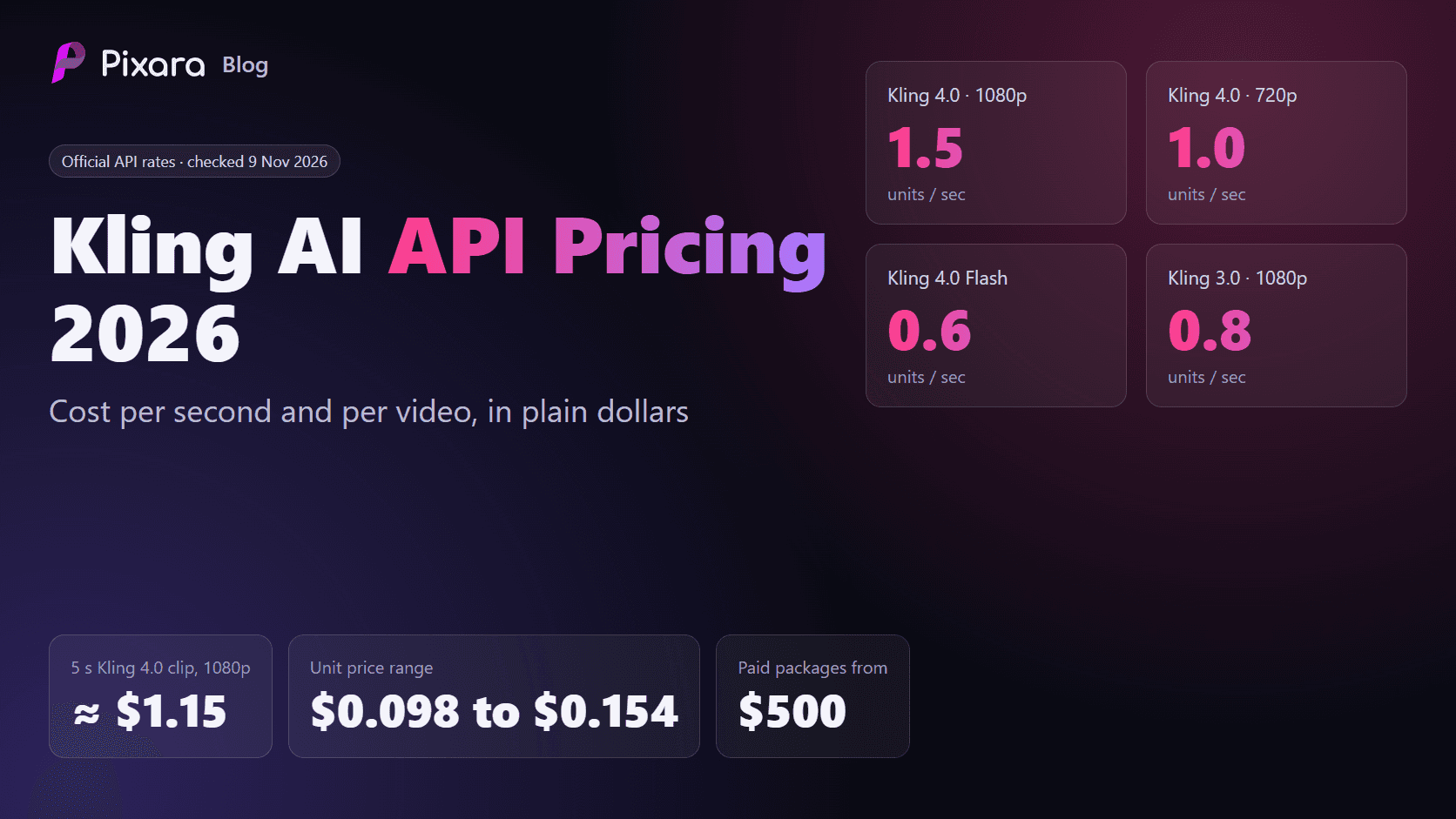
The Kling AI API is Kling's developer access to its video and image models, sold as prepaid units that cost between $0.098 and $0.154 each. Kling AI API pricing is per second: each model burns a fixed number of units per second of video, so your real cost depends on the model, the resolution and the package you bought. In plain dollars, a 5 second Kling 4.0 clip at 1080p costs about $1.15 through the official API, and a 5 second Kling 3.0 clip at 1080p without audio costs about $0.56.
Updated 9 November 2026. We checked every number in this guide against Kling's official API pricing page on that date, across all four package tabs and both the Video API and Image API views. AI video prices change often, so treat this as a dated snapshot and confirm the live page before a large purchase.
This guide covers the developer API. For the consumer plans inside Kling's own app, see our separate Kling AI pricing guide.
How much does the Kling AI API cost?
The Kling AI API costs between $0.098 and $0.154 per unit, depending on the package. Kling 4.0 uses 1 unit per second at 720p and 1.5 units per second at 1080p, so a 5 second 1080p clip costs about $1.15. Paid 180-day packages start at $500 for Kling 4.0 and $700 for older models.

What is the difference between Flagship and General packages?
Flagship packages are the only way to call Kling 4.0 and Kling 4.0 Flash, and their units cost $0.141 to $0.154. General packages cover every other model, including Kling 3.0, Turbo, Omni, Motion Control and Avatar, at $0.098 to $0.14 per unit. The two wallets are separate: units bought in one cannot be spent in the other.
- Flagship packages work only with Kling 4.0 and Kling 4.0 Flash, the newest models.
- General packages work with everything else: Kling 3.0, 3.0 Turbo, 3.0 Omni, Motion Control, Avatar, lip sync, effects and the e-commerce tools. Kling states plainly that these packs are not compatible with Kling 4.0 or 4.0 Flash.
Each family has trial and 180-day packs, and all video packages include text to video, image to video, multi-image to video, video editing, extension, avatar, lip sync, effects, text to audio and video to audio.
Flagship packages (Kling 4.0 and 4.0 Flash)
- Trial: $9 for 64 units or $90 for 637 units, with 10% off the first purchase. That works out to $0.141 per unit. Valid for 30 days, 5 concurrent jobs, up to five purchases.
- Standard Package 1: $500 for 3,250 units ($0.154 per unit).
- Standard Package 2: $2,000 for 13,135 units ($0.152 per unit).
- Standard Package 3: $8,000 for 53,640 units ($0.149 per unit).
All three paid Flagship packs run for 180 days with 20 concurrent jobs.
General packages (Kling 3.0 family and older)
- Trial: $9.80 for 100 units or $98 for 1,000 units, 30% off the first purchase, which is $0.098 per unit. Valid for 30 days, 5 concurrent jobs, up to five purchases.
- Standard Packages 1 and 2: $700 for 5,000 units and $2,100 for 15,000 units, both at $0.14 per unit.
- Standard Packages 3, 4 and 5: $3,780 for 30,000, $5,670 for 45,000 and $7,560 for 60,000 units, all at $0.126 per unit after a 10% discount.
How much does the Kling Image API cost?
Kling Image API units cost $0.0035 each at list price, and most current image models use 8 units per image, so one image costs about $0.028. Paid image packs start at $350 for 100,000 units, enough for about 12,500 images on Kling Image 3.0. Images use their own wallet, separate from video units.
In detail, Kling Image 3.0, 3.0 Omni and O1 use 8 units per image at 1K or 2K, which is about $0.028 per image. Omni at 4K uses 16 units ($0.056) and Image 2.1 text to image 4 units ($0.014). Kling Image 4.0 is not covered.
How much does the Kling API cost per second?
Kling API video costs about $0.092 to $0.231 per second for Kling 4.0 and 4.0 Flash, and about $0.084 to $0.168 per second for Kling 3.0 at 720p and 1080p. Kling 3.0 at 4K costs about $0.42 per second. The exact rate depends on resolution, audio and whether you supply an input video.

- Kling 4.0, no input video: 1.0 unit per second at 720p and 1.5 units at 1080p. About $0.154 and $0.231 per second on the $500 pack.
- Kling 4.0 Flash: 0.6 units per second at 720p only, about $0.092 per second.
- Kling 3.0 without audio: 0.6, 0.8 and 3.0 units per second at 720p, 1080p and 4K. At $0.14 per unit that is $0.084, $0.112 and $0.42 per second.
- Kling 3.0 with native audio: 0.9 and 1.2 units at 720p and 1080p, and 3.0 units at 4K.
- Kling 3.0 Turbo (audio included): 0.8 units at 720p and 1.0 unit at 1080p.
- Kling 3.0 Motion Control: 0.9 units at 720p and 1.2 units at 1080p.
- Kling 3.0 Omni: 0.6 to 0.9 units at 720p and 0.8 to 1.2 units at 1080p, depending on audio and reference video, and 3.0 units at 4K.
- Avatar: 0.4 units at 720p and 0.8 units at 1080p.
The input video rule that can double your bill
Kling 4.0 has a lower rate when you supply an input video (0.6 units at 720p and 0.9 at 1080p), but the billed duration changes. If your input is shorter than or equal to the output, Kling bills the output length times two. If the input is longer, it bills input plus output.
So a 5 second Kling 4.0 edit at 1080p with a 5 second source video bills 10 seconds at 0.9 units, which is 9 units or about $1.38. A fresh 5 second generation at 1080p is only 7.5 units. Lower rate, higher bill. Check this before you build an editing feature on top of Kling 4.0.
How much does one Kling video cost through the API?
One 5 second Kling video costs about $0.46 to $2.10 through the API, depending on the model. A 5 second Kling 4.0 clip at 1080p costs about $1.15 on the $500 Flagship package, and a 10 second one about $2.31. These prices assume one generation; retries add to the bill. Common clips on the entry 180-day packages:

- Kling 4.0 Flash, 720p, 5 seconds: 3 units, about $0.46.
- Kling 3.0, 1080p, no audio, 5 seconds: 4 units, about $0.56 (or $0.50 on the larger General packs).
- Kling 4.0, 720p, 5 seconds: 5 units, about $0.77. A 10 second clip is about $1.54.
- Kling 3.0, 1080p, with audio, 5 seconds: 6 units, about $0.84.
- Kling 4.0, 1080p, 5 seconds: 7.5 units, about $1.15. A 10 second clip is about $2.31.
- Kling 3.0, 4K, 5 seconds: 15 units, about $2.10.
Real projects rarely keep every generation. Shahzeb Khalid, founder of Pixara, makes the point when he explains how to budget AI production: "If a campaign requires ten finished images, you may need to generate more than ten options before finding the versions that meet your requirements." His advice is to "reserve some of your monthly allowance for these additional attempts."
The same applies to API units. If one in three Kling 4.0 clips is usable, your real cost per finished 5 second 1080p clip is closer to $3.46 than $1.15.
Is there a free Kling AI API plan?
No. Kling's API pricing page lists no free tier as of 9 November 2026. The cheapest way to start is a trial pack: $9 for 64 Flagship units, which covers about 42 seconds of Kling 4.0 at 1080p, or $9.80 for 100 General units. Both last 30 days and can be bought five times.
The Flagship trial also covers about 106 seconds of Kling 4.0 Flash at 720p, and the General trial about 125 seconds of Kling 3.0 at 1080p without audio. Trials allow 5 concurrent jobs. Free daily credits in Kling's consumer app are a separate thing and do not apply to the API. If you are after those, our guide to Kling AI free credits explains how they work.
What hidden limits come with Kling API packages?
The main limits are a $500 or $700 minimum after the trial, units that expire after 30 or 180 days with no rollover, separate wallets for Kling 4.0 and older models, and input video billing that at least doubles the counted seconds. You also build the queue, storage and interface yourself.
Three more conditions from the pricing page are easy to miss:
- Concurrency: Trials allow 5 parallel jobs and paid packs allow 20. Anything more needs a business inquiry.
- No 4K on Kling 4.0: 4K is only listed for Kling 3.0 and 3.0 Omni, at 3.0 units per second.
- Effects pricing varies by template, so check the separate effects list before you promise a price to your own customers.
Kling 4.0 vs 4.0 Flash vs 3.0: which model should you call?
Call Kling 4.0 for final, high quality 1080p shots, Kling 4.0 Flash for cheap 720p drafts and high volume app generations, and Kling 3.0 when you need 1080p at the lowest rate or the only 4K option. The model sets your price more than any other choice. Kling's API documentation covers each endpoint in detail.
- Kling 4.0 is the newest model and the most expensive per second: 1.0 unit at 720p and 1.5 units at 1080p. It needs a Flagship package and has no 4K option. Use it for hero shots and final client deliverables where motion quality matters most.
- Kling 4.0 Flash costs 0.6 units per second, 40% less than Kling 4.0 at 720p, but it only outputs 720p. It runs on the same Flagship wallet, so it is the natural choice for drafts, previews and high-volume user generations inside an app.
- Kling 3.0 is the cheapest way to get 1080p, at 0.8 units per second without audio, and the only Kling model on the rate card that offers 4K (3.0 units per second). Native audio raises 1080p to 1.2 units. It runs on a General package.
- Kling 3.0 Turbo bundles native audio at 0.8 units (720p) and 1.0 unit (1080p), which makes it cheaper than standard Kling 3.0 with audio at 1080p.
- Kling 3.0 Omni is for reference-driven work. Adding a reference video lifts 1080p from 0.8 to 1.2 units per second.
For what each model can actually produce, see our Kling 4.0 review and our notes on Kling AI maximum video length.
How do you estimate a monthly Kling API budget?
Multiply clips per month by seconds per clip, units per second and your retry rate, then multiply by your package's unit price. Then check the 180-day total against package sizes, because unused units expire. Here are four worked examples using the official rates above.
Example 1: a social media team on Kling 4.0
A team publishes 60 finished 5 second clips a month at 1080p and keeps about one in two generations. That is 120 generations x 7.5 units = 900 units a month, or about $138 at $0.154 per unit. Over 180 days the team needs about 5,400 units. Two $500 Flagship packs (6,500 units) cover it; the $2,000 pack would leave over half its units to expire.
Example 2: an app offering Kling 4.0 Flash to users
An app runs 1,000 user generations a month, each a 5 second Flash clip at 720p. That is 3,000 units a month, about $462 at the $500 pack rate. Over 180 days that is 18,000 units, so the $2,000 pack plus one $500 pack (16,385 units) falls short. The $2,000 pack plus two $500 packs (19,635 units for $3,000) fits, while the $8,000 pack would leave most of its units unused.
Example 3: product images on the Kling Image API
2,000 product images a month on Kling Image 3.0 is 16,000 units, about $56 a month. Over 180 days that is 96,000 units, which fits the $350 pack of 100,000 units.
How can you lower your Kling API bill?
Draft cheaply on Kling 4.0 Flash or 720p, keep clips short, avoid input video on Kling 4.0, switch off native audio when you will add a voiceover, and size packages to what you will use in 180 days. Switching off audio alone cuts Kling 3.0 at 1080p from 1.2 to 0.8 units per second, a third less. Seven specific moves:
- Draft on Kling 4.0 Flash or at 720p, then render the final at 1080p.
- Keep clips short. Billing is per second.
- Avoid input video on Kling 4.0 unless you need it, because billed seconds at least double.
- Switch off native audio on Kling 3.0 if a voiceover comes later.
- Use the trial packs first (up to five buys each) to measure real usage.
- Size packages to 180 days of usage, not to the biggest discount, because unused units expire.
- Write tighter prompts to cut retries. Every failed attempt is paid for. Our Kling 3.0 prompt guide has tested prompt patterns that reduce wasted generations.
If you are comparing Kling with other providers on cost, our guides to Veo 3.1 pricing, Seedance 2.0 pricing and the cheapest AI video generators use the same per-clip method.
Is it cheaper to use Kling through Pixara than the API?
On Pixara's yearly plans, yes: a 5 second Kling 4.0 clip at 1080p costs about $0.59 to $0.94 in Pixara credits against about $1.15 on the API, with no $500 minimum and no code. On Pixara Starter or monthly billing, the API's per second rate is lower. The API remains the right choice if you are building a product.
Pixara is a creative workspace that gives you Kling 4.0, Kling 3.0, Kling O1 and O3, Motion Control, Kling lip sync and Kling avatars alongside other video and image models, all paid from one monthly credit balance. Pixara charges 235 credits per second for Kling 4.0 at 1080p and 157 credits per second at 720p, according to its public credit rules.

For a 5 second Kling 4.0 clip at 1080p (1,175 credits), here is how the two routes compare:
- Pixara Starter ($10 a month, 4,000 credits): about $2.94 per clip.
- Pixara Pro on monthly billing ($60, 36,000 credits): about $1.96 per clip.
- Kling API, $500 Flagship pack: about $1.15 per clip.
- Pixara Hobby on yearly billing ($12 a month, 15,000 credits): about $0.94 per clip.
- Pixara Pro on yearly billing ($20 a month, 36,000 credits): about $0.65 per clip.
- Pixara Ultimate on yearly billing ($75 a month, 150,000 credits): about $0.59 per clip.
Pixara's yearly prices carry an early Black Friday discount on its pricing page as of 9 November 2026, and these figures assume you use your full monthly allowance. The credits are not locked to Kling either: the same balance can go to Seedance, Veo 3.1 or Nano Banana.
The multi-model point matters more than it looks. As Shahzeb Khalid puts it, "AI models are developing at an incredible pace, and no single model is necessarily the best choice for every creative task." A Kling-only wallet bets 180 days on one model family.
For Kling 3.0, a 5 second Pro quality clip without audio uses 560 Pixara credits, about $0.31 on yearly Pro, against about $0.56 on the API. Read more on our Kling 3.0 model page and in our Kling 4.0 review.

Who should use the Kling API, and who should not?
The Kling API suits developers and product teams who generate video programmatically, will spend at least $500 of units within 180 days and only need Kling models. It does not suit creators making a few videos a month, teams that want to compare several models, or anyone without engineering time.
Buy Kling API units if you are a developer building Kling into an app, bot or automated pipeline, you will use at least $500 of units within 180 days, and you have the engineering time to handle queues, storage and retries.
Use Pixara if you make the videos yourself or for clients, you want to compare Kling with other models such as Runway (see our Runway vs Kling comparison), or you prefer a monthly budget starting at $10. The API is not for you if you need a visual editor, voiceovers or templates out of the box, or if your volume is too low to use a $500 pack before it expires. If you want to call Pixara from an AI assistant instead of writing code, Pixara MCP connects its creative tools to compatible AI clients.
How did we check these prices?
Every price here was read directly from Kling's official API pricing page and Pixara's pricing page on 9 November 2026, and every dollar figure is our own calculation from those published rates. We did not use third-party price lists, and we did not run paid API calls.
We read all four package tabs, the video rate card and the Image API tab, plus the API pricing documentation the pricing page links to. Dollar costs are units multiplied by the package's unit price, rounded to the cent. Pixara costs use the Pixara pricing page and its public credit rules, dividing plan price by monthly credits.
The bottom line on Kling AI API pricing
Kling AI API pricing is simple once you turn units into dollars: roughly $0.15 to $0.23 per second for Kling 4.0, $0.08 to $0.17 per second for Kling 3.0 at 720p and 1080p, and a $500 or $700 minimum once the trial runs out. If you are building a product, the API is the right tool. If you just need great Kling videos, a yearly Pixara plan gets you the same models for less per clip, with every other major model in the same place.