AI video generators have made it much easier to create cinematic clips, product visuals, and social media ads without hiring a production team. PixVerse is one of the platforms attracting attention, particularly among creators who want eye catching visuals without spending hours editing footage.
But before you subscribe, there are a few things worth understanding. PixVerse pricing depends on your subscription tier, available credits, chosen video model, and generation settings. A plan that looks affordable on paper can feel quite different once you start generating multiple versions of a video, experimenting with higher resolutions, or working with premium models.
The good news is that PixVerse offers a free entry level plan, several paid subscriptions, credit packs, and options for teams. The platform also brings multiple image and video generation models into one workspace, which can make it useful for marketers, social media creators, and businesses producing content at scale.
In this breakdown, we will look at the current PixVerse pricing structure, what you get for your money, how daily credits work, what to know about PixVerse V6, and which alternatives might suit your workflow better.
What Is PixVerse AI, and What Can You Create With It?

PixVerse AI is a generative media platform built around AI video creation, with image generation and creative tools available through the same workspace. You can start with a written prompt, animate a reference image, experiment with visual effects, or work with different models to produce short videos for marketing and entertainment.
The appeal is fairly straightforward. You do not need a camera, a studio, or an advanced video editing setup to produce a short cinematic sequence. You can describe a scene, select your preferred generation settings, and let the AI create a clip that you can use as a starting point for a larger project.
For content marketers and small businesses, this opens up several practical possibilities. A single product image can become a short promotional video, a campaign concept can be turned into a moving visual, and a social media team can test several creative directions before committing to a final advertisement.
PixVerse is particularly relevant for short form content where visual impact matters. Think of dramatic product reveals, stylized character animations, cinematic camera movements, eye catching transitions, and short video hooks designed to capture attention in the opening seconds.
Here are some of the main ways you can use the platform.
- Social media videos: Create short clips for TikTok, Instagram Reels, YouTube Shorts, and LinkedIn posts without producing every shot manually.
- Product advertisements: Animate product photographs, create atmospheric backgrounds, and generate promotional visuals for ecommerce campaigns.
- Creative experimentation: Test different prompts, visual styles, effects, and compositions to find a direction that works for your audience.
- Marketing concepts: Produce rough campaign visuals and video mockups before investing in professional filming or more expensive production.
- AI assisted storytelling: Generate individual scenes and combine them with other footage, voiceovers, music, and editing to build a longer video.
There is one important limitation to keep in mind. Generating an impressive short clip is different from producing a complete, consistent video. Characters, product details, camera movement, and scene continuity can vary between generations. For longer projects, you may still need multiple clips, careful selection, and post production editing.
That makes PixVerse particularly interesting for creators who need a steady supply of short, visually engaging content rather than a single uninterrupted film.
Recommended Guides For You!
- Pixara Black Friday 2026: $1, Three Days, Hundreds of Creative Possibilities
- 7 Best AI Lip Sync Tools in 2026 (Video, Photo & Dubbing Tested)
- Arcads Pricing 2026: Cost per UGC Ad, Plans & Cheaper Alternatives
- Higgsfield AI Pricing 2026: Plans, Credits, Free Tier & What You Get
- How to Use PixVerse v4.5 to Create Explainer Videos from Scripts and Images
PixVerse Pricing 2026: All Plans Compared

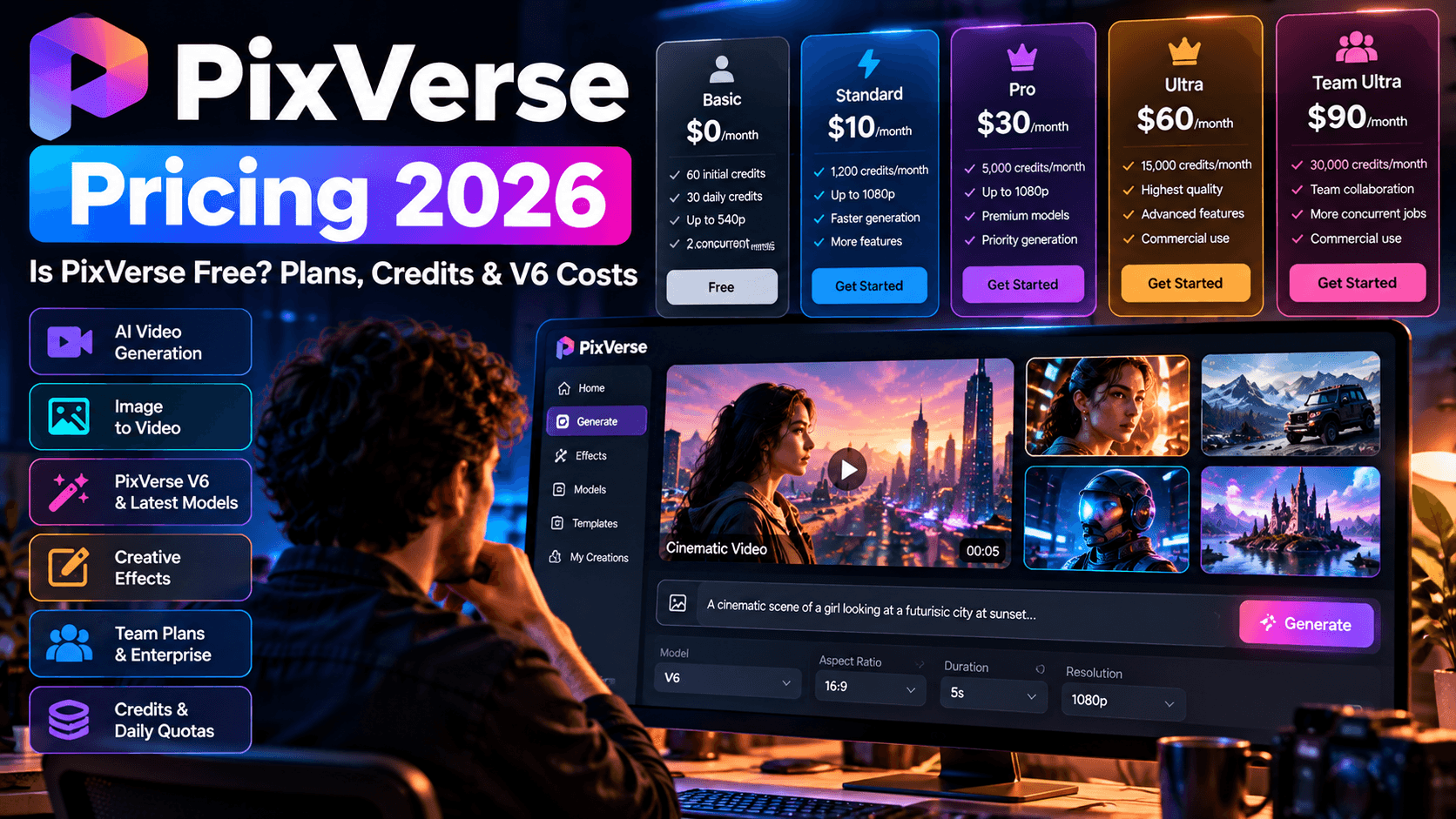
The current PixVerse subscription page lists five main consumer and team plans, ranging from the free Basic tier to Ultra and Team Ultra. There is also an Enterprise option for businesses that need API access, higher generation limits, and more control over their production workflows.
The most important thing to understand about PixVerse pricing is that a subscription gives you a combination of recurring credits, daily credits, generation capacity, and access to selected features. The number of videos you can produce depends on how quickly your chosen model consumes those credits.
The prices below reflect the official subscription page checked on October 29, 2026. Annual billing offers lower monthly equivalents, but the full annual amount is charged for the year. Promotional prices can change, so check the official PixVerse pricing page before subscribing.
- Basic: $0/month
- Free entry level plan.
- 60 initial credits.
- 30 daily credits.
- Video resolution up to 540p.
- Two concurrent generations.
- Standard: $10/month
- Annual billing equivalent: $8/month, billed at $96/year.
- 1,200 membership credits per 30 day cycle.
- 60 daily credits.
- Watermark free output.
- Video resolution up to 720p.
- Three concurrent generations.
- Pro: $30/month
- Annual billing equivalent: $24/month, billed at $288/year.
- 6,000 membership credits per 30 day cycle.
- 60 daily credits.
- Video resolution up to 4K on supported models.
- Five concurrent generations.
- Discounts on selected models.
- Premium: $60/month
- Annual billing equivalent: $48/month, billed at $576/year.
- 15,000 membership credits per 30 day cycle.
- 60 daily credits.
- Video resolution up to 4K on supported models.
- Eight concurrent generations.
- Larger discounts on selected models.
- Ultra: $199/month
- Promotional monthly price, with $249 shown as the reference price.
- Annual billing equivalent: $149/month, billed at $1,788/year.
- 25,000 membership credits per 30 day cycle.
- 60 daily credits.
- Video resolution up to 4K on supported models.
- Eight concurrent generations.
- Extensive discounts on selected models.
- Unlimited free generations during Off Peak Mode for supported PixVerse models.
- Team Ultra: $199 per seat/month
- Annual billing equivalent: $149 per seat/month, billed at $1,788 per seat/year.
- 25,000 membership credits in a shared pool.
- Shared assets and unified workspace.
- Centralized billing.
- Role based member management.
- Usage analytics.
- Up to 12 concurrent generations.
- Enterprise: Starting from $100
- Designed for businesses and teams.
- Full API access and documentation.
- Volume based pricing discounts.
- Custom effect configurations.
- Higher concurrency limits.
- Usage analytics and monitoring.
- Confirm billing terms and final pricing with PixVerse.
API access, volume based pricing discounts, custom effect configurations, higher concurrency limits, and usage monitoring. Confirm the billing basis and final quote with PixVerse.
Which PixVerse plan gives you the best value?
The right subscription depends on how much video you generate, the quality you need, and how often you experiment with different models. Paying for a more expensive tier does not automatically make every individual video better. Much of the extra value comes from a larger credit allowance, higher resolution access, parallel generation, and model specific discounts.
- Basic is best for testing the platform. If you want to learn how text prompts and image animation work, the free tier lets you get started without a subscription. Its 540p ceiling and daily allowance make it less suitable for a consistent commercial workflow.
- Standard suits occasional creators. At $10 per month, it provides watermark free output and up to 720p resolution. This is a sensible starting point for someone producing a few social posts, trying visual effects, or testing ideas before investing more.
- Pro is a practical choice for regular content production. The jump to 6,000 membership credits, up to 4K resolution, and five concurrent generations makes it more suitable for marketers and creators who need multiple variations for campaigns. Its selected model discounts and batch creation can also reduce friction during busy production periods.
- Premium is worth considering for frequent creators. Its 15,000 membership credits and larger model discounts provide more room for repeated generations. If you create promotional videos, product visuals, or short form content every week, the extra allowance can be more useful than purchasing credit packs repeatedly.
- Ultra is aimed at high volume production. The 25,000 membership credits, expanded discounts, and Off Peak Mode benefits make it relevant for agencies, experienced creators, and teams running many generation experiments. The advertised free generation benefit applies to supported PixVerse models during Off Peak Mode, not every third party model on the platform.
- Team Ultra is designed for shared production. Its value comes from team coordination, shared assets, pooled credits, role management, and centralized billing. It is easier to justify when several people are producing content together than when one person simply wants a larger individual allowance.
The key takeaway is simple: start with the lowest plan that covers your regular output. Upgrade when your credit consumption, resolution requirements, or need for concurrent generations makes the extra monthly expense worthwhile.
Is PixVerse Free? What You Get Without Paying

Yes, PixVerse has a free Basic plan. You can start generating content without paying a monthly subscription, although the free tier has tighter limits than the paid plans.
According to the current subscription page, Basic includes 60 initial credits and 30 daily credits that reset daily. It supports video generation up to 540p and allows two concurrent generations. Paid plans include 60 daily credits, additional membership credits, watermark free output, and higher resolution access.
For someone searching for free PixVerse AI, the Basic plan is useful for understanding the platform before spending money. You can test prompts, get a feel for the visual style, and see how your reference images translate into motion.
However, free credits can disappear quickly if you repeatedly regenerate clips. AI video creation is an iterative process. A prompt might produce a useful result on the first attempt, or it might take several tries to get the composition, camera movement, and subject appearance right.
There are three practical limitations to consider.
- Resolution: Basic is listed with a maximum resolution of 540p, which is fine for testing concepts but less attractive for polished commercial deliverables.
- Watermarks: The paid subscription page explicitly advertises watermark free output for subscribers. Do not assume the free plan includes the same benefit.
- Credit limits: Daily credits restrict how much you can generate without paying. More complex or higher quality generations may consume credits faster, depending on the settings and model.
Free access also does not mean every premium model is available without restrictions. PixVerse provides access to multiple models across its paid tiers, and the included benefits vary by subscription.
PixVerse Credits Explained: Daily Credits vs Membership Credits
Credits determine how much content you can generate on PixVerse. The platform does not charge a single fixed amount for every video, because generation costs can change according to the model, duration, resolution, and other settings.
Understanding the different credit balances is important if you want to estimate your monthly spending. Someone creating occasional social media clips may get sufficient mileage from daily credits and a small subscription, while an agency generating dozens of variations could need a larger membership allocation.
PixVerse separates its web credits into three main categories: daily credits, membership credits, and purchased credits.
1. Daily credits
Daily credits are refreshed each day. The free Basic plan provides 30 daily credits, while Standard, Pro, Premium, and Ultra each list 60 daily credits.
The platform's FAQ states that daily credits refresh at 00:00 UTC and expire at the end of the day if unused. That means you cannot rely on today's unused daily balance accumulating indefinitely for a bigger project tomorrow.
For creators, these credits are most useful for maintaining a regular habit of experimentation. You can try a prompt, test a visual effect, or generate a quick concept without immediately purchasing additional credits.
One thing to remember is that daily credits are not a guaranteed number of videos. If a generation costs more credits than your remaining balance, you may need to choose a less expensive setting or use another available credit source.
2. Membership credits
Membership credits are the larger allocation attached to a paid subscription. The official plans list the following amounts for each 30 day cycle.
Basic: No membership credits, 30 daily credits.
Standard: 1,200 membership credits, 60 daily credits, approximately 14,400 membership credits over 12 cycles.
Pro: 6,000 membership credits, 60 daily credits, approximately 72,000 membership credits over 12 cycles.
Premium: 15,000 membership credits, 60 daily credits, approximately 180,000 membership credits over 12 cycles.
Ultra: 25,000 membership credits, 60 daily credits, approximately 300,000 membership credits over 12 cycles.
Team Ultra: 25,000 shared membership credits. Daily credit allocation is not listed in the supplied pricing details.
Annual figures are simple projections of twelve 30 day allocations, not a promise that credits are deposited in one annual balance.
According to PixVerse's subscription FAQ, membership credits refresh every 30 days from the subscription's starting date, and unused membership credits expire at the end of the current cycle. Paying annually does not mean you receive all twelve monthly allocations upfront.
This matters when planning a campaign. If you have a large production scheduled for the end of the month, keep an eye on your available balance and renewal date rather than assuming unused credits will carry over.
3. Purchased credits
Purchased credits are additional credits you can buy when your subscription allocation is insufficient. The official web subscription page lists four packs.
- 500 credits: $5, equivalent to $10 per 1,000 credits.
- 2,000 credits: $20, equivalent to $10 per 1,000 credits.
- 5,000 credits: $50, equivalent to $10 per 1,000 credits.
- 10,000 credits: $100, equivalent to $10 per 1,000 credits.
All four packs have the same base price per credit. The potential savings come from the bonus offered to eligible subscribers, not from a lower listed unit price on the larger packs.
- Standard subscribers receive 10% extra credits on eligible credit pack purchases.
- Pro subscribers receive 30% extra credits.
- Premium and Ultra subscribers receive 50% extra credits.
Team Ultra users should check the current purchase screen for the applicable bonus, as the team plan's displayed benefits do not explicitly list the same credit pack bonus.
For example, a Premium subscriber purchasing a 2,000 credit pack at $20 would receive 3,000 credits if the advertised 50% bonus applies to that purchase. This brings the effective price down to approximately $6.67 per 1,000 credits.
The bonus improves the value of extra credits, but it does not make every video cheaper by the same percentage. Your final cost still depends on the model and settings selected.
PixVerse states that purchased credits do not expire under its web credit policy. This makes them useful for occasional bursts of production, particularly when you need more capacity for a campaign but do not want to upgrade your recurring subscription.
How Much Does One PixVerse Video Cost?

There is no single price for a PixVerse video. A short generation using one model can cost substantially less than a longer clip generated at a higher resolution with audio or other advanced options.
The platform displays the credit cost for the selected configuration near the bottom right of the prompt box before you generate. If you regenerate the result, the corresponding credits are charged again. PixVerse also says credits used for a failed generation are automatically refunded.
This makes the displayed generation cost your best reference when calculating how much a particular project will consume.
Calculate your video budget
You can use the calculator below to estimate how many generations fit within your available credits. Enter the cost displayed by PixVerse for your chosen model and settings.
PixVerse credit calculator
Illustrative calculations only. The example generation cost is not an official PixVerse model price.
- Available credits: Choose 30, 1,200, 6,000, 15,000, or 25,000 credits, depending on your daily allowance or subscription.
- Credits per generation: Enter the credit cost shown for your selected model and settings.
- Attempts per final clip: Choose 1, 3, 5, or 10 attempts.
- Generations available: Divide your available credits by the credits required for one generation, rounding down to a whole number.
- Approximate final clips: Divide the available generations by the number of attempts needed for each finished clip, rounding down.
Example: With 1,200 credits and a generation cost of 80 credits, you can produce 15 generations. At three attempts per final clip, that works out to approximately five finished clips.
Why repeated generations change your costs
Suppose you need five usable clips for a social media campaign. You might generate five clips and finish immediately, or you might need three attempts per clip to find five results that meet your creative requirements.
In the second case, you need 15 generations rather than five. If every generation costs 80 credits, your production consumes 1,200 credits instead of 400.
This is why experienced creators should budget for experimentation rather than calculating costs around the number of clips they intend to publish. The first output might be excellent, but some prompts need refinement, and some generations will not make the final cut.
A practical workflow is to test ideas using lower cost settings where available, select the best concepts, and reserve more expensive configurations for the shots that matter most.
PixVerse V6: Features, Video Quality, and Generation Costs
PixVerse V6 is one of the most important models to understand if you are evaluating the platform for regular video production. It brings together text and image inputs, camera direction, multi shot generation options, and optional audio generation in a workflow designed to give creators more control over the finished clip.
The model catalog published by PixVerse in October 2026 documents V6 output durations from one to 15 seconds through its API, with resolution options up to 1080p. This is an important qualification for buyers: some paid web plans advertise access to resolutions up to 4K, but that does not mean every model, including V6, natively generates video at 4K.
What makes PixVerse V6 useful?
Text to video generation lets you describe a scene in ordinary language. You can specify the subject, setting, lighting, visual style, camera movement, and the action you want to see. The model interprets those instructions to create a video, giving you a starting point without requiring live footage.
Image to video generation is useful when you already have a product photo, character design, illustration, or other reference image. You can instruct the model to animate the scene, introduce camera movement, or create a sense of depth and motion. This is particularly helpful for ecommerce marketers who want to turn static product photography into short video assets.
Camera direction and multi shot options give creators more ways to shape the visual result. Rather than relying entirely on a single static composition, you can direct the scene and work with supported multi shot workflows. These capabilities are useful for prototyping a sequence, creating a more cinematic product reveal, or building a short narrative from a prompt.
Optional audio generation can help reduce the number of separate steps required to produce a clip. V6 supports audio in documented workflows, although the available controls and credit charges depend on the generation mode. You should still review the result before publishing, particularly if accurate dialogue, brand messaging, or precise sound timing matters.
How much does PixVerse V6 cost?
There are two different cost structures to understand. The consumer web application uses subscription credits, while the developer API has its own credit system and published usage rates.
For the API, PixVerse's October 2026 reference documentation sets the exchange rate at 225 API credits per US dollar. Its published V6 rates provide a useful example of how resolution and audio affect the cost of a five second generation.
- 720p without audio
- 9 credits per second.
- 45 credits for five seconds.
- Approximately $0.20 per five second generation.
- 720p with audio
- 12 credits per second.
- 60 credits for five seconds.
- Approximately $0.27 per five second generation.
- 1080p without audio
- 18 credits per second.
- 90 credits for five seconds.
- Approximately $0.40 per five second generation.
- 1080p with audio
- 23 credits per second.
- 115 credits for five seconds.
- Approximately $0.51 per five second generation.
These are calculated API estimates, not consumer web subscription prices. They exclude retries and any other operations that may incur charges.
For example, 100 five second generations at 1080p with audio would use 11,500 API credits, equivalent to approximately $51.11 at the published rate. If you generate three variations of every final shot, your cost increases accordingly.
These calculations are useful for developers and businesses building repeatable workflows through the API. If you use the standard PixVerse web application, check the credit requirement displayed for your selected V6 configuration before generating. Web subscription credits and API credits are separate balances, so do not apply API rates directly to your monthly membership allowance.
Is PixVerse V6 worth paying for?

V6 is worth testing if your work involves short cinematic sequences, product animations, visual concepts, or social media ads that benefit from camera movement and optional audio. It offers a more directed workflow than simply animating a still image with minimal control.
However, you should evaluate output quality using your own prompts. A model can produce an attractive clip while still changing a product label, introducing inconsistent details, or handling complex physical motion poorly. High resolution does not automatically guarantee perfect visual accuracy.
My recommendation is to create a small test set using the same prompts and reference assets you would use in a paid project. Compare the composition, motion, consistency, audio, and number of retries required. That will give you a more useful cost estimate than comparing subscription prices alone.
PixVerse V5 vs V6: Should You Upgrade?
Creators researching PixVerse V6 may also encounter earlier versions such as V5, V5.5, and V5.6. PixVerse's official model information lists these among its earlier API model options, although availability depends on the endpoint and account. The current web application model selector is the better place to confirm which versions you can access directly.
V6 offers documented features such as multi shot workflows, camera direction, and optional audio. Those features can make it a more flexible choice for projects that need a directed sequence rather than a single visual moment.
That does not mean every V6 generation will outperform every result from an older model. Different versions can behave differently with specific prompts, art styles, subjects, and movement patterns. An older model may remain useful if it produces the look you want at a lower cost or fits a particular template based workflow.
Here is a practical way to compare them.
- Best reason to consider V5, V5.5, or V5.6: Existing workflows, familiar results, and compatibility with previously tested prompts.
- Creative direction: Earlier versions vary in their supported controls, while V6 offers camera direction and selected multi shot workflows.
- Audio: Check the supported audio options for each earlier version. V6 supports optional generated audio in compatible workflows.
- Output resolution: Earlier models depend on the selected version and mode. V6 API documentation lists resolutions up to 1080p.
- Credit consumption: Earlier models have their own displayed costs. V6 costs vary according to duration, resolution, audio, and generation mode.
The best choice depends on the output you need. Test both versions against the same prompts before deciding whether V6 offers enough improvement to justify its cost.
PixVerse App vs Web: Do You Get the Same Credits and Features?
PixVerse is available through its web application and mobile app. The choice largely comes down to how you prefer to create, manage, and publish your content.
The official app FAQ states that the two versions share account data, generation history, membership benefits, and credits. You can start a project on one platform and access your account information on the other.
For creators working at a desk, the web interface is convenient for writing detailed prompts, managing multiple generations, and reviewing a batch of results. The mobile app is useful when you want to experiment with ideas, animate images stored on your phone, or create content while away from your computer.
Here is how I would choose between them.
- Account and credits
- Web: Uses your account credit balance.
- Mobile app: Shares account credits with the web version.
- Generation history
- Web: Available for reviewing previous generations.
- Mobile app: Generation history syncs with the web account.
- Prompt writing
- Web: Convenient for detailed prompts and desktop workflows.
- Mobile app: Useful for quick prompts and creating content on the go.
- Asset management
- Web: Better suited to organizing larger production workflows.
- Mobile app: Convenient for creating and reviewing content from your phone.
- Subscription benefits
- Web: Benefits are linked to your account.
- Mobile app: Membership benefits are linked to the same account.
- Best suited for
- Web: Regular production, detailed prompting, and managing multiple generations.
- Mobile app: Quick experiments, mobile creation, and animating images stored on your phone.
The main consideration is not the device itself but the generation settings and features available to your account. Model availability, interface options, and individual controls can vary, so check the model selector before assuming every feature works identically across the app and web.
If you are planning to pay for PixVerse, compare the subscription details shown in your account before purchasing through either platform. The published web pricing is a useful reference, but you should confirm the final charge and any applicable conditions at checkout.
PixVerse Models Beyond V6: What Else Can You Access?
One reason PixVerse is worth considering is that it has developed beyond a single video generation model. Its current workspace includes proprietary PixVerse models alongside video and image models from other providers. The exact selection depends on your subscription and the options available in your account.
This matters because different models can be useful for different creative tasks. You might want a cinematic product shot for one campaign, a more stylized animation for another, or a clean product image before you begin video generation.
The subscription page lists several additional video models and image generation options.
Video models available through selected paid plans
ByteDance Seedance: How China's Video-Gen Model Turned the Tide - Pandaily
Seedance 2.5 and Seedance 2.0
These options give creators additional video generation choices. The subscription page lists different discount levels for selected Seedance versions, making the plan tier relevant if you use them frequently.
Introducing Kling 3.0: Best Prompts and Examples to Get Started | Masonry Blog
Kling 4.0 and Kling O3
Kling provides another model family to test for cinematic visuals and motion driven scenes. PixVerse lists model specific discounts and access conditions for eligible subscriptions.
AI Video Models - Premium Video Models for Pro Creators | freebeat AI
MiniMax H3 and H3 Max
These options expand the range of models available in the workspace. Check the selected version and its displayed credit cost before building a production workflow around it.
Alibaba Wan API – Access Latest Wan 2.7, Wan 2.6 & More APIs in One Place | Kie.ai
Wan 3.0, FLUX 3, and Grok Imagine 1.5
These are among the additional model labels shown on the subscription page. Availability and the listed discounts vary by plan and generation type.
The subscription page also lists Gemini Omni Flash and Happy Horse 1.0. The exact version names and generation options should be verified in the application because a model listed in the pricing catalog does not guarantee that every mode is available on every account.
Image generation models and unlimited image benefits
PixVerse also provides access to a range of image models, including Qwen Image, GPT Image, Nano Banana, and Seedream versions. These are separate image generation options, not interchangeable names for the V6 video model.
The Pro and Premium plans advertise unlimited image generation in Relax Mode for selected eligible models. Ultra and Team Ultra list a broader collection of models with 365 day unlimited labels. These benefits are tied to specific models and modes, so they should not be interpreted as unlimited access to every image model or video generation task.
For a marketer, this combination can be handy. You can develop a visual concept, create a suitable image, and move into video generation without needing to manage several separate subscriptions. The benefit is particularly useful when your campaign requires a mix of static creatives and moving visuals.
Still, model access is only part of the decision. Check the quality, consistency, and cost of each option against your actual needs. A large model catalog is useful when it helps you produce better work, but paying for access to models you rarely use may not justify a more expensive subscription.