Black Friday has become one of the best times of the year to invest in creative software, particularly if you rely on AI tools to produce images, videos, marketing materials, written content or social media campaigns.
The 2026 shopping season is bringing some interesting opportunities for content creators. AI platforms are offering discounted annual subscriptions, bonus generation credits, reduced monthly pricing and promotional trials that make premium creative capabilities considerably more accessible.
For independent creators, these offers can make a meaningful difference to production budgets. A subscription that normally costs $30 or $60 per month might become considerably cheaper with an annual promotion. Others are offering additional credits, giving users more room to experiment with different AI models and creative workflows.
The deals cover several categories of creative software, including AI image generators, video production platforms, automated short form video editors, writing assistants, website builders and business automation solutions.
Some platforms specialize in a particular creative task, such as converting long videos into social media clips. Others bring multiple capabilities together, allowing users to generate images, create videos, produce voiceovers and complete different stages of content production within one workspace.
There are also some particularly interesting offers for businesses. Automation platforms, for example, can help marketing teams reduce repetitive administrative work, while AI writing assistants can improve the quality and consistency of their published content.
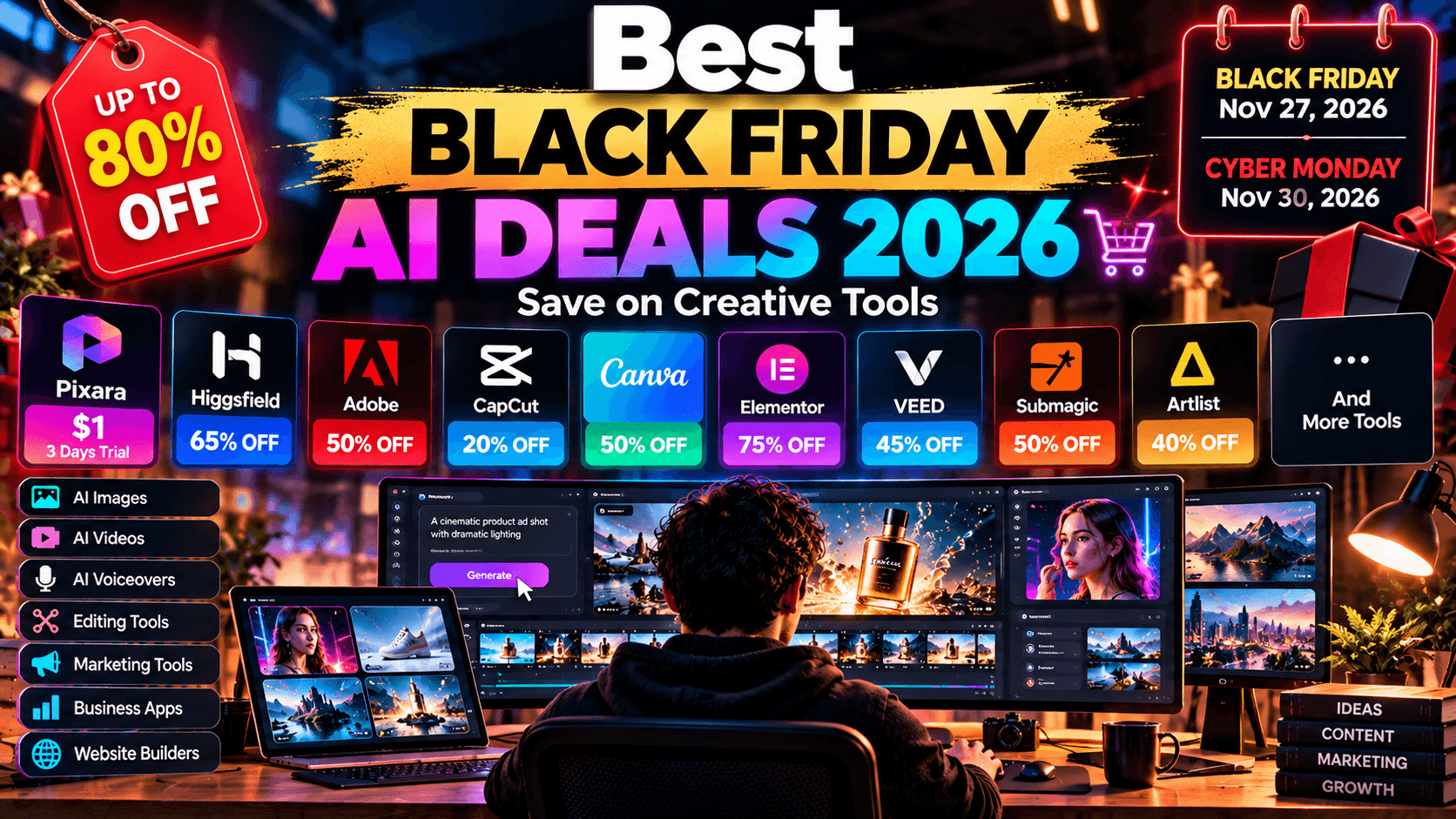
The 2026 Black Friday shopping calendar is worth keeping in mind:
• Black Friday: November 27, 2026• Cyber Monday: November 30, 2026• Promotional period: Many offers begin several weeks before Black Friday and continue into early December.
You do not necessarily have to wait until November 27 to find a worthwhile discount. Several companies launch their promotions early, while others introduce limited time offers that expire before the actual shopping weekend.
Here are the best Black Friday AI deals worth considering in 2026, starting with a creative workspace that brings multiple AI production capabilities together.
1. Pixara: Create AI Images, Videos and Voiceovers With One Creative Workspace

If you regularly produce visual content, managing several separate AI subscriptions can become expensive rather quickly. You might need one platform for image generation, another for video creation, a third for voiceovers and yet another for editing and rendering your finished projects.
Pixara takes a different route by bringing these capabilities together within a single creative environment.
The platform provides access to multiple AI models and creative tools, covering image generation, generative video, voiceovers and video production. It also includes Ara, its AI copilot, alongside Workflows and MCP capabilities that help connect different parts of the creative process.
For Black Friday 2026, the headline offer is particularly interesting for anyone who has been considering trying an integrated AI creative workspace.
Black Friday 2026 Deal: Start Creating for Just $1
The Starter subscription normally costs $10 per month. For the exclusive promotional offer, new users can access a three day Starter trial for just $1.
This is a promotional trial rather than a permanent $1 subscription. Once the three day period ends, the subscription moves to its regular $10 monthly price.
The offer gives new users an opportunity to test several creative capabilities without committing to a more expensive subscription immediately.
Here is what the $1 Starter trial includes:
• 4,000 credits: A generous allocation for experimenting with the platform's available AI models and creative tools.
• 1,000 AI image generations: Generate product visuals, marketing graphics, social media images, thumbnails, character concepts and other creative assets.
• 222 seconds of generative AI video: Experiment with text to video and image to video creation for short promotional clips, social media content and visual storytelling.
• 666 minutes of AI voiceovers: Produce narration for advertisements, explainers, product videos, social media content and other projects.
• 33 minutes of video rendering: Bring generated assets together into finished video projects.
• 2 GB of storage: Keep your creative assets and projects within the workspace.
• 2 concurrent generations: Run multiple generation tasks without having to wait for each individual job to finish.
• Ara AI: Get assistance with creative instructions, prompt development and navigating the available generation capabilities.
• Workflows and MCP: Access additional capabilities for connected creative processes and AI driven workflows.
The Starter subscription also includes public generations shared with the community.
One detail worth mentioning is that Starter does not include the daily free generations available on higher subscription tiers. Those benefits begin with the Hobby plan.
For someone who simply wants to test the creative environment, however, the $1 offer provides enough capacity to get a meaningful feel for its capabilities.
Get Pixara's $1 Black Friday Deal
What Can You Create With the Platform?
The appeal of an integrated creative workspace becomes clearer when you consider how many different assets go into producing a typical marketing campaign.
A business might start with a product image, generate several variations for different audiences, turn selected visuals into short promotional videos, add a voiceover and render the finished advertisement.
A social media creator might need a collection of images, animated clips, narration and visual variations for different publishing channels.
Having these capabilities available within one environment can simplify the production process and reduce the need to maintain several disconnected subscriptions.
AI Image Generation
Image generation is one of the primary creative capabilities. Users can produce visuals for ecommerce stores, advertising campaigns, social media accounts, blogs and other digital projects.
The available generation capacity makes experimentation particularly accessible. You can test different visual styles, compositions, lighting conditions and creative directions before settling on the assets you want to use.
Some useful applications include:
• Ecommerce product photography and lifestyle imagery.
• Social media graphics and promotional creatives.
• Blog featured images and YouTube thumbnails.
• Advertising concepts and campaign visuals.
• Character designs and concept art.
• Brand imagery and marketing illustrations.
For businesses producing content regularly, the ability to generate multiple creative variations can be particularly useful when testing different advertising concepts.
Generative AI Video
The Starter allocation includes 222 seconds of generative AI video, giving users room to experiment with short video concepts.
This opens up opportunities for creators who want to move beyond static imagery and produce more engaging visual content.
Potential applications include Instagram Reels, TikTok videos, YouTube Shorts, product demonstrations, promotional advertisements and short storytelling projects.
The platform brings together access to multiple generative video models, with availability depending on the subscription and applicable model requirements.
This is particularly useful for creators who want to experiment with different generation technologies without maintaining a separate subscription for every model.
AI Voiceovers
Voiceovers are another important component of modern content production.
A video might have excellent visuals, but it still needs narration, dialogue or other audio elements to communicate its message effectively.
The included 666 minutes of AI voiceovers provide room to experiment with different narration styles and audio driven content.
This can be useful for product advertisements, educational videos, explainers, promotional campaigns and social media clips.
For creators producing several videos every week, having voice generation available alongside image and video capabilities can make the production process considerably more convenient.
Video Rendering and Production
Generating individual images and video clips is only one part of content production. Those assets eventually need to be assembled into something ready for publication.
The Starter plan includes 33 minutes of video rendering, allowing users to test the production side of the workspace as well.
This is particularly relevant for people who want to move from generating isolated creative assets to producing complete video projects.
Ara AI, Workflows and MCP Add More Than Generation Capabilities
There is another part of the platform worth understanding beyond its image, video and audio capabilities.
Ara acts as the AI copilot, helping users translate creative ideas into instructions that can be used across the available tools and models.
For beginners, this can reduce the learning curve associated with prompt engineering and model selection. You can concentrate on describing the content you want to create, while the copilot helps guide the creative process.
Workflows introduce another useful layer. Rather than treating every generation as an isolated task, users can build repeatable processes around their creative requirements.
MCP provides further opportunities for connecting AI capabilities with external tools and workflows. This is particularly relevant to users who want to experiment with more connected AI production environments.
Together, these capabilities make the workspace useful beyond simple text to image or text to video generation.
What Happens After the $1 Trial?
The three day Starter trial is a convenient entry point, but creators who need more production capacity can move to one of the higher subscription tiers.
The Hobby plan is listed at $20 per month, reduced from its regular $25 price. It includes 15,000 credits, 25 GB of storage and four concurrent generations.
The Pro plan costs $36 per month, reduced from $60, and includes 36,000 credits, 50 GB of storage and eight concurrent generations. This is the more suitable option for creators producing content regularly, freelancers handling multiple client projects and businesses running frequent advertising campaigns.
For higher volume production, the Ultimate plan is listed at $150 per month, down from $250. It provides 150,000 credits, 100 GB of storage and 16 concurrent generations.
The higher tiers also provide access to 365 day Unlimited Access for selected models, subject to the applicable plan conditions.
The Hobby tier is a sensible starting point for individual creators who need more room to experiment. Pro offers considerably more capacity for regular production, while Ultimate is aimed at agencies, marketing teams and businesses with substantial creative requirements.
Is the $1 Black Friday Offer Worth It?
For someone already paying for multiple AI creative subscriptions, the opportunity to test an environment that combines image generation, video creation, voiceovers and production capabilities for $1 is worth considering.
The offer is particularly relevant to:
• Content creators: Produce visual assets, short videos and voiceovers for multiple social channels.
• Ecommerce businesses: Generate product imagery, promotional videos and advertising concepts.
• Freelancers: Handle different creative requirements across multiple client projects.
• Marketing agencies: Experiment with AI assisted production workflows for campaigns and client deliverables.
• Designers: Generate visual concepts, test creative directions and produce supporting assets.
The important thing is to use the three day trial to test the features you genuinely need. Check the available models, experiment with different generation types and see how the workflow fits your production requirements.
Remember that the promotional subscription renews at $10 per month after the three day trial, so account for the renewal terms before signing up.
Get Started With the $1 Black Friday Offer
For creators looking to produce more images, videos and audio content without managing a collection of separate AI subscriptions, this is an interesting entry point into a broader creative production environment.
2. OpusClip: Turn Long Form Videos Into Engaging Social Media Clips

Creating long form video content takes considerable time and effort. Podcasts, interviews, webinars, tutorials and YouTube videos can require hours of recording, editing and post production before they are ready for publication.
The problem becomes even more noticeable when you need to distribute that content across multiple social media platforms. A 45 minute podcast, for example, might contain dozens of interesting moments that could work as standalone clips. Finding those moments manually, cutting them into shorter segments, adding captions and adjusting the framing can easily turn into another lengthy editing project.
OpusClip addresses this problem with AI powered video repurposing.
The platform analyzes longer videos, identifies potentially engaging moments and automatically converts them into shorter clips suitable for platforms such as TikTok, Instagram Reels and YouTube Shorts.
For creators who publish frequently, this can significantly reduce the amount of manual editing involved in maintaining a consistent social media presence.
Black Friday 2026 Deal: Save 65% During Cyber Month
OpusClip is offering 65% off for Cyber Month 2026, making this an interesting opportunity for creators who want to automate more of their video editing workflow.
The promotion is particularly relevant to people who already produce long form video content and want to get more value from every recording.
Rather than recording separate videos for every social platform, you can take an existing piece of content and generate multiple shorter assets from it.
The financial benefit can become particularly noticeable for creators who regularly publish podcasts, interviews or educational videos. A single recording can potentially supply content for several days of social media publishing.
How Does OpusClip Work?
The platform uses AI to analyze uploaded videos and identify sections that could work as independent short form content.
It examines the conversation, recognizes potentially interesting moments and generates shorter clips with automated editing enhancements.
Some of its useful capabilities include:
AI Clip Detection: The system analyzes longer recordings and identifies sections that may work well as standalone videos. This helps creators find interesting moments without manually watching an entire recording.
Automatic Caption Generation: Captions are generated from the spoken content, making videos easier to follow, particularly for audiences watching without sound.
AI Reframing: The platform adjusts video framing for vertical formats, helping creators convert traditional landscape recordings into content suitable for mobile viewing.
B Roll Integration: Relevant supporting footage can be added to improve visual variety and make certain clips more engaging.
Filler Word Removal: OpusClip can identify and remove unnecessary verbal pauses and filler words, helping create cleaner, more polished clips.
These capabilities are particularly useful when working with talking head videos, podcasts and interviews, where the original footage may not have been recorded specifically for short form distribution.
Who Should Consider OpusClip?
OpusClip is particularly useful for creators who already have a library of long form video content.
Podcasters can turn individual conversations into multiple promotional clips. YouTubers can repurpose longer videos for Shorts, while coaches and educators can extract useful lessons from webinars and recorded training sessions.
Marketing agencies can also use the platform to help clients distribute more content across social media without increasing their manual editing workload.
However, there is an important consideration. AI selected clips still need human review. A segment might contain an interesting statement but lack the context required to communicate the intended message properly.
Creators should review captions, transitions, framing and clip selection before publishing.
For anyone looking to get more mileage from existing video recordings, the 65% Cyber Month discount makes this worth considering.
Claim Your OpusClip Black Friday Deal
3. Pabbly Plus: Automate Business Workflows With AI and Connected Applications

Content creation involves considerably more than producing images, writing articles or editing videos.
There is also the administrative side of running a creative business. You need to manage enquiries, organize customer information, update CRM records, send follow up messages, coordinate applications and keep different business processes running smoothly.
These repetitive activities can consume a surprising amount of time, particularly for freelancers, agencies and small businesses handling multiple clients.
Pabbly Plus brings together a collection of business applications designed to automate different parts of these workflows.
Its offering includes Pabbly Connect, which connects applications and automates actions between them, alongside Pabbly AgenticAI, which introduces AI driven workflow creation and execution capabilities.
For creators and marketing teams, this can help reduce the manual work associated with managing a growing content operation.
Black Friday 2026 Deal: Pabbly Plus for $799 Per Year
Pabbly Plus is offering its annual subscription for $799, reduced from $1,428.
The promotional offer launches on November 4, 2026, and includes 100 seats at the advertised price. Renewal is also listed at $799 per year.
Use coupon code BFCM26 at checkout.
Get Pabbly Plus Black Friday Deal
The annual subscription includes all nine Pabbly applications, with unlimited usage subject to fair usage policies and feature specific limits.
A 30 day money back guarantee also applies.
One important detail is that separate AI provider charges and connected application charges may still apply, depending on the services and integrations involved.
Pabbly Plus is an annual subscription, so it is worth considering the longer term commitment before purchasing.
What Does Pabbly Plus Include?
The appeal of Pabbly Plus comes from having several business applications available within one subscription.
For content creators and digital marketing businesses, some of the most relevant capabilities revolve around connecting applications, automating repetitive tasks and handling business processes with less manual intervention.
Pabbly Connect
Pabbly Connect is an automation platform that allows different applications to communicate with one another.
For example, a marketing agency might receive a new enquiry through a website form. An automated workflow could capture the submitted information, add the contact to a CRM, notify the sales team and trigger a follow up process.
Similar workflows can be created for content operations.
A new blog publication could trigger notifications, update a tracking spreadsheet or initiate other connected tasks, depending on the applications involved.
This is particularly useful for businesses that rely on several applications to manage their daily operations.
Pabbly AgenticAI
AgenticAI adds another dimension to business automation.
Rather than requiring users to manually configure every individual action, it can build workflows from written instructions, combining AI analysis and content generation with actions in connected applications.
For example, a business could create workflows that classify incoming enquiries, analyze submitted information, generate responses and update relevant records.
This makes it particularly interesting for teams looking to introduce AI into their existing administrative processes.
How Can Content Creators Benefit?
Although Pabbly Plus is not a dedicated image or video generation platform, its automation capabilities can be valuable to anyone running a content driven business.
Consider a small content marketing agency managing several clients.
Every new project might require creating folders, updating project records, notifying team members and organizing client information. These tasks are necessary, but they do not directly contribute to producing better content.
Automation can reduce the amount of repetitive administration involved.
Some potential applications include:
• Lead management: Capture enquiries from website forms and automatically organize them within connected business applications.
• Content operations: Connect publishing tools, spreadsheets and notification systems to streamline repetitive tasks.
• Client onboarding: Trigger internal workflows when a new client submits information or confirms a project.
• Customer communication: Automate selected notifications and follow up processes through supported integrations.
• Business reporting: Move information between connected applications to make routine reporting easier.
The main consideration is that automation requires some planning. You need to understand which applications are involved, what information needs to move between them and what actions should happen after a particular event.
For businesses with repetitive workflows, however, the time savings can justify the initial setup effort.
Is Pabbly Plus Worth the Black Friday Discount?
The $799 annual price represents a substantial reduction from the advertised $1,428 regular annual cost.
The offer makes more sense for businesses that intend to use several applications within the subscription, particularly those handling multiple workflows or requiring access for a larger team.
Independent creators with very simple requirements might find a smaller automation subscription sufficient.
For agencies, growing businesses and marketing teams, having access to a broader collection of automation applications can make the investment more worthwhile.
Claim the Pabbly Plus Black Friday Offer
4. Magica: Access AI Writing, Image, Video and Audio Tools in One Platform

One of the biggest challenges with modern AI content production is keeping track of different platforms, subscriptions and generation models.
You might use one service for writing marketing copy, another for creating images, a separate platform for video generation and yet another for producing voiceovers.
Each service has its own interface, pricing structure, usage limits and learning curve.
Magica, formerly known as Galaxy.ai, attempts to simplify this experience by bringing multiple AI models and creative tools together in one workspace.
The platform caters to users who need access to several types of AI capabilities without constantly switching between unrelated services.
For independent creators, marketers and small businesses, this can make everyday content production easier to manage.
Black Friday 2026 Deal: Special Savings on an All in One AI Workspace
Magica is promoting a special Black Friday offer for 2026.
Get Magica's Black Friday Deal
The promotional page contains the current offer details. Check the available subscription options, included usage allowances and applicable restrictions before purchasing.
The platform's broader value proposition comes from consolidating several creative capabilities within one subscription.
What Can You Do With Magica?
Magica covers several areas of AI assisted content production.
AI Writing and Content Generation
Writing tools can help users develop marketing copy, blog content, product descriptions, social media captions and other written materials.
For businesses producing content regularly, having AI writing assistance available alongside other creative tools can simplify the transition from an initial idea to a finished campaign.
AI Image Generation
The image generation capabilities allow users to create visual assets from written instructions.
These can include marketing graphics, social media imagery, product concepts, illustrations and other creative materials.
For designers and marketers, access to different models can be useful when testing different styles and visual directions.
AI Video Creation
Video generation is another important part of the platform.
Users can experiment with AI generated video content for promotional campaigns, social media posts, product presentations and other creative projects.
This can be particularly useful for businesses that want to test video concepts without investing in a complicated production setup.
AI Audio and Voiceovers
Audio generation introduces further possibilities for video creators and marketers.
Voiceovers can help turn written scripts into narrated content, while other audio capabilities can support different creative requirements.
Document and Productivity Tools
The platform also includes tools for working with documents and other productivity related tasks, extending its usefulness beyond traditional creative generation.
Who Is Magica Best Suited For?
Magica is worth considering for people who regularly move between different types of AI content production.
Small businesses can use it for marketing materials, product content and promotional campaigns. Freelancers may appreciate having several creative capabilities available through one interface, while individual creators can experiment with different AI tools without maintaining numerous separate subscriptions.
There is one important purchasing consideration.
An all in one platform can be convenient, but users should examine the specific models available, generation allowances and usage restrictions before choosing a subscription. Having access to several tools does not necessarily mean every model offers unlimited generation.
For anyone looking to consolidate parts of their AI workflow, the Black Friday promotion is worth checking.
Claim Magica's Black Friday Deal
5. ProWritingAid: Improve Writing Quality With AI Powered Editing and Feedback

AI writing assistants have become useful companions for bloggers, authors, marketers and businesses producing written content regularly.
However, generating text is only one part of the writing process. Good content also requires careful editing, clear sentence structure, appropriate tone, consistent language and a strong reading experience.
ProWritingAid is designed to help writers improve these areas through a combination of grammar checking, style analysis and AI assisted editing tools.
It is particularly relevant to people who work with long form content, including blog articles, ebooks, business documents, website copy and creative writing projects.
For content marketers, it can provide an additional layer of editorial feedback before an article goes live.
Black Friday 2026 Deal: Save 20% on Annual Premium Plans
ProWritingAid is offering 20% off its annual Premium and Premium Pro plans for Black Friday 2026.
The promotion is relevant to writers who want access to more advanced editing capabilities without paying the full annual subscription price.
What Makes ProWritingAid Useful?
ProWritingAid provides several tools that address common writing problems.
Grammar and Style Checking
The platform identifies grammatical mistakes, spelling issues and sentence level problems.
It can also highlight areas where writing becomes repetitive, unnecessarily complicated or difficult to follow.
For bloggers and content marketers, this is useful when reviewing long articles containing multiple sections and different writing styles.
AI Rephrasing
Sometimes a sentence communicates the correct idea but lacks clarity or flow.
The AI rephrasing tool helps writers refine sentences and improve their readability while retaining the intended meaning.
This can be particularly useful when editing product descriptions, introductions, marketing copy and lengthy explanations.
AI Sparks
AI Sparks provides creative assistance for writers who need inspiration or help moving past writer's block.
It can support brainstorming, idea development and creative writing exercises.
For bloggers, this can help generate alternative ways to communicate a concept or develop a more engaging introduction.
Contextual Writing Feedback
Writing quality depends on more than grammatical accuracy.
A professional business report requires a different tone from a conversational blog post, while marketing copy needs to communicate its message without sounding unnecessarily complicated.
ProWritingAid provides contextual suggestions designed to help writers improve tone, vocabulary and overall presentation.
Plagiarism Checking
The plagiarism checker helps identify text that may overlap with existing published material.
This is particularly relevant to professional writers, academic users and content teams working with large volumes of written material.
It is worth remembering that plagiarism checking is a supporting editorial measure, not a replacement for proper research, attribution and original writing.
Who Should Consider ProWritingAid?
ProWritingAid is particularly useful for people who spend a significant portion of their working day writing and editing.
Bloggers can use it to improve article readability, authors can review lengthy manuscripts, while marketing teams can maintain more consistent writing standards across different projects.
Freelance writers may also appreciate having a dedicated editing assistant available throughout their writing process.
The 20% annual discount makes the platform worth considering for anyone who expects to use its editing capabilities regularly.
Claim the ProWritingAid Black Friday Discount
6. Dzine: Get More Creative Control Over AI Image Generation and Design

AI image generators have made it considerably easier to produce visual content from simple text descriptions. However, anyone who has spent time working with these tools knows that getting the desired result can require several attempts.
You might generate an image with an interesting subject but an unsuitable background. Perhaps the composition is close to what you imagined, but an object appears in the wrong position. You could also have difficulty maintaining consistent characters or arranging several visual elements within a specific layout.
Dzine addresses some of these challenges by combining generative AI with a more controllable design environment.
Formerly known as Stylar AI, the platform is designed for users who want more control over the composition and editing of AI generated images.
Rather than relying entirely on text prompts, you can work with visual elements, layers and positioning tools to guide the generation process.
For designers, ecommerce businesses and marketing teams, this provides a more structured way to develop creative assets.
Black Friday 2026 Deal: Use the THANKS2026 Promotional Code
Dzine is offering a special Black Friday 2026 promotion.
Use the promotional code THANKS2026 at checkout to access the available discount.
The offer is particularly relevant to designers who want to experiment with AI generated imagery while retaining greater control over the final composition.
What Makes Dzine Different?
Dzine combines several image generation and editing capabilities within one interface.
Layer Based Image Editing
Layer based editing gives users more control over how different elements appear within a composition.
You can position visual assets, arrange objects and define the placement of different elements before generating or modifying an image.
This is particularly useful when creating promotional graphics, product imagery and designs that require specific layouts.
AI Generative Fill
Generative fill allows users to modify selected areas of an image with AI assistance.
For example, you might want to add an object, replace part of a background or make changes to an existing composition without recreating the entire image.
This can save considerable time when working with visual assets that are already close to the desired result.
Background Removal
Background removal is useful for ecommerce businesses, product designers and marketers who regularly work with isolated product images.
You can remove unwanted backgrounds and prepare visual assets for use in advertisements, product listings and other marketing materials.
Character Consistency
Maintaining consistent characters across multiple generated images can be difficult with conventional AI image generation.
Dzine offers creative tools designed to help users maintain greater consistency when producing visual content involving recurring characters.
This can be particularly useful for storytelling, advertising concepts, branded illustrations and character based creative projects.
2D to 3D Conversion
The platform also includes capabilities for converting 2D visual concepts into 3D representations.
This opens up additional possibilities for designers experimenting with different visual styles and creative formats.
Who Should Consider Dzine?
Dzine is particularly relevant to designers who need more control over their generated images.
Ecommerce businesses can use it to prepare product visuals, marketing teams can create promotional graphics, while freelancers can experiment with more structured AI assisted design workflows.
It is also worth considering for people who regularly produce character based artwork or need to maintain consistent visual compositions across several assets.
The promotional code makes this an interesting opportunity to test a platform that combines generative AI with more traditional design controls.
Claim the Dzine Black Friday Offer
7. Fliki: Turn Written Scripts Into Videos With AI Voices and Visuals

Video production can become expensive and time consuming, particularly when you need to create content regularly.
A typical video project might involve writing a script, finding suitable footage, recording narration, editing the timeline, adding captions and preparing the final output for different platforms.
For creators who publish several videos every week, repeating this process can quickly become difficult to manage.
Fliki simplifies much of this work through text to video generation.
The platform allows users to transform written scripts, blog posts and other text based content into videos using AI generated narration and automatically selected visuals.
It is particularly useful for faceless YouTube channels, educational content, explainer videos, marketing campaigns and social media publishing.
Black Friday 2026 Deal: Save 50% on Annual Plans
Fliki is offering 50% off annual subscription plans for Black Friday 2026.
The promotion provides an opportunity to access its video creation capabilities at a reduced annual cost.
Use promotional code FLIKIBLACKFRIDAY50 at checkout.
The offer is valid until December 2, 2026.
What Can You Create With Fliki?
Fliki is designed to make video production more accessible to people who may not have traditional video editing experience.
Its workflow revolves around converting written material into narrated video content.
Text to Video Generation
You can provide a written script and allow the platform to generate a video around it.
The system can match relevant visual clips to different sections of the script, helping transform written information into a more engaging visual format.
This can be particularly useful for educational videos, product explainers and informational content.
AI Voiceovers
One of Fliki's major selling points is its extensive voice library.
The Premium plan reference includes more than 2,000 voice options across over 80 languages.
This gives creators flexibility when producing narration for different audiences, markets and content formats.
You can experiment with different voices and narration styles to find something that suits your brand or project.
For businesses producing multilingual content, this can also reduce the complexity associated with arranging separate voice recordings.
AI Video Clips
Fliki also provides AI video clip generation capabilities at higher subscription levels.
These features allow creators to generate supporting visual content for their projects, reducing their dependence on manually sourcing every piece of footage.
Longer Video Exports
Higher tier subscriptions support exports of up to 30 minutes.
This makes the platform relevant to creators producing longer educational videos, presentations and informational content, alongside shorter social media clips.
Brand Kits
Multiple brand kits are available on higher level plans, helping businesses maintain consistent visual branding across different projects.
This is particularly useful for agencies and freelancers working with several clients.
Who Should Consider Fliki?
Fliki is worth considering for creators who want to produce narrated video content without spending hours editing individual scenes.
Some particularly relevant use cases include:
• Faceless YouTube channels: Convert scripts into narrated videos using AI voices and supporting visuals.
• Educational content: Produce tutorials, informational videos and explainer content.
• Digital marketing: Turn blog posts and written campaigns into promotional videos.
• Social media publishing: Create video content for multiple distribution channels.
• Multilingual content: Produce narration in different languages for international audiences.
There is also a practical advantage for people who already have a substantial collection of written content.
Rather than leaving blog posts and articles confined to a website, you can repurpose selected material into videos and reach audiences who prefer watching rather than reading.
Fliki's 50% annual discount makes it worth considering for creators who intend to use text to video production regularly.
Claim Fliki's Black Friday Deal
8. Pictory: Convert Blog Posts, Scripts and Long Videos Into Engaging Content

Repurposing existing content is one of the most practical ways to increase publishing output without constantly starting new projects.
Consider a business that publishes several blog articles every month. Each article represents an opportunity to create additional content for social media, YouTube and other marketing channels.
The same applies to webinars, podcasts, interviews and recorded presentations.
Pictory is designed to make this process easier by converting written material and longer video recordings into shorter, more accessible video content.
Its AI assisted production workflow helps users generate videos from scripts, turn blog posts into visual presentations and extract useful segments from existing recordings.
For marketers and content creators, this makes it a useful addition to a broader content distribution strategy.
Black Friday 2026 Deal: Save 50% and Get 2,400 Bonus AI Credits
Pictory is offering 50% off along with 2,400 AI credits, advertised as worth $100.
Use the promotional code BLACKFRIDAY2026 at checkout.
Get Pictory's Black Friday Deal
The offer is particularly interesting for users who want to increase their video production capacity while reducing the annual subscription cost.
The additional credits provide more room to experiment with the platform's AI capabilities, although their exact usage depends on the applicable features and credit requirements.
What Can You Do With Pictory?
Pictory concentrates on making video production accessible to people who already have written content or recorded footage.
Blog to Video Conversion
This is one of the more useful capabilities for content marketers.
You can take an existing blog post and convert its main ideas into a video format.
The platform helps transform written information into visual scenes, allowing you to create additional content from material you have already researched and published.
For businesses with extensive blog libraries, this can provide a practical way to expand their distribution strategy.
Script to Video Creation
Pictory can also transform written scripts into videos.
You provide the content, and the platform helps assemble suitable visuals, narration and other video elements.
This is particularly useful for educational content, marketing presentations, product explainers and informational videos.
AI Video Summarization and Clipping
Long recordings often contain valuable information that can be presented in shorter formats.
Pictory provides capabilities for identifying useful moments and extracting shorter clips from longer videos.
This can help creators repurpose webinars, podcasts, interviews and other recorded material.
AI Voiceovers
Voice generation allows users to add narration to their video projects.
This is useful for people producing explainer videos, educational content and marketing campaigns without recording their own voiceovers.
Captions and Transcription
Captions improve accessibility and make videos easier to follow, particularly on social media platforms where many viewers watch without sound.
Pictory includes transcription and captioning capabilities to help prepare videos for distribution.
Stock Visual Library
The platform also provides access to a large collection of stock visuals.
This gives creators additional options when assembling video scenes and finding suitable supporting footage.
Who Should Consider Pictory?
Pictory is particularly relevant to content marketers, bloggers, educators and businesses that want to repurpose existing material.
A content marketing team could take a detailed blog post, create a summarized video and distribute it through social media channels.
A webinar organizer could turn a longer recording into several shorter promotional clips.
An educator could transform written lessons into narrated videos that are easier for students to consume.
For creators who already have a substantial library of written or recorded content, these capabilities can help extract more value from existing material.
Is the Pictory Black Friday Offer Worth It?
The combination of 50% off and 2,400 additional AI credits makes this an interesting offer for people planning to use the platform regularly.
The value becomes particularly apparent for businesses that want to introduce video into their existing content marketing operations.
Rather than treating every video as an entirely new production project, you can repurpose material that has already been created, researched or recorded.
That can make video production considerably more manageable for smaller teams.
Claim 50% Off Pictory Plus 2,400 AI Credits
9. Kling AI: Generate Cinematic AI Videos and Creative Images

AI video generation has developed considerably over the last couple of years.
What once required traditional filming equipment, animation software and extensive post production can now be attempted through text prompts, reference images and generative video models.
Kling AI is one of the platforms operating in this space, providing tools for generating images and videos through AI.
It is particularly relevant to creators who want to produce cinematic scenes, product demonstrations, visual advertisements and short form video content.
The platform also provides creative controls that help users guide the generation process, including video duration, aspect ratio and other generation settings.
For marketing teams and independent creators, these capabilities open up additional possibilities for producing visual content without traditional filming requirements.
Black Friday 2026 Deal: Get 50% Off Annual Plans or 50% Extra Credits
Kling AI is offering two promotional options for Black Friday 2026:
• 50% off annual subscription plans.
• 50% extra credits for eligible purchases.
The promotion is valid from November 15 through December 3, 2026.
Get Kling AI's Black Friday Deal
For creators who already use the platform, the additional credit offer may be particularly useful.
Those considering a longer subscription can look at the annual discount and compare the overall cost against their expected generation requirements.
What Makes Kling AI Useful?
Kling AI combines image and video generation capabilities with creative tools designed to make AI assisted production more flexible.
Text to Video Generation
Users can describe a scene through written prompts and generate corresponding video content.
This can be useful for creating cinematic sequences, advertisements, social media videos and conceptual visual content.
You can describe the subject, environment, movement and visual style to guide the generated result.
Image to Video Generation
Image to video capabilities allow users to animate existing visual assets.
For example, an ecommerce business might start with a product image and generate a short video that introduces movement, camera effects or a more dynamic presentation.
This is useful for creators who want to transform static visuals into short video assets.
AI Image Generation
The platform also supports AI image creation, giving users another way to produce visual concepts and creative assets.
This can be useful for generating reference imagery, experimenting with different compositions and preparing visuals for subsequent video generation.
Creative Effects and Video Controls
Kling offers additional creative controls that allow users to influence how generated content appears.
Settings such as aspect ratio, duration and creativity controls can help tailor outputs to different requirements.
This is particularly relevant when producing content for platforms that have different video dimensions and publishing formats.
Marketing and Ecommerce Applications
Kling AI has applications beyond entertainment and experimental video creation.
Businesses can use generated visuals for product showcases, promotional campaigns, social media advertisements and conceptual product presentations.
For ecommerce brands, image to video generation can be useful for creating more dynamic product content without arranging a traditional filming session for every campaign.
Who Should Consider Kling AI?
Kling AI is particularly relevant to creators who want greater flexibility when producing AI generated visual content.
Video creators can experiment with cinematic sequences, marketers can produce advertising concepts and ecommerce businesses can generate product focused video assets.
It can also be useful for designers who want to animate existing images or develop visual concepts into short video sequences.
The 50% annual discount is worth considering if you expect to use the platform throughout the year.
However, pay attention to the credit requirements of individual models and generation settings. Video generation can consume credits quickly, particularly when experimenting with multiple versions of the same scene.
For anyone planning to produce AI video content regularly, the Black Friday promotion offers an opportunity to secure additional generation capacity at a reduced cost.