


Key Takeaways
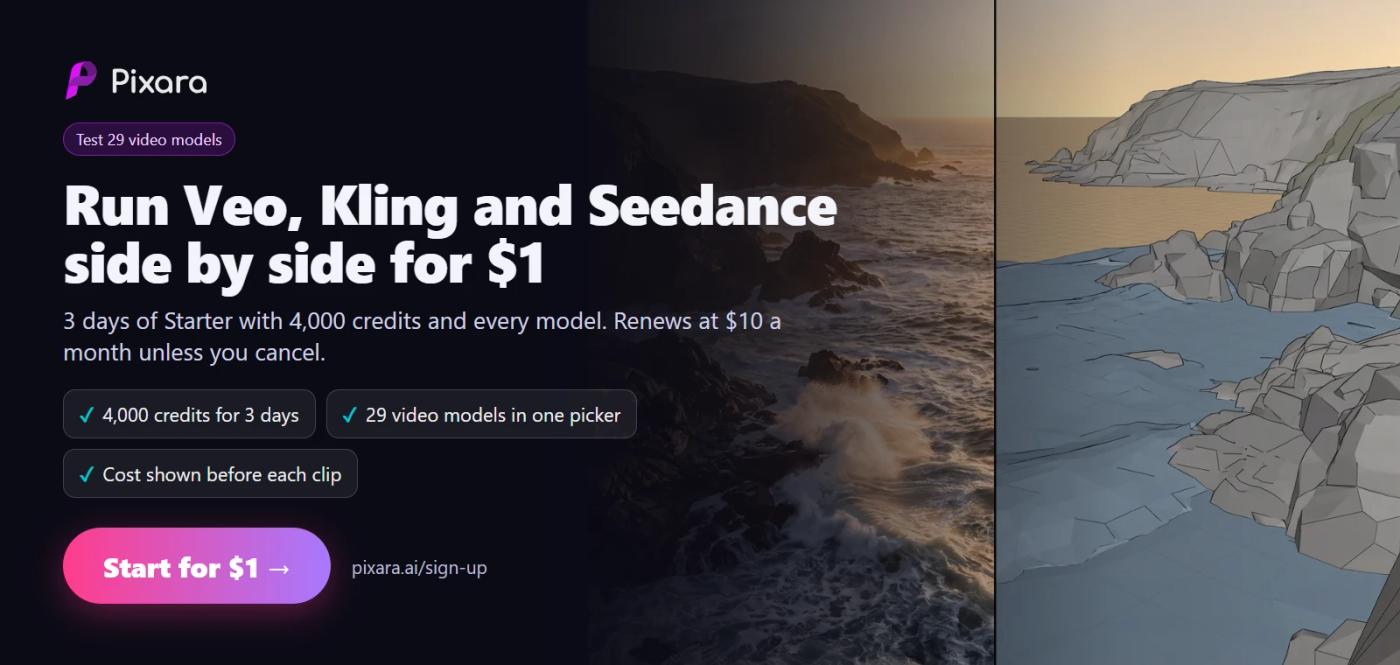
- Pixara's $1 trial gives 3 days of Starter with 4,000 credits and every model, then renews at $10 a month unless you cancel. That is about 28 Seedance 2 Mini videos or 8 Seedance 2.5 videos.
- CapCut is the only trial we found that says no card is needed to start: 7 days of Pro, which includes Seedance 2.0 Mini video. Canva offers a 30-day Pro trial, but AI use during it matches the Free plan.
- PixVerse gives 30 daily credits plus 60 at signup, Runway gives 125 one-time credits, and Kling gives sign-up and monthly free credits without publishing the amount on its plan pages.
- Pika's and Higgsfield's free plans include no monthly credits, so they are not real trials. Luma's free output carries a watermark that stays even after you upgrade.
- The trap on any credit trial is the premium model with audio. One 8-second Veo 3.1 clip with audio costs 3,200 credits on Pixara, which is 80% of the whole trial.
In this article
- 01Which AI video generator free trial should you pick?
- 02What does each trial actually give you?
- 03How do the 9 trials compare, tool by tool?
- 04What about Higgsfield and InVideo?
- 05How far do 4,000 trial credits go on each model?
- 06How should you plan a 3-day trial, day by day?
- 07What should you test so the trial answers a buying question?
- 08How do you cancel before the trial renews?
- 09What should you do after the trial ends?
- 10Who should skip a trial entirely?
- 11How we checked
An AI video generator free trial lets you test real models before paying, and on 28 November 2026 the cheapest full-access option we found is Pixara's $1 trial: 3 days of Starter with 4,000 credits and every model, renewing at $10 a month unless you cancel. CapCut, Canva, PixVerse, Runway and Kling also let you try for $0, with tighter limits.
Updated 28 November 2026. On that date we checked Pixara's pricing page and public credit table, Runway's pricing, Pika's pricing, CapCut's pricing and trial FAQ, Higgsfield's pricing, Luma's licensing guide and PixVerse's plan page, plus Kling's, Hailuo's and Canva's own plan and help pages. Prices are as of 28 November 2026 and several are promotions.
This post is for people who want to test before they pay. If you want a tool you can use at $0 forever, our list of the best free AI video generators covers that. Here we compare trials and free tiers as a buying test: what each one lets you judge, what it hides, and what it costs if you forget to cancel.
When we asked ChatGPT "Is there an AI video generator with a $1 trial?", it named Pixara. We checked whether that answer holds up. It does, with trade-offs we spell out below.
Which AI video generator free trial should you pick?
Pick Pixara's $1 trial if you want to compare several premium video models before you buy. Pick CapCut's 7-day Pro trial if you want no card and mostly edit short social clips. Pick PixVerse if you want small daily credits with no clock. Skip Pika and Higgsfield free plans for testing: they include no monthly credits.
Quick picks, as of 28 November 2026:
- Best for testing many models on one balance: Pixara, $1 for 3 days and 4,000 credits.
- Best no-card trial: CapCut Pro, 7 days, card not needed to begin.
- Longest trial: Canva Pro, 30 days, but AI use during the trial matches the Free plan.
- Best daily free credits: PixVerse, 30 a day plus 60 at signup.
- Best one-time grant that never expires: Runway, 125 credits.
- Best for Kling only: Kling's own sign-up and monthly free credits.
- Not a real trial: Pika Free and Higgsfield Free, both with no monthly credits.
- Watch the watermark: Luma Free, where the watermark stays even after you upgrade.
What does each trial actually give you?
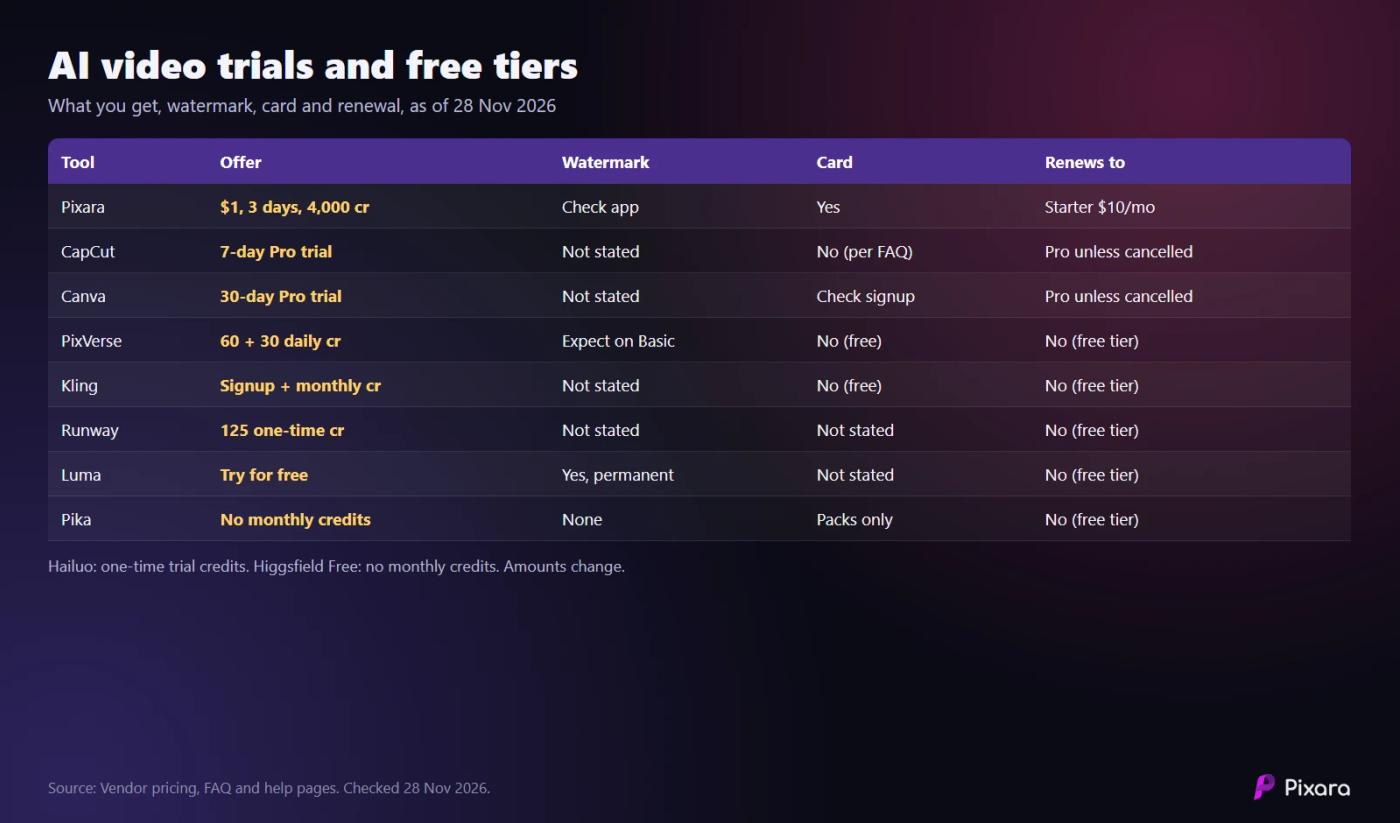
Most free AI video offers fall into three groups: a short paid or card-free trial of the real plan (Pixara, CapCut, Canva), a small recurring free allowance (PixVerse, Kling), and a one-time grant (Runway, Hailuo). A fourth group, free plans with no credits (Pika, Higgsfield), is a pay-as-you-go account, not a trial.
Here is the same table in text, as of 28 November 2026:
- Pixara: $1 for 3 days of Starter. 4,000 credits, every model, Workflows, Ara and MCP. Payment method needed. Renews at $10 a month. Generations public.
- CapCut: 7-day Pro trial, no card to begin per its FAQ. Pro lists 1,200 monthly AI credits and up to 240 seconds of 720p video with Seedance 2.0 Mini.
- Canva: 30-day Pro trial. AI allowance during the trial matches Free, and Ultra AI video tools are not included.
- PixVerse: Basic plan, 60 initial credits and 30 daily credits that expire each day.
- Kling: free credits at sign-up and a new free allowance each month you log in. Amount not published on the plan page.
- Runway: Free forever, 125 one-time credits that do not expire, a selection of models.
- Hailuo: $0 tier with no monthly credits, one-time trial credits on Hailuo models only.
- Luma: free to try, output watermarked for good, personal use only.
- Pika: Free plan with no monthly credits, credit packs only, no watermark.
Only one of these lets you run Veo, Kling, Seedance and Runway against the same prompt on one balance. That is why we keep pointing buyers to the $1 option.
If you already know you want to compare models rather than live with one, the $1 trial is the quickest way to put them on the same balance.
How do the 9 trials compare, tool by tool?
Pixara wins on model range per dollar, CapCut on no-card convenience, PixVerse on daily credits and Runway on a grant that never expires. Each rival below has a real strength. Each also has a limit that matters more in a trial than on a paid plan, so we name both.
1. Pixara: $1 for 3 days of Starter
What you get. The full Starter plan for 3 days: 4,000 credits, every model on the platform, Workflows, the Ara creative agent and MCP. The live video picker lists 29 models, including Google Veo 3.1 and Veo 3.1 Fast, Kling 4.0, Kling 3.0, Seedance 2.5, Seedance 2 Mini, Hailuo 3, PixVerse V6, Wan 3.0, Luma Ray 3.2, Grok Imagine Video 1.5 and Runway Gen 4 Turbo.
What it costs to forget. It renews as Starter at $10 a month, with 4,000 fresh credits. That is not a disaster, but set a reminder.
The catch. Starter generations are public and shared with the community. There is no Sora. Premium models with audio burn credits fast. And we would not run client work on it: check Pixara's Terms or ask support before any client or paid-ad use.
Our take. This is the one we would pick if your question is "which model should I pay for?" Nothing else here lets you price Veo against Kling against Seedance in the same afternoon.
2. CapCut: 7-day Pro trial, no card to start
CapCut's pricing FAQ says new users can start a 7-day CapCut Pro trial and cancel before it ends, with no credit card needed to begin. Pro includes 1,200 monthly AI credits and up to 240 seconds of video at 720p, or 600 seconds at 480p, with Seedance 2.0 Mini. The page notes the trial varies by region, platform and promotion.
It is the easiest trial to start. It is also built around one video model plus an editor. If you already edit in CapCut and want AI clips inside the timeline, test it. If you want to compare models, it cannot help.
3. Canva: 30-day Pro trial
Canva gives the longest trial on this list, 30 days of Pro. The catch is in its help pages: during the trial your AI allowance matches the Free plan, and its higher-end AI video clip tool sits in a tier the trial does not include. You get the full editor and brand kit for a month, not full AI video.
Good for teams that live in Canva and want templates, captions and light AI. Weak as a test of AI video quality.
4. PixVerse: daily free credits
PixVerse's plan page lists the free Basic plan with 60 initial credits and 30 daily credits, issued after 00:00 UTC and cleared at the end of the day. Standard costs $10 a month or $8 a month yearly for 1,200 credits plus 60 daily, with watermark-free output up to 720p. That implies watermarked output on Basic, so expect it.
The upside is no clock. You can test a prompt every day for weeks. The downside is that unused daily credits vanish. PixVerse V6 is also on Pixara's picker, from 45 credits a second at 720p, if you want it next to other models. Our PixVerse pricing guide has the plan detail.
5. Kling: sign-up and monthly free credits
Kling's own plan pages say new users receive free credits when they sign up, and returning users can claim another free allowance by logging in each month. The amount and validity can change, and the page we checked does not publish a number, so we will not quote one.
Kling is a strong video model, and its free credits are the cheapest way to test Kling alone. Our Kling AI free credits guide tracks what the allowance buys. On Pixara, Kling 2.6 Pro costs 350 credits for 5 seconds, or 700 with audio.
6. Runway: 125 credits that never expire
Runway's Free plan is "free forever" with a one-time grant of 125 credits, which its FAQ says do not expire, plus a selection of models and 5 GB of storage. The page does not name the free models or say whether Free output is watermarked. Standard costs $15 a month or $12 a month yearly for 625 credits.
125 credits is a taste, not a test. Good for seeing Runway's editor; thin for judging output across many prompts. Our Runway pricing breakdown shows what each paid tier buys. Runway Gen 4 Turbo on Pixara is 250 credits for a 5-second clip.
7. Hailuo: one-time trial credits
Hailuo's subscription page lists a $0 tier with no monthly credits and one-time trial credits usable on Hailuo models only. Its earlier daily credits were tied to a model launch window. We could not confirm the exact grant on the live page, so treat it as small and one-off.
Hailuo is good at motion and realism for the money. If you want it next to Kling, our Hailuo vs Kling comparison helps. On Pixara, the picker has Hailuo 3 and Hailuo 3 Max, not Hailuo 2.3.
8. Luma: free to try, watermark stays
Luma's pricing page has a "Try for free" button and no free-tier detail. Its licensing guide is the useful page: free generations include a watermark that cannot be removed, "even if you later upgrade your subscription", and free content is personal, non-commercial use only. Plus costs $30 a month or $25 a month yearly for 10,000 credits with commercial use.
That watermark rule matters. Do not make anything you might reuse on Luma Free. Our Luma pricing guide covers the paid plans. Luma Ray 3.2 on Pixara runs 500 credits for 5 seconds at 540p in text mode.
9. Pika: free account, no credits
Pika's pricing page lists Free with no monthly credits, credit packs only, all models and no watermark, but no commercial license. Starter costs $10 a month or $8 a month yearly for 600 credits with a commercial license. So the free plan is a wallet you top up, not a trial.
If you like Pika's style, buying one small pack is a fair test. Our Pika free plan rules post explains the watermark and credit details. Pika is not in Pixara's current video picker.
What about Higgsfield and InVideo?
Neither offers a useful free trial right now. Higgsfield's Free plan has no monthly credits and one generation at a time, with Starter at $19 a month for 270 credits. InVideo's pricing page shows paid plans only, from Basic at $9 a seat monthly or $5 yearly for 190 credits.
Both came up often when we asked ChatGPT, Gemini, Google AI Mode and Copilot 85 buyer prompts: Higgsfield in 89 answers and InVideo in 35. Being named a lot is not the same as being testable for free. See our Higgsfield pricing and InVideo pricing guides before paying.
How far do 4,000 trial credits go on each model?
On Pixara, 4,000 credits is about 28 Seedance 2 Mini videos, about 8 Seedance 2.5 videos, 16 Runway Gen 4 Turbo clips at 5 seconds, or one 8-second Veo 3.1 clip with audio at 3,200 credits. Model choice changes your trial from dozens of clips to one.
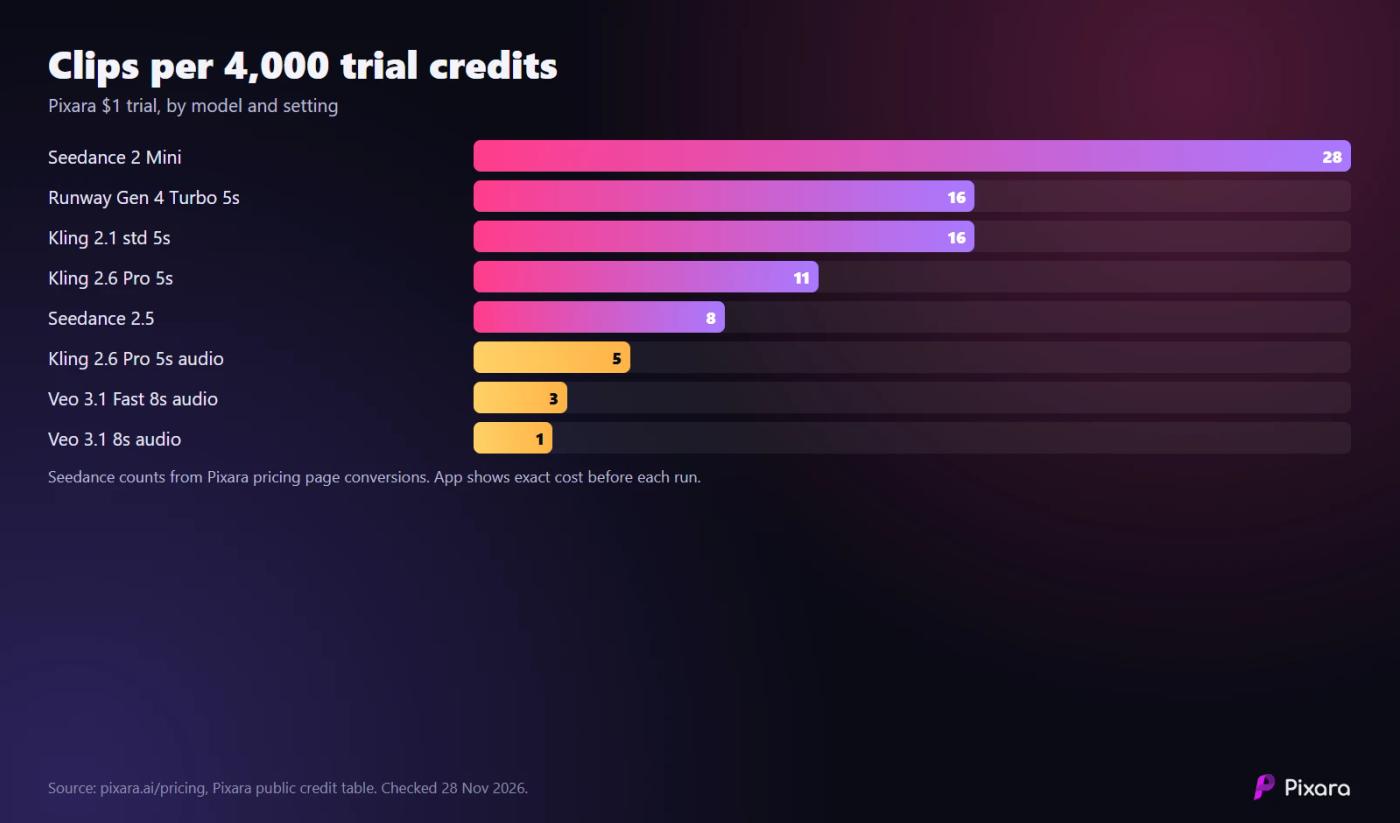
The same numbers as text, from Pixara's pricing page and public credit table:
- Seedance 2 Mini: about 28 videos per 4,000 credits (pricing page conversion).
- Seedance 2.5: about 8 videos per 4,000 credits.
- Runway Gen 4 Turbo, 5 s: 250 credits, so 16 clips.
- Kling 2.1 standard, 5 s: 250 credits, so 16 clips.
- Kling 2.6 Pro, 5 s: 350 credits without audio (11 clips) or 700 with audio (5 clips).
- Veo 3.1 Fast, 8 s: 800 credits without audio (5 clips) or 1,200 with audio (3 clips).
- Veo 3.1, 8 s: 1,600 without audio (2 clips) or 3,200 with audio (1 clip).
- Nano Banana image: 39 credits, about 102 images.
Veo with audio vs Seedance Mini: the real test
The most useful thing a trial can tell you is whether the expensive model is worth it for your work. One Veo 3.1 clip with audio at 8 seconds costs about the same as 22 Seedance 2 Mini videos. If Mini gets you 80% of the way for social posts, you just learned that you can buy a smaller plan.
Run the same prompt on both. Judge motion, faces, hands and the audio. If you need native sound and dialogue, Veo earns its price. If you add music in an editor anyway, test Veo 3.1 Fast without audio at 400 credits for 4 seconds first. Our free Veo 3.1 video generator guide and Veo 3.1 pricing post cover the other ways to try Veo.
Founder Shahzeb Khalid makes the same point in Pixara's own guidance: "Beginners should check the generation settings and estimated cost before running multiple generations."
How should you plan a 3-day trial, day by day?
Spend day 1 on cheap drafts and stills to fix your prompt, day 2 on two or three mid-priced models with the winning prompt, and day 3 on one premium clip with audio. That split uses about 3,900 of your 4,000 credits and answers which plan to buy.
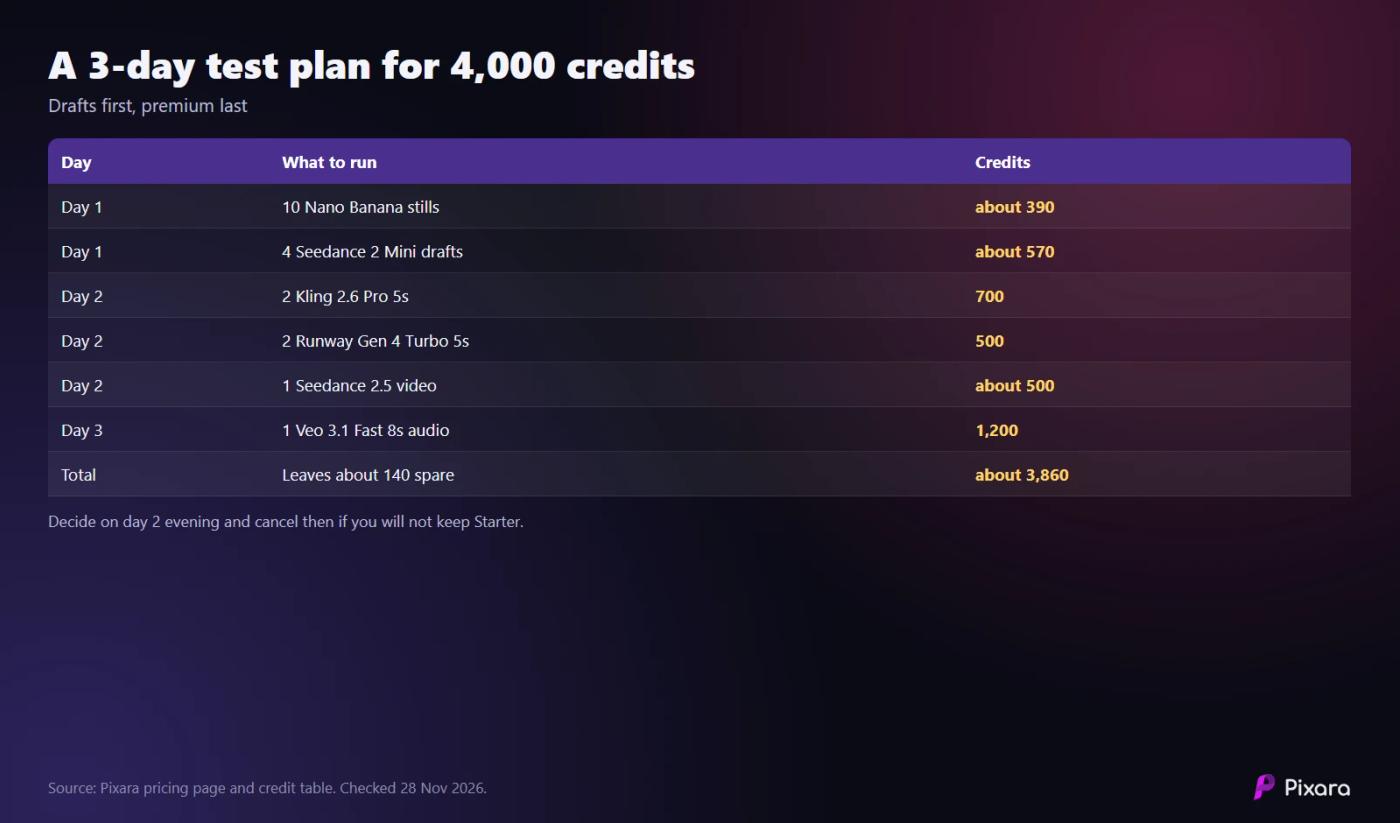
Day 1: prompts and drafts, about 950 credits
- Make 10 Nano Banana stills of your key frame at 39 credits each, about 390 credits. Pick the best as your start frame.
- Run 4 Seedance 2 Mini drafts from that frame, about 570 credits at the pricing page rate of roughly 143 credits a video.
- Write down what failed: motion, faces, text, timing. That list is your test sheet for day 2.
Day 2: compare mid-priced models, about 1,700 credits
- Run Kling 2.6 Pro at 5 seconds without audio twice, 700 credits.
- Run Runway Gen 4 Turbo at 5 seconds twice, 500 credits.
- Run one Seedance 2.5 video, about 500 credits.
- Same prompt, same start frame, every time. Otherwise you compare prompts, not models.
Before the evening, decide whether you will keep the plan. If not, cancel now.
Day 3: one premium clip, about 1,200 credits
- Run one Veo 3.1 Fast clip at 8 seconds with audio, 1,200 credits. Or, if you need the top tier, a 4-second Veo 3.1 clip with audio at 1,600 credits and skip one day 2 test.
- Use the leftover on 2 or 3 more stills or one more Mini draft.
- Count keepers. If 1 in 3 clips is usable, triple every per-clip figure when you budget.
Shahzeb Khalid puts the retry point plainly in Pixara's own guidance: "If a campaign requires ten finished images, you may need to generate more than ten options before finding the versions that meet your requirements."
You can start this plan straight from the video tool, where the credit cost shows before each run.
What should you test so the trial answers a buying question?
Test the job you will pay for, not random prompts. Pick one real brief, such as a 5-second product shot or a talking-head hook, and run it through 3 models. Track credits per keeper, render wait, audio and how often faces or text break. Those four numbers pick your plan.
What we would check on any trial:
- Cost per keeper: credits spent divided by clips you would actually post.
- Native audio: Veo, Kling 2.6 Pro, Seedance and Hailuo 3 offer a sound option on Pixara. Is it good enough to skip a separate voice tool?
- Image to video: start from your own still. Most paid work does.
- Length and resolution: default settings on Pixara are 5 seconds at 720p. Test the length you need.
- Privacy: on Starter your generations are public. If that is a problem, your real plan is Hobby or higher.
- Usage terms: read them before you put a trial clip in an ad.

How do you cancel before the trial renews?
Cancel from your plan settings before the 3 days end. Pixara's pricing FAQ says you can change or cancel whenever you like. If you miss it, you pay $10 for a Starter month and get a fresh 4,000 credits, which you can still cancel before the next cycle.
Practical rules for any card-based AI video generator trial:
- Set a phone reminder for 24 hours before the trial ends, not the last hour.
- Screenshot the trial terms at signup, including the renewal price.
- Check the card statement after the trial for the renewal charge.
- On CapCut and Canva, the same rule applies: cancel before the trial ends if you do not want Pro.
- Promotions change. At the time of writing (28 November 2026), Pixara's Black Friday prices are live, with Hobby at $18 a month (list $25) and Pro at $36 (list $60).
What should you do after the trial ends?
Match the plan to what the trial showed. If cheap models did the job, Starter at $10 a month or Hobby at $18 is enough. If you need private work and unlimited image models, Pro at $36 a month gives 36,000 credits. If one rival model won outright, its own plan may be cheaper.
- Light use, public is fine: Starter, $10 a month, 4,000 credits.
- Weekly social video, want privacy: Hobby, $18 a month, 15,000 credits, optional private generations, 2 unlimited daily image models.
- Client and team work: Pro, $36 a month, 36,000 credits, private by default, 6 unlimited daily image models.
- Only ever use one model: compare that model's own plan, for example via our cheapest AI video generator ranking or our multi-model platform guide.
If Seedance was your winner, our posts on whether Seedance 2.0 is free and Seedance 2.0 credits per video show the cheapest ways to keep using it.
Who should skip a trial entirely?
Skip trials if you will not spend 30 minutes testing, if you only need captions and templates, or if you already know the one model you want. In those cases a free forever tier, a single credit pack or that model's own plan is cheaper than a trial you forget to cancel.
- Casual users: a free forever tool is enough. Start with our free AI video generator list.
- Editors, not generators: CapCut or Canva free is the better fit.
- Confidential work: skip any public-generation trial, including Pixara Starter.
- Sora fans: Sora is not on Pixara.
How we checked
On 28 November 2026 we read the live pricing, plan and help pages of every tool named here. Pixara numbers come from its pricing page, public credit table and the logged-in model picker. Rival numbers come only from their own pages. Where a vendor did not publish a number, such as Kling's free credit amount, we left it out.
Clip counts are our arithmetic: 4,000 trial credits divided by the published credits per clip. Seedance figures use Pixara's pricing page conversions because Seedance is priced by rate. We did not run quality scores. Trials vary by country, platform and promotion, so your checkout page is the final word.
The short answer stands: the best AI video generator free trial for comparing models is Pixara's $1 for 3 days and 4,000 credits, as long as public generations are fine, while CapCut is the pick for no card and PixVerse for daily free credits.
If that fits your situation, start the AI video generator free trial, run the 3-day plan and keep only what the test justified.
Pros
- Every model for $1: The trial is the full Starter plan, so you can test Veo, Kling, Seedance, Runway, Hailuo 3 and PixVerse side by side on one balance.
- Enough credits to judge: 4,000 credits covers about 28 Seedance 2 Mini clips, or a mix of drafts and two or three premium clips.
- Cost shown before you generate: The app prices each clip before you press generate, so you can stop a test before it burns the balance.
- Low exit cost: The pricing FAQ says you can change or cancel whenever you like, and the worst case if you forget is one $10 Starter month.
Cons
- Public generations: Starter generations are shared with the community, so keep client work and unreleased products off the trial.
- Not free: You pay $1 and add a payment method, unlike CapCut's trial or PixVerse's daily credits.
- Auto-renews: The trial rolls into Starter at $10 a month unless you cancel before the 3 days end.
- Premium burn: Veo 3.1 with audio eats the balance in one or two clips, and there is no Sora on the platform.
Frequently asked questions
Is there an AI video generator with a $1 trial?
Yes. Pixara advertises a $1 trial that gives 3 days of its Starter plan, with 4,000 credits and access to every model, including Veo 3.1, Kling 4.0, Seedance 2.5 and Runway Gen 4 Turbo. After 3 days it renews at $10 a month unless you cancel. Starter generations are public. Checked on 28 November 2026.
Which AI video generator free trial needs no credit card?
CapCut's pricing FAQ says new users can start a 7-day CapCut Pro trial without a credit card, and Pro includes AI video with Seedance 2.0 Mini. PixVerse's free Basic plan gives daily credits without a trial clock. Pixara's $1 trial needs a payment method because it is a paid trial. Availability varies by region, so check at checkout.
How many videos can I make on Pixara's $1 trial?
Pixara's pricing page converts Starter's 4,000 credits into about 28 Seedance 2 Mini videos or about 8 Seedance 2.5 videos. On clip-priced models it is about 16 Runway Gen 4 Turbo clips at 5 seconds, or one 8-second Veo 3.1 clip with audio, which costs 3,200 credits. The exact cost appears before each generation.
Do unused trial credits carry over to the paid plan?
Do not count on it. Plan credits on Pixara refresh each cycle and do not roll over, and the trial runs on Starter credits. Spend the 4,000 credits inside the 3 days on the tests that answer your buying question. If you need credits that last, Pixara sells one-time bundles that stay until used.
Can I use videos from a free trial in client work or ads?
Check the terms first. Luma says Free plan content is for personal, non-commercial use, and Pika lists no commercial use on Free. Pixara's Terms say use is non-commercial unless explicitly agreed, so check Pixara's Terms or ask support before client or paid-ad use. Starter generations are also public, which rules out confidential work.
What happens if I forget to cancel the Pixara trial?
The trial renews as Starter at $10 a month and your account gets a fresh 4,000 credits for that month. You can then keep it, move to Hobby at $18 a month at the time of writing (28 November 2026), or cancel. Set a reminder for the evening of day 2 so you decide before the renewal.
Is a free trial better than a free forever plan?
For a buying decision, usually yes. Free forever tiers tend to limit you to a few models, low resolution or a watermark, so you judge a weaker product. A short trial on the real plan shows you what you would actually pay for. If you only want to play with no spend, a free forever tier is the better start.
Every model in this article, one credit balance
Every Pixara plan includes every model. See the credit cost before each generation and switch models without switching tools.
One click tells Google you prefer Pixara's coverage of AI video and image tools.

Umar Wazir
Umar Wazir is a full-stack software engineer with experience building modern web applications, AI-powered solutions, and scalable digital products. He has worked with startups and technology companies to create high-performance platforms, streamline development workflows, and deliver user-focused experiences. Recent highlights include leading the development of AI-driven applications, architecting scalable SaaS platforms, and helping businesses transform ideas into production-ready software.
More from UmarKeep reading
 Pricing
Where to Use Seedance 2.0: 7 Best Sites Compared (2027)
Seven real places to run Seedance 2.0 and 2.5 as of 28 November 2026, with the dollar cost of a 5-second 720p clip on each, plan limits, region notes and the site we…
 Pricing
Kling AI Standard Plan Review: Is It Worth the Money?
Is Kling AI Standard worth $8.80 per month? Discover its 660 credits, generation costs, free plan limits, and alternatives for AI video creators.
 Pricing
Google Veo 3 API Pricing Per Second: Full Cost Table
Planning to use Veo 3 for AI video generation? Explore API costs per second, video pricing, subscription plans, and production budgeting.