Choosing the right Runway subscription can be tricky, especially if you plan to generate AI videos regularly.
The platform offers several pricing tiers, access to multiple video and image models, and a credit based system that determines how much content you can create each month. The subscription price is only part of the equation. Your choice of model, video duration, generation quality, and number of retries all affect how far your credits will go.
The latest Runway pricing plans listed on the official website include Free, Standard, Pro, and Max. Although many creators still search for Runway Unlimited, Max is the high volume subscription presented to new customers in the pricing information provided here.
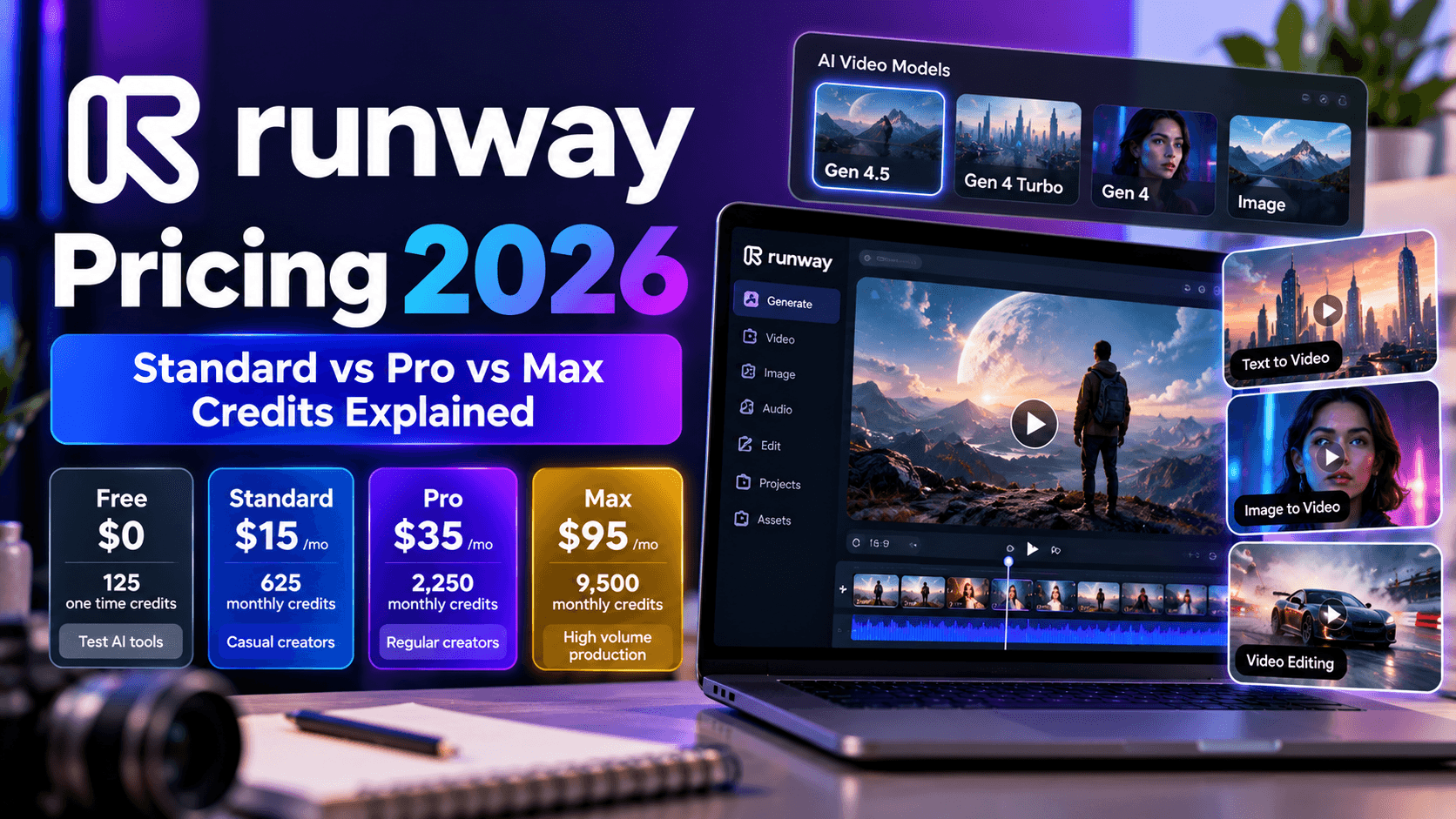
For individual creators, Standard starts at $15 per month, Pro costs $35 per month, and Max costs $95 per month when billed monthly. Annual billing reduces those effective monthly prices to $12, $28, and $76, respectively.
The bigger question is how much creative work each plan can support. Someone generating occasional social media clips might find Standard sufficient, while a video professional producing advertising creatives, product demonstrations, or several campaign variations may need a larger credit allowance.
In this breakdown, we will look at the latest subscription prices, explain how Runway credits work, compare Standard and Pro with the higher volume options, and examine the costs associated with models such as Gen 4, Gen 4 Turbo, and Gen 4.5. We will also look at an alternative for creators who want access to multiple AI models without committing their entire creative workflow to one platform.
Runway Pricing Plans in 2026: What Does Each Subscription Include?

Runway uses a credit based pricing system for its generative tools. Each paid plan provides a monthly credit allowance, with different models consuming credits at different rates. Your subscription also determines practical limits such as simultaneous generations, project capacity, storage, and access to certain professional features.
The following information summarizes the individual subscriptions and prices supplied from Runway's official pricing page. Annual prices represent the effective monthly rate when billed annually, not the month to month payment.
Runway Pricing Plans
- Free: $0 per month, $0 annual billing, 125 one time credits. Best for testing AI tools.
- Standard: $15 per month, $12 per month with annual billing, 625 monthly credits. Best for casual creators and occasional AI video production.
- Pro: $35 per month, $28 per month with annual billing, 2,250 monthly credits. Best for regular creators and professional projects.
- Max: $95 per month, $76 per month with annual billing, 9,500 monthly credits. Best for heavy individual usage and high volume production.
There are two important details to understand before choosing a subscription. Free provides 125 credits only once, so it is a trial allowance rather than a recurring monthly budget. Paid subscriptions replenish their included credits monthly, giving you a predictable allowance for ongoing projects.
Annual billing can make a meaningful difference for creators who already know they will use the platform throughout the year. Standard saves $36 annually, Pro saves $84, and Max saves $228 compared with paying the respective monthly prices for 12 months.
Runway Free: A Practical Way to Test the Platform
The Free plan costs nothing and includes 125 one time credits, 5GB of asset storage, and access to a selection of generative creative models.
It is a sensible starting point if you want to understand the interface, test prompts, compare a few outputs, or decide if Runway fits your creative process. You can get a feel for the available tools before committing to a recurring subscription.
The limitation becomes apparent when you start producing content regularly. Since the credits are not replenished each month, the Free plan cannot support a predictable ongoing production schedule. It is better suited to initial testing than to a business that needs a steady stream of AI generated video.
Runway Standard: The Entry Level Paid Plan
Standard costs $15 per month, or $12 per month with annual billing, and provides 625 credits every month. Runway lists this allowance as enough for approximately 52 seconds of Gen 4.5 video, 104 seconds of Gen 4 Turbo, or 78 Gen 4 images at 1080p.
The plan includes access to AI video and image models, the agentic creative collaborator, music and sound effect generation, voice tools, up to five parallel video and image generations, and up to three projects. Subscribers also receive watermark free outputs, 4K upscaling, and 20GB of asset storage.
For a solo creator producing occasional advertisements, short social media clips, or concept videos, Standard offers a reasonable starting point. You can access the wider collection of models without paying for a large monthly allowance that might go unused.
The main concern is credit consumption. Gen 4.5 can use up the monthly allowance surprisingly quickly, especially if you generate several versions of a scene before finding one worth keeping. Standard works best when you plan your prompts carefully and reserve expensive generations for shots that genuinely matter.
Runway Pro: More Room for Professional Production
Pro costs $35 per month, dropping to $28 per month with annual billing. Its monthly allowance increases to 2,250 credits, more than three times the Standard allocation.
According to the official pricing figures provided, this supports approximately 187 seconds of Gen 4.5 video, 375 seconds of Gen 4 Turbo, or 281 Gen 4 images at 1080p.
The plan also raises the simultaneous generation limit to 15 videos and images. You can manage up to five projects, create one Brand Kit, and set up one custom voice clone. Other listed benefits include credit top ups, Runway MCP, unlimited 4K video upscaling, 100GB of storage, and access to Topaz AI Upscale.
Pro makes more sense for creators who use AI video as part of their regular work rather than as an occasional experiment. Freelancers, marketers, and small creative teams can produce more variations, maintain several projects, and work with a larger allowance before needing additional credits.
However, the word professional should not be mistaken for unlimited generation capacity. The 2,250 credit allowance still has a ceiling, and expensive models or repeated attempts can reduce the number of usable clips you produce. If your monthly output is substantial, estimate your expected generation costs before choosing the plan.
Runway Max: For Creators Who Need a Larger Credit Allowance
Max costs $95 per month, or $76 per month with annual billing, and includes 9,500 credits each month. Runway positions it as its high volume plan for individual creators who need more capacity.
The official pricing page lists enough credits for approximately 791 seconds of Gen 4.5 video, 791 seconds of Gen 4 video, 1,900 seconds of Gen 4 Turbo, 1,187 Gen 4 images at 1080p, or 475 Nano Banana Pro images at 2K.
Max supports up to 20 parallel video and image generations, ten projects, three Brand Kits, and three custom voice clones. It also includes early access to new models, studio grade generation options such as HDR, ProRes, and image sequences, 500GB of storage, Runway MCP, and unlimited 4K video upscaling.
One useful advantage is that unused monthly credits can roll over for one month, subject to the plan's rollover rules. This can help when production fluctuates between quieter periods and busier campaign schedules.
For a creator who generates advertising concepts, product videos, and multiple campaign variations every week, Max provides considerably more breathing room than Standard or Pro. Still, the larger allowance does not guarantee unlimited video generation. Your output depends on which models you use and how many credits each generation consumes.
How Runway Credits Work in 2026
Runway's credit system determines how much video, imagery, and other creative content you can generate with your subscription. The monthly price tells you what you pay, but the credit allowance tells you how much production capacity you receive.
Each model has its own credit consumption rate. A short generation with a relatively economical model can leave enough credits for several more experiments, while a few expensive generations can consume a significant portion of your monthly allowance. This is why comparing Runway pricing plans purely by their subscription fees can lead to the wrong decision.
For example, Standard provides 625 credits each month, while Pro provides 2,250. Pro costs more, but it also gives you a considerably larger generation budget. The value depends on how much content you need, which models you prefer, and how many attempts it takes to get an output you are happy with.
How Many Seconds of Video Can You Generate?
Runway publishes estimated output durations for several models directly on its pricing page. These figures provide a useful starting point for planning a monthly content budget.
Runway Credit Capacity by Plan
Plan
- Free: 125 one time credits. Gen 4.5 and Gen 4 Turbo capacity depends on available model access.
- Standard: 625 monthly credits, approximately 52 seconds of Gen 4.5 video or 104 seconds of Gen 4 Turbo video.
- Pro: 2,250 monthly credits, approximately 187 seconds of Gen 4.5 video or 375 seconds of Gen 4 Turbo video.
- Max: 9,500 monthly credits, approximately 791 seconds of Gen 4.5 video or 1,900 seconds of Gen 4 Turbo video.
These are the published approximate capacities, not a promise that every generation will produce a usable result. Model availability, generation settings, and retries can affect how much finished content you obtain from your credits.
The difference becomes easier to understand when you consider a typical marketing workflow. Suppose you need a 30 second promotional video made up of six separate five second shots. You might generate several versions of each shot before selecting the final clips. Your credit consumption could therefore be substantially higher than the cost of generating six clips once.
A useful budgeting habit is to calculate the credits needed for your initial generations, then reserve a portion of your allowance for revisions. That gives you a more realistic picture of your monthly capacity than assuming every generation will be perfect on the first attempt.
Do Runway Credits Roll Over?
Credit expiration is another important part of the pricing calculation.
- Standard: Unused monthly credits do not roll over into the following month.
- Pro: Unused monthly credits do not roll over into the following month.
- Max: Unused credits can roll over for one month, subject to the plan's rollover rules.
- Purchased credits: Top up credits follow separate expiration rules and, according to Runway's published credit guidance supplied for this comparison, do not expire.
For Standard and Pro subscribers, unused credits generally lose their value when the monthly allowance resets. If you have a quiet production month, you cannot assume the remaining balance will be available for a larger project later.
Max is more flexible for creators whose workloads fluctuate. The one month rollover allowance can help preserve some unused capacity for a busy production period, although it should not be treated as an unlimited reserve.
Runway also maintains separate balances for its creative web application and its API. Credits purchased for one do not transfer to the other, so developers and creative users need to budget for those environments separately.
Runway Gen 4 Pricing: Gen 4, Gen 4 Turbo, and Gen 4.5 Compared

Runway offers multiple video generation models, and each comes with its own balance of visual quality, speed, and credit consumption. Understanding these differences is essential if you want to calculate your Runway Gen 4 price or estimate how much your monthly production will cost.
The official subscription page provides useful capacity estimates for Gen 4 Turbo and Gen 4.5. Runway's developer pricing page also publishes model specific rates, although API pricing should not be confused with the credit allowances in a consumer subscription.
Runway Gen 4.5 Cost
Gen 4.5 is designed for creators who need detailed visuals, convincing motion, and accurate interpretation of prompts. It is a useful option for cinematic scenes, product advertisements, campaign visuals, and other projects where the quality of individual shots matters.
The official pricing figures supplied for this comparison indicate that 625 credits generate approximately 52 seconds of Gen 4.5 video, while 2,250 credits provide around 187 seconds. Max raises that capacity to approximately 791 seconds per month.
For budgeting purposes, the listed capacities work out to roughly 12 credits per second. Here is how that translates into individual clips.
Runway Gen 4.5 Credits by Video Duration
Gen 4.5 output duration
- 5 seconds: Approximately 60 credits.
- 8 seconds: Approximately 96 credits.
- 10 seconds: Approximately 120 credits.
- 15 seconds: Approximately 180 credits.
- 30 seconds: Approximately 360 credits, based on the estimated rate of 12 credits per second. This is a budgeting estimate, not confirmation of a supported single generation duration.
These figures are estimates derived from the published plan capacities. Actual generation limits depend on the model's supported duration and settings, so a 30 second entry in the table represents a budgeting calculation, not confirmation that Gen 4.5 can generate a single clip of that length.
Consider a creator who needs ten five second shots for a promotional campaign. At approximately 60 credits per shot, the initial generations would consume around 600 credits. That would leave almost nothing from a Standard subscription for alternative takes, corrections, or additional scenes.
This is where the Gen 4.5 cost becomes important. A model can produce impressive results and still be expensive for someone who needs a large volume of content every month.
Runway Gen 4 Price
Gen 4 is another option for creators producing controlled, visually consistent video content. It is worth considering when you need a particular visual style or want to maintain continuity between shots.
The pricing information provided for the Max plan lists 9,500 credits as sufficient for approximately 791 seconds of Gen 4 video. This gives you a useful estimate of its capacity within that subscription.
However, the published figures above do not provide a complete, directly comparable Gen 4 credit rate for every subscription. It would be misleading to assign an exact Gen 4 price per second across all plans without confirming the relevant model settings and credit rates.
When comparing Gen 4 with Gen 4.5, pay attention to the output quality you need, the duration of your clips, and the number of usable results you expect. A slightly cheaper generation is not necessarily better value if you repeatedly need to regenerate it to achieve the desired result.
Runway Gen 4 Turbo Cost
Gen 4 Turbo is designed for faster, more economical video generation. It is particularly useful when you want to test a concept, check a camera movement, try different compositions, or create several versions of a scene before committing to a more demanding model.
The official subscription figures make the capacity difference clear.
Gen 4.5 vs Gen 4 Turbo Capacity
Plan
- Standard: Approximately 52 seconds of Gen 4.5 video or 104 seconds of Gen 4 Turbo video.
- Pro: Approximately 187 seconds of Gen 4.5 video or 375 seconds of Gen 4 Turbo video.
- Max: Approximately 791 seconds of Gen 4.5 video or 1,900 seconds of Gen 4 Turbo video.
Standard provides approximately twice as much Gen 4 Turbo footage as Gen 4.5 footage. Max provides a larger difference still, making the Turbo model worth considering when volume matters more than obtaining the highest quality from every initial generation.
For example, a marketer preparing several concepts for a paid social campaign might use Turbo to test scene composition and movement. Once the direction is approved, selected shots can be generated with a higher quality model when the project justifies the additional credit expenditure.
This workflow can help control costs, although the savings depend on the available model settings and how much regeneration the project requires.
One important clarification: the term Runway Gen 4 pricing can refer to either credits consumed inside a consumer subscription or the price of generating content through the developer API. These are separate billing environments.
Runway's developer documentation currently lists Gen 4.5 at $0.12 per second through the API, which should not be presented as the direct cash price of a second generated through a Standard or Pro subscription.
Runway Unlimited vs Max: What Happened to the Unlimited Plan?
If you have been researching Runway for a while, you may have come across reviews recommending Standard, Pro, and Unlimited. The current individual pricing information supplied for this comparison lists Free, Standard, Pro, and Max, with Max serving as the high volume option for new subscribers.
This matters because older reviews may describe pricing, generation allowances, and features that do not match the options currently displayed to new customers. Before subscribing, check the current plan page rather than relying on an older comparison.
Is Runway Unlimited Still Available?

The Unlimited name remains relevant to people researching older subscriptions, but Max is the plan to consider when comparing the current individual options presented here.
Max includes 9,500 monthly credits, a one month rollover allowance for unused credits, higher parallel generation limits, more project space, and additional professional features. Its monthly price is $95, or an effective $76 per month with annual billing.
A larger allowance does not mean every model generates unlimited video. The included credits still determine how much credit based generation you can perform, while specific features such as 4K upscaling have their own plan benefits.
For a buyer comparing an older Unlimited review with the current Max plan, the important questions are how many credits are included, which models are accessible, and what happens when the monthly allowance runs out. The name alone does not tell you how much production capacity you will receive.
Which Plan Makes the Most Sense for Heavy Usage?
Max is the logical starting point for creators who regularly generate large volumes of video, but it is worth estimating your monthly requirements before paying $95.
A creator producing a few short clips each week may not need 9,500 credits. A marketing team creating product advertisements, social media variations, and campaign assets across several brands could use the allowance much faster.
The annual option reduces the effective monthly price to $76, saving $228 over 12 months compared with monthly billing. That saving is worthwhile only if you expect to use the service consistently throughout the year.
The practical recommendation is straightforward: choose a subscription based on the number of usable outputs you need, not simply the largest credit balance available. If you repeatedly reach the limit on Pro, Max deserves consideration. If you regularly leave credits unused, a less expensive plan may be a better fit.
Is Runway Expensive for Teams and Agencies?
Runway's individual plan prices can look reasonable when you consider a single creator. The calculation becomes more complicated when several people need access to the same workspace.
A team may need multiple editors, additional project capacity, and enough credits to support different campaigns running at the same time. The monthly subscription is only one part of the expense, particularly when several people generate alternative versions of the same video.
Before purchasing subscriptions for a team, establish how many people need to create content, how many only need to review it, and how many generations your workflow consumes in a typical month.
Why Your Team Size Matters
Suppose a small agency has five people who need to generate video content. If each person requires a separate Standard subscription at $15 per month, the combined subscription cost would be $75 per month, or $60 per month on an annual billing basis.
That calculation represents five separate subscriptions. It should not be confused with the cost or credit allocation of a shared workspace, which may have its own editor charges and credit pooling rules.
The important point is to confirm the exact workspace arrangement before making a purchase. A low advertised per user price does not automatically mean every editor receives an independent monthly allowance.
For agencies, the following questions can help prevent unexpected costs:
- Who needs generation access? People who create videos consume credits, while reviewers may need only viewing permissions.
- How many versions does each project require? Product advertisements and campaign videos can involve repeated generations before approval.
- Can different projects share a budget? A common credit pool can make allocation easier, but it can also be exhausted quickly if several people generate content at once.
- Will additional credits be necessary? Top ups can support extra work, but frequent purchases should be included in the monthly production budget.
A solo creator and an agency can therefore reach very different conclusions about the same subscription. For individual use, the question is how far the monthly allowance goes. For teams, the calculation also needs to account for user access, shared usage, project coordination, and the cost of keeping production moving.
Pixara.ai: A Multi Model AI Video Alternative for Creators Who Want More Flexibility
Runway is a capable option for creators who want advanced video generation and editing tools in one place. However, if you produce content for several brands, manage advertising campaigns, or need different visual styles for different projects, committing your entire workflow to one platform may not be the most convenient option.
Pixara.ai is worth considering as a preferred Runway alternative, particularly for creators who want access to multiple generative models through a single creative workspace. Its subscription plans start at $10 per month, and the platform combines AI image generation, video creation, voiceovers, audio tools, and editing capabilities.
The main appeal is flexibility. Rather than treating video generation as an isolated task, you can use one workspace to create visual assets, produce video variations, generate audio, and prepare creative material for marketing campaigns. That can be useful for ecommerce businesses, agencies, social media managers, and independent creators who need more than an occasional AI generated clip.
How Pixara Compares With Runway on Value
Runway's Standard plan costs $15 per month with monthly billing and includes 625 credits. Pixara's Starter plan is listed at $10 per month in the pricing information available for this comparison.
The subscription prices alone do not establish which service is cheaper for a particular video. Each platform has its own model access, generation limits, and usage rules. The more useful comparison is how much work you can complete with your subscription and how easily you can access the models required for your projects.
Here is how the two platforms differ in their overall creative workflow.
Runway vs Pixara
Feature
- Entry level paid price: Runway starts at $15 per month; Pixara starts at $10 per month.
- Video generation: Runway provides its own models and supported third party models; Pixara offers access to multiple AI video models.
- Image generation: Runway includes integrated image models; Pixara provides integrated AI image generation.
- Audio creation: Runway offers music, voice, and sound effect tools; Pixara offers voiceovers and audio creation tools.
- Creative assistance: Runway provides an agentic creative collaborator; Pixara features the Ara AI copilot.
- Video editing: Runway provides built in creative tools, with separate editing software useful for larger projects; Pixara includes a built in video editor.
- Model flexibility: Runway provides access to supported models within its platform; Pixara offers a multi model creative workspace.
- Suitable for: Runway suits creators who value its generation tools and workflows; Pixara suits creators who want a broader collection of visual content tools.
The above comparison describes the platforms' general capabilities. It does not establish equivalent generation limits, identical model availability, or equal output quality at the listed subscription prices.
Ara AI Copilot Simplifies the Creative Process
One of the useful features is Ara, the AI copilot designed to help creators turn an idea into a usable prompt and select an appropriate model for the task.
Prompt writing can be a frustrating part of AI video production. You may know what you want a scene to look like, but describing the camera movement, lighting, composition, subject motion, and visual style in a way that produces the intended result takes practice.
Ara is designed to reduce that learning curve by assisting with prompt engineering, model selection, and the creative direction of a generation. This can be helpful for marketers who understand their audience and campaign objectives but do not want to spend hours learning the prompting conventions of every individual model.
For example, an ecommerce marketer creating a product advertisement might begin with a simple creative brief describing the product, target audience, visual style, and intended placement. The copilot can help translate that brief into a more detailed generation prompt.
The resulting output still needs review. AI models can misinterpret product details, produce inconsistent motion, or generate visuals that need several revisions. The benefit is a more accessible starting point for people who want to create content without becoming prompt engineering specialists.
Multiple AI Video Models in One Workspace
Another reason to consider this alternative is its multi model setup. Pixara provides access to several AI video generation technologies, including models from the Sora, Veo, Kling, and Seedance families, with availability depending on the current platform offering.
Different models can be useful for different creative requirements. One might be a better fit for a cinematic product shot, another for character movement, and another for generating alternative visual concepts.
Having multiple models available in one workspace gives creators more room to experiment with different styles without maintaining a separate creative workflow for every provider.
For an agency managing several clients, this flexibility can be particularly useful. A fashion campaign may need polished editorial visuals, while a software advertisement may require a clean product demonstration and an ecommerce campaign may need several short promotional clips.
There is one qualification worth keeping in mind: access to a model through a third party platform does not necessarily mean every model feature, generation setting, or usage limit matches the model provider's native service. Check the current model list and plan restrictions before purchasing a subscription for a specific production requirement.
Image Generation, Video Creation, and Audio Tools Together
Video is only one part of a typical marketing workflow. You may also need product images, social media graphics, voiceovers, background audio, and different versions of an advertisement for multiple placements.
Pixara combines several of these capabilities within the same creative environment.
- AI image generation: Create campaign visuals, product imagery, concept art, and supporting assets.
- AI video creation: Generate short videos from prompts and supported reference inputs using available models.
- AI voiceovers: Produce narration for promotional videos, product advertisements, and social content.
- Audio tools: Create or work with audio elements to support video production.
- Built in video editor: Assemble generated material and make creative adjustments within the platform.
- Creative templates: Use available advertising templates to help produce content for common marketing needs.
The advantage is workflow convenience. A creator preparing a product launch can develop supporting imagery, generate video concepts, add narration, and prepare the creative assets within a connected environment.
That does not eliminate the need for dedicated editing software in every situation. Complex timelines, detailed colour correction, advanced sound mixing, and professional finishing may still require specialised tools. For short advertisements, social content, and product creatives, however, combining these capabilities can reduce the need to move between several separate applications.
Who Should Choose Pixara Over Runway?
This alternative is particularly relevant for creators whose work involves several types of AI generated content rather than video alone.
It is worth considering if you are:
- An ecommerce business: You need product images, promotional videos, voiceovers, and multiple advertising variations for your catalogue.
- A marketing agency: You produce different creative formats for clients across several industries and want access to a wider selection of models.
- A social media creator: You regularly need fresh visuals, short videos, audio, and creative variations for different platforms.
- A freelancer or small business owner: You want an accessible creative workspace without immediately committing to a $35 or $95 monthly Runway subscription.
- A creative professional who experiments with models: You want the freedom to test different generation technologies as your project requirements change.
Runway may still be the better fit if your workflow depends heavily on its specific generation tools, model controls, or professional production features. Pixara is worth evaluating when model variety, integrated creative capabilities, and a lower starting subscription price are more important to your day to day work.
My recommendation: If your primary requirement is advanced Runway generation with its particular workflow and features, start by comparing Standard and Pro. If you need a broader toolkit for images, videos, audio, and advertising creatives, Pixara deserves a place on your shortlist. Compare the available models and generation allowances against your expected output before deciding which subscription offers better value.