Understanding InVideo AI pricing can be a little confusing, especially if you are comparing monthly subscriptions, generative credits, AI video models, and the amount of content you can produce with each plan. The platform has expanded beyond its original text to video workflow, giving creators access to AI generated visuals, automated video production, editing tools, and different levels of access to generative models.
For someone creating videos occasionally for social media, the Basic plan might be enough to get started. For marketers publishing videos every week, the Pro plan offers a larger monthly credit allowance and access to more advanced features. Teams producing content at a higher volume may find the Ultra plan more suitable, particularly when multiple people need access to the same workspace.
The important thing is to look beyond the subscription price. A plan that seems affordable at first can become expensive if your preferred AI model consumes credits quickly or your production schedule requires more generations than the monthly allowance supports.
This breakdown covers the published monthly prices, the features included with each subscription, how generative credits affect production costs, and which plan makes sense for different types of creators. It also looks at alternatives for people who need AI avatar videos, original generative visuals, or more design control over their marketing content.
InVideo AI Pricing Plans in 2026

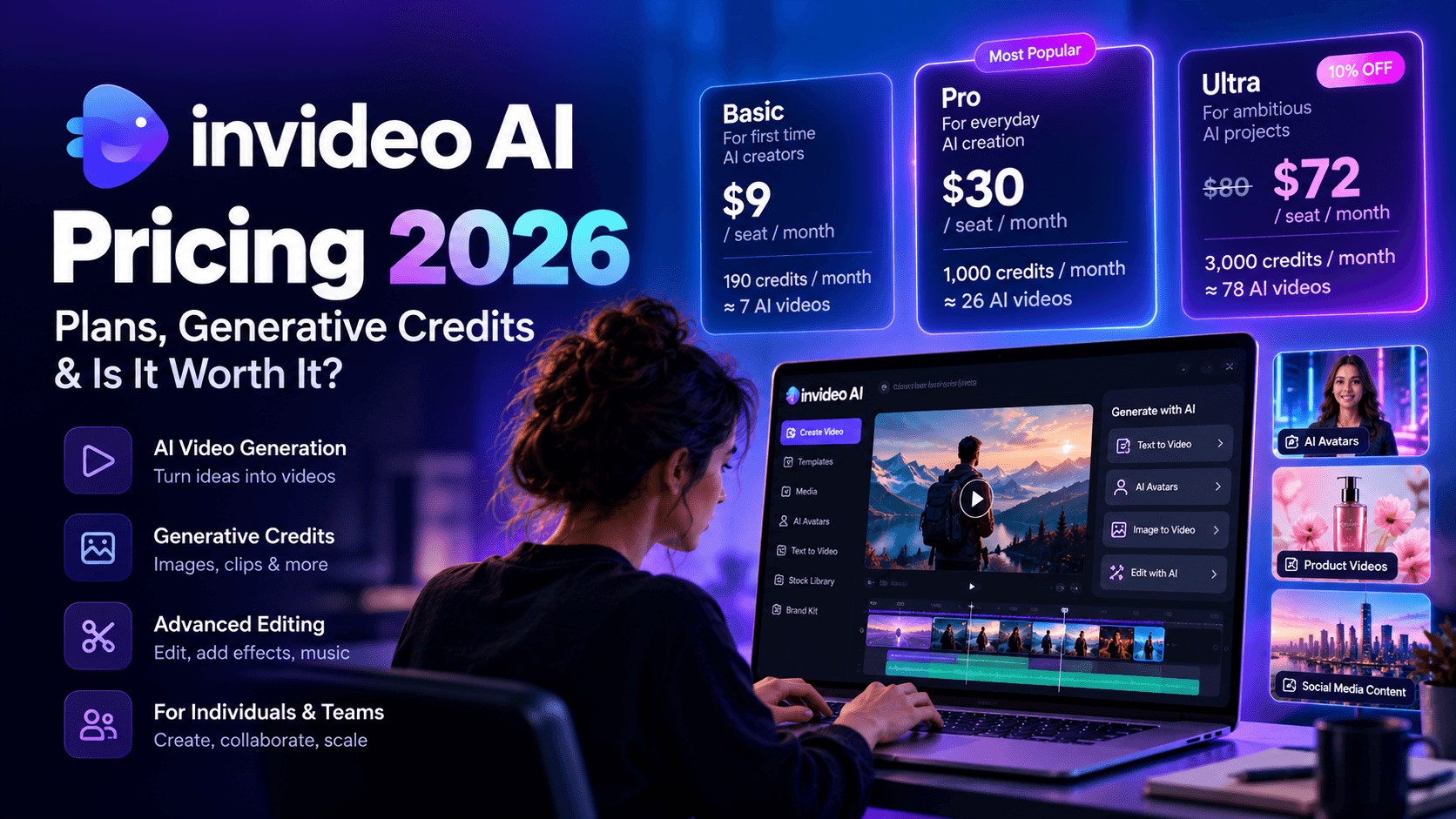
The current InVideo AI subscription lineup uses three main plans: Basic, Pro, and Ultra. Each plan comes with a monthly credit allowance, access to editing features, and different levels of access to AI models. The higher tiers provide more credits, more premium stock footage, additional storage, and greater support for team collaboration.
According to the monthly pricing details provided from the official pricing page, the starting prices are $9 per seat for Basic, $30 per seat for Pro, and $80 per seat for Ultra before the advertised Ultra discount. The Ultra offer shown in your reference reduces the price to $72 per seat for the promotional period, with renewal at $80.
One detail worth clearing up before comparing subscriptions: some older pricing references use the names Plus, Max, and Generative. The current lineup in your supplied pricing information uses Basic, Pro, and Ultra, so the breakdown below follows those names and credit allowances.
InVideo AI Pricing Comparison
1. Basic Plan
- Best for: First time AI creators
- Monthly price: $9 per seat
- Monthly credits: 190
- Approximate generation capacity: 7 Seedance 2 Fast videos
2. Pro Plan
- Best for: Everyday AI creation
- Monthly price: $30 per seat
- Monthly credits: 1,000
- Approximate generation capacity: 26 Seedance 2 videos
3. Ultra Plan
- Best for: Ambitious AI projects
- Standard monthly price: $80 per seat
- Promotional monthly price: $72 per seat
- Discount: 10% off
- Monthly credits: 3,000
- Approximate generation capacity: 78 Seedance 2 videos
These video counts are estimates from the supplied pricing details, not guaranteed production limits for every model or video quality. Credit consumption varies by the generation method and model selected.
Recommended Guides:
- Master Kling AI: A Comprehensive Kling Review
- YouTube Automation Guide: How to Start, Scale and Monetize with AI
- Kling 1.6 Standard vs Kling 1.6 Pro: Complete Comparison, Performance, Quality & Best Use Cases (2026)
- How to Make AI Marketing Videos That Convert in 2026
- Grok Imagine AI: The Complete Guide to Image & Video Generation
- Best AI MCP Agents For Solo Content Creators & Design Studios
1. InVideo AI Basic: $9 Per Month
The Basic plan is aimed at people who are just getting started with AI video creation. If you publish occasional social media videos, experiment with AI generated visuals, or want to turn ideas into short marketing clips, the entry level subscription provides a relatively affordable way to get started.
The 190 monthly credits give you a limited budget for AI generation. According to the pricing page, this is equivalent to approximately 76 Nano Banana Pro image generations or seven Seedance 2 Fast videos under the advertised usage assumptions. Your actual output will depend on how you spend those credits.
Basic also includes the timeline editor, professional editing tools for color, audio, and 3D, access to Agent Two Lite, selected AI models, and 100 GB of storage according to the supplied pricing details.
There are some important limitations. Basic does not include access to Seedance 2.5 or Seedance 2.0, and access to frontier agents is restricted to Lite. It also does not include early access to advanced AI features or the lowest cost per credit offered by the highest tier.
Who should choose Basic?
Basic makes sense for beginners, freelancers testing their first AI video workflow, and creators who need occasional AI assistance rather than a high volume of generated content. It is also a reasonable starting point if most of your work involves editing existing footage and you only need AI generation for a few supporting assets.
The main drawback is the credit ceiling. If you frequently regenerate clips to improve motion, composition, or visual consistency, 190 credits can disappear quickly. Creators producing several polished videos each week should calculate their expected generation costs before committing to this tier.
2. InVideo AI Pro: $30 Per Month
Pro is designed for creators who use AI video tools as part of their regular production workflow. The monthly allowance rises from 190 credits to 1,000, giving you considerably more room to generate images, produce clips, and experiment with different models.
The supplied pricing details estimate that 1,000 credits can support around 400 Nano Banana Pro image generations or approximately 26 Seedance 2 videos. Those figures are useful for planning, although they should not be treated as fixed limits for every type of generation.
Pro also opens access to Seedance 2.5 at 1080p and Seedance 2.0 at up to 4K, alongside the Lite, Pro, and Ultra levels of Agent Two. It includes access to all models and features listed for the plan, 150 premium stock footage assets, and 300 GB of storage.
Another useful benefit is collaboration. Pro supports multiplayer editing for up to 10 seats and includes 10 guest seats with 190 credits each, according to the supplied plan information. That can make it more practical for a small marketing team that needs to share projects and coordinate video production.
Who should choose Pro?
Pro is a sensible middle ground for content marketers, YouTube creators, social media managers, and small businesses that publish videos regularly. It offers a larger generation budget without requiring the higher monthly commitment of Ultra.
Consider a marketer producing product explainers, short promotional videos, and social media ads every month. That person may need several attempts to get a suitable scene, voiceover, or visual sequence. Pro gives them more flexibility to experiment without running through the entire credit allowance after a handful of projects.
The main question is how much of the credit allowance you will consume on each finished video. If your projects require lots of high quality generative footage, the advertised total can overstate how many usable final videos you will produce. If your workflow combines stock footage, editing, and selective AI generation, the subscription may offer better value.
3. InVideo AI Ultra: $80 Per Month

Ultra is aimed at creators and teams with heavier production requirements. Its standard monthly price is $80 per seat, while the supplied promotional pricing shows a discounted rate of $72, with renewal at $80.
The plan includes 3,000 credits per month, which is three times the Pro allowance. The official pricing details supplied for this comparison estimate up to 1,200 Nano Banana Pro generations or approximately 78 Seedance 2 videos under the listed usage assumptions.
Ultra includes access to Seedance 2.5 at 1080p, Seedance 2.0 at up to 4K, all listed Seedance models, and the full set of Agent Two access levels. It also offers 180 premium stock footage assets and 800 GB of storage.
For teams, the plan supports multiplayer editing for up to 20 seats and includes 20 guest seats with 190 credits each, according to the supplied pricing information. Ultra also includes early access to advanced AI features and the lowest cost per credit among these three tiers.
Who should choose Ultra?
Ultra is worth considering for agencies, high volume content teams, and businesses that depend on frequent AI video production. If your team creates multiple ad variations, produces campaign assets for several clients, or needs to test different visual concepts throughout the month, the additional credits can reduce the need to ration every generation.
However, the higher allowance does not automatically make Ultra the best financial choice. A solo creator publishing two videos a month may leave a substantial portion of the allowance unused. A smaller team that produces mostly timeline edited content could also find Pro sufficient.
Ultra becomes easier to justify when the additional credits and advanced model access help your team complete more paid projects, reduce production bottlenecks, or avoid paying for another generation service.
How Do InVideo AI Credits Work?
The credit system is one of the most important parts of InVideo AI pricing. The subscription fee tells you what you pay each month, but the credit allowance determines how much AI generation you can perform within that budget.
InVideo uses credits for AI work, including video generation, image creation, voice, music, and AI agent processing. Different models and operations consume different amounts, so there is no single credit cost that applies to every video. The company also notes that unused credits do not roll over into the following month.
For example, generating a still image can use a small fraction of the credits needed for a premium video clip. Producing a clip at a higher resolution or using a different model may also change the cost. If you repeatedly regenerate scenes to correct visual problems, your available balance will decrease with each chargeable generation.
This is why a credit allowance should be treated as a production budget rather than a guaranteed number of finished videos.
What Can You Generate With Your Monthly Credits?
The examples below use the figures provided in the pricing details. They help illustrate the difference between plans, although your actual output may vary with model selection and settings.
1. Basic Plan
- Monthly credits: 190
- Approximate Nano Banana Pro generations: 76
- Approximate Seedance video generations: 7 Fast videos
2. Pro Plan
- Monthly credits: 1,000
- Approximate Nano Banana Pro generations: 400
- Approximate Seedance video generations: 26 videos
3. Ultra Plan
- Monthly credits: 3,000
- Approximate Nano Banana Pro generations: 1,200
- Approximate Seedance video generations: 78 videos
A creator working primarily with AI images may get substantially more individual generations than someone creating video clips with a more expensive model. Someone who mixes images, generated footage, voiceovers, and music will need to divide the monthly allowance across those activities.
The practical lesson is simple: estimate your monthly workload before choosing a subscription. Count the finished videos you want to publish, the number of scenes each video needs, and how many attempts you typically make before accepting a result. That will give you a much more useful estimate of your likely monthly cost than the headline credit figure alone.
Where InVideo AI Can Become Expensive
The main cost concern is generative credit consumption. If your projects require extensive AI generated footage, repeated attempts, or premium models, your subscription allowance may not stretch as far as the headline generation figures suggest.
There is also the question of creative control. Automated video assembly can work well for explainers and content repurposing, but some projects require specific camera movements, precise product shots, consistent characters, or a carefully directed visual style. Those requirements can involve more editing and regeneration.
Finally, an AI generated video still needs human quality control. You should check factual accuracy, narration, scene relevance, transitions, branding, and licensing before publishing. Automation can speed up production, but it does not guarantee that every exported video is ready for an audience.
Best InVideo AI Alternatives in 2026
InVideo is a useful option for automated video production, but it is not the ideal tool for every creative project. Some creators need realistic AI presenters, others want to convert articles into short videos, and some need original generative scenes rather than stock footage assembled around a script.
The alternatives below serve different needs. Their prices are included as reference points from the supplied research material, not as independently verified current offers. Check each provider's official pricing page before purchasing, especially if you need a particular credit allowance or commercial usage rights.
1. Synthesia: Best for Enterprise AI Avatar Videos

Synthesia is worth considering if your main goal is to create professional videos featuring a virtual presenter. Rather than assembling a sequence of stock footage around a narration, the platform centers on AI avatars delivering a script.
That makes it particularly useful for employee training, onboarding, internal communications, product education, and multilingual business content. A company can prepare a script and use a virtual presenter to deliver the message without arranging a camera, studio, or recording session for every update.
What Makes Synthesia Different?
Its main appeal is the presenter led format. A talking avatar can be a natural fit for an instructional video or a product walkthrough where viewers need a clear explanation delivered directly to them.
For a business producing dozens of training videos, this can make updates easier. When a process changes, the team can revise the script and regenerate the relevant content rather than organizing another filming session.
The trade off is that avatar production serves a different purpose from generative scene creation. If you need cinematic action, original environmental footage, or a fast paced advertisement built around varied visual sequences, a presenter focused workflow may not be enough on its own.
Synthesia Pricing
The reference material supplied for this comparison lists the following prices:
- Free: A limited plan for testing avatar video creation, with watermarked output according to the supplied reference.
- Starter: Listed at $29 per month, aimed at individual creators and smaller projects.
- Creator: Listed at $89 per month, with a larger production allowance and more avatar features.
- Enterprise: Custom pricing for larger organizations with more extensive requirements.
These are reference figures from the supplied research and should be checked against the current Synthesia pricing page.
Who Should Choose Synthesia?
Synthesia is a good fit for enterprise training teams, HR departments, educators, and businesses that need repeatable presenter led videos. It can also work for sales enablement content where a clear spoken explanation is more useful than a montage of visuals.
If your primary need is turning written content into a video with varied footage, InVideo may suit you better. If you need a virtual presenter delivering a consistent message at scale, Synthesia deserves a closer look.
2. HeyGen: Best for Accessible AI Presenter Videos

HeyGen offers another option for creators who want AI presenters, voice generation, and videos that can be produced without a traditional recording setup.
It is particularly relevant to marketers creating personalized sales videos, product explainers, social media content, and multilingual communications. The platform's appeal is its focus on making avatar based video production accessible to individuals and smaller teams as well as larger businesses.
Where HeyGen Fits
Imagine a marketing team that needs a series of short product introductions for different audiences. Recording each version separately would take time, particularly if the team wants to communicate in several languages. An AI avatar workflow can make those variations easier to produce, subject to the available features and plan limits.
The same workflow can be useful for sales teams preparing personalized introductions or educators creating lessons that feature a virtual presenter. The content still needs a good script, and the presenter should suit the intended audience, but the production process can be more flexible than conventional filming.
The main limitation is that AI avatar credits and video generation allowances can restrict output. A plan that appears affordable at first may support fewer premium avatar minutes than expected, so check the credit consumption for the specific feature you intend to use.
HeyGen Pricing
The supplied research lists these reference prices:
- Free: A limited option for testing the platform, with watermarked videos.
- Creator: $29 per month.
- Pro: $99 per month.
- Business: $149 per month, plus $20 per seat according to the supplied reference.
The same reference mentions a premium avatar generation allowance that can limit the number of minutes produced from the included credits. Confirm the current allowances and billing conditions on the official HeyGen pricing page.
Who Should Choose HeyGen?
HeyGen is worth considering if you need realistic digital presenters, personalized videos, or multilingual avatar content. It is less suitable as a direct replacement for every stock footage and script automation feature offered by InVideo.
For a business that communicates through a human presenter, it may be a better fit. For a creator who needs a more general workflow for turning written content into complete videos, InVideo remains a relevant option.
3. Pictory: Best for Turning Articles Into Videos

Pictory is one of the more relevant alternatives for content marketers who want to turn written material into video. Its workflow is centered on converting scripts, articles, and other long form content into videos with visuals, narration, and captions.
If you run a content website, publish educational articles, or manage a company's blog, this type of workflow can help you get more value from existing material. You already have the research and written content. The next task is to turn it into a video that works for a different audience or distribution channel.
How Pictory Compares With InVideo AI
Both platforms can help automate parts of video production, but they appeal to slightly different needs.
Pictory is particularly relevant when you want to summarize written content, extract important points, and produce a video around those ideas. This can work well for short educational videos, blog summaries, presentations, and repurposed content.
InVideo offers a broader combination of AI assisted video creation, editing, stock media, and generative model access. Depending on the project, this can make it a more flexible option for creators who want to assemble complete videos or experiment with different visual generation tools.
Neither platform eliminates the need for editorial judgment. A long article rarely translates perfectly into a video without some rewriting. You still need a strong opening, a logical narrative, and visuals that support the message rather than simply filling screen time.
Pictory Pricing
The supplied reference lists Standard pricing starting at $19 per month. Higher tiers offer additional capacity and features, while trial availability should be confirmed on the provider's website.
You can check the current options on the official Pictory website.
Who Should Choose Pictory?
Pictory makes sense for bloggers, publishers, educators, and content marketing teams that regularly repurpose written material. It is worth comparing with InVideo if your main objective is to turn existing articles into concise videos rather than create highly customized generative scenes.
4. Pixara: Best for Creators Who Want Multiple AI Video Models in One Workspace

A multi model AI creation workflow for video, images, and marketing assets.
Pixara.ai takes a different route to AI video production. Rather than centering the experience on turning a script into a complete stock footage video, it brings multiple generative models and creative tools into a single workspace.
This is particularly useful for marketers, ecommerce brands, creative agencies, and independent creators who want more control over the visuals they produce. If you need original product scenes, campaign visuals, creative advertisements, or stylized short videos, having several models available in one environment can make experimentation easier.
How Pixara Fits Into an InVideo AI Pricing Comparison
The key consideration is the type of output you need. InVideo is a relevant option for automated video assembly and script driven production. Pixara is more relevant when your workflow requires access to different generative models for creating images, video clips, voiceovers, and other marketing assets.
For example, an ecommerce marketer could develop a product concept, generate supporting imagery, produce short video scenes, and prepare an advertisement within the same creative environment. A content creator could experiment with different visual styles before deciding which direction suits a social media campaign.
This flexibility can be valuable if you regularly work across several creative formats. It can also reduce the need to maintain separate subscriptions solely to access different AI models.
Features Worth Considering
Pixara offers several features that make it relevant to creators comparing AI video platforms.
* Ara AI copilot: Ara helps with prompt development, model selection, and creative direction. This can be useful for beginners who know what they want to create but are unsure how to structure prompts for different models.
* AI image generation: Creators can generate visual assets for product marketing, advertising concepts, social media posts, and other creative projects.
* AI video creation: Access to models such as Sora, Veo, Kling, and Seedance, depending on current availability, gives creators options for generating different types of video content.
* AI voiceovers: Voice generation can support narrated videos, promotional content, and other projects that require spoken audio.
* Audio and product advertisement templates: These features can help marketers develop advertising assets without constructing every element from scratch.
* Built in video editor: An editing environment helps bring generated assets together into a more complete creative output.
* Multi model access: Having different generation models available in one workspace makes it easier to compare results and select a suitable tool for a particular project.
The important consideration is that access to a model does not guarantee unlimited generations. Each model can have its own usage requirements, and the available features depend on the current subscription and platform offering.
Pixara Pricing and Value
Pixara's supplied subscription information lists four tiers:
1. Starter Plan
* Monthly price: $10
2. Hobby Plan
* Monthly price: $25
3. Pro Plan
* Monthly price: $60
4. Ultimate Plan
* Monthly price: $250
Check the current Pixara.ai website for the latest plan inclusions, model availability, and usage limits before subscribing.
The value proposition is different from simply comparing the price of one AI video generator. If your work involves image generation, video creation, voiceovers, and creative experimentation, a multi model workspace can consolidate several parts of your workflow. Your savings will depend on which tools you would otherwise pay for separately and how frequently you use them.
Who Should Choose Pixara?
Pixara is worth considering for ecommerce teams creating product advertisements, agencies producing campaign assets, social media marketers, and creators who want to experiment with multiple AI models.
For beginners, the copilot can make the creative process more approachable. For experienced marketers, access to different models can offer more flexibility when a particular visual style or generation technique works better for a campaign.
If you mainly want to convert written articles into narrated videos with automatically assembled footage, InVideo may be the more direct fit. If your priority is creating original images and video scenes across different AI models, Pixara deserves a place on your shortlist.
5. Canva: Best for Design Led Marketing Videos

Canva is a practical option for people who want to produce marketing videos within a broader design environment. Its video editing tools sit alongside templates, presentations, social graphics, image editing, and AI assisted creative features.
That combination can be useful for marketing teams that already create most of their visual content in Canva. Rather than managing a separate application for every asset, they can prepare social media graphics, animated posts, promotional videos, and branded presentations within a familiar workflow.
What Canva Does Well
Canva is particularly useful when brand consistency matters. Teams can work with their colors, fonts, logos, templates, and existing design assets to create content that follows a consistent visual identity.
Its AI features, including Magic Media and other assisted design tools, can help users develop creative assets and adapt content to different formats. The platform is also accessible to people who do not have professional video editing experience.
For example, a small business could create an animated product announcement, resize it for different social platforms, and combine it with branded graphics. This can be more convenient than moving assets between multiple applications.
The limitation is that Canva is primarily a design and content creation platform. Its template driven workflow serves a different purpose from a dedicated AI video generator built around automated script conversion or extensive generative model access.
Canva Pricing
The supplied research lists the following reference prices:
- Free: Access to a selection of design tools, templates, and limited AI features.
- Canva Pro: Listed at $14.99 per month in the supplied reference.
- Canva Teams: The supplied reference lists $14.99 per user per month, although team pricing and packaging can change.
Check the official Canva website for current plan details and regional pricing.
Who Should Choose Canva?
Canva is a good option for social media managers, small businesses, and marketing teams that prioritize branded graphics, animated content, and straightforward video editing.
If your work requires extensive text to video automation, generative video models, or a large volume of AI generated footage, compare its capabilities with InVideo before committing. If your videos are mainly composed of graphics, text, animations, and existing assets, Canva may cover most of your needs.
6. Runway: Best for Generative AI Video Creation

Runway is worth considering when you want to create original video scenes with AI rather than primarily assemble footage from a stock library.
Its generative workflow is suited to creative projects that require stylized visuals, cinematic sequences, experimental concepts, and more control over how a scene looks. Depending on the available model and tools, creators can generate video from prompts and images and refine their results through additional creative workflows.
How Runway Compares With InVideo
The main consideration is the production style.
InVideo is useful for turning scripts and ideas into assembled videos, particularly for content marketing, explainers, and promotional content. Runway is more relevant when the visual material itself needs to be generated from scratch.
Consider a creative agency producing a cinematic advertisement for a new product. The agency may want a surreal environment, dramatic lighting, or a scene that would be expensive to film. A generative video platform can help develop those visuals without organizing a conventional shoot.
However, generated footage may require multiple attempts to achieve the intended result. Motion consistency, subject details, scene continuity, and prompt interpretation can affect the final output. Credit consumption also matters, especially for projects that require numerous revisions.
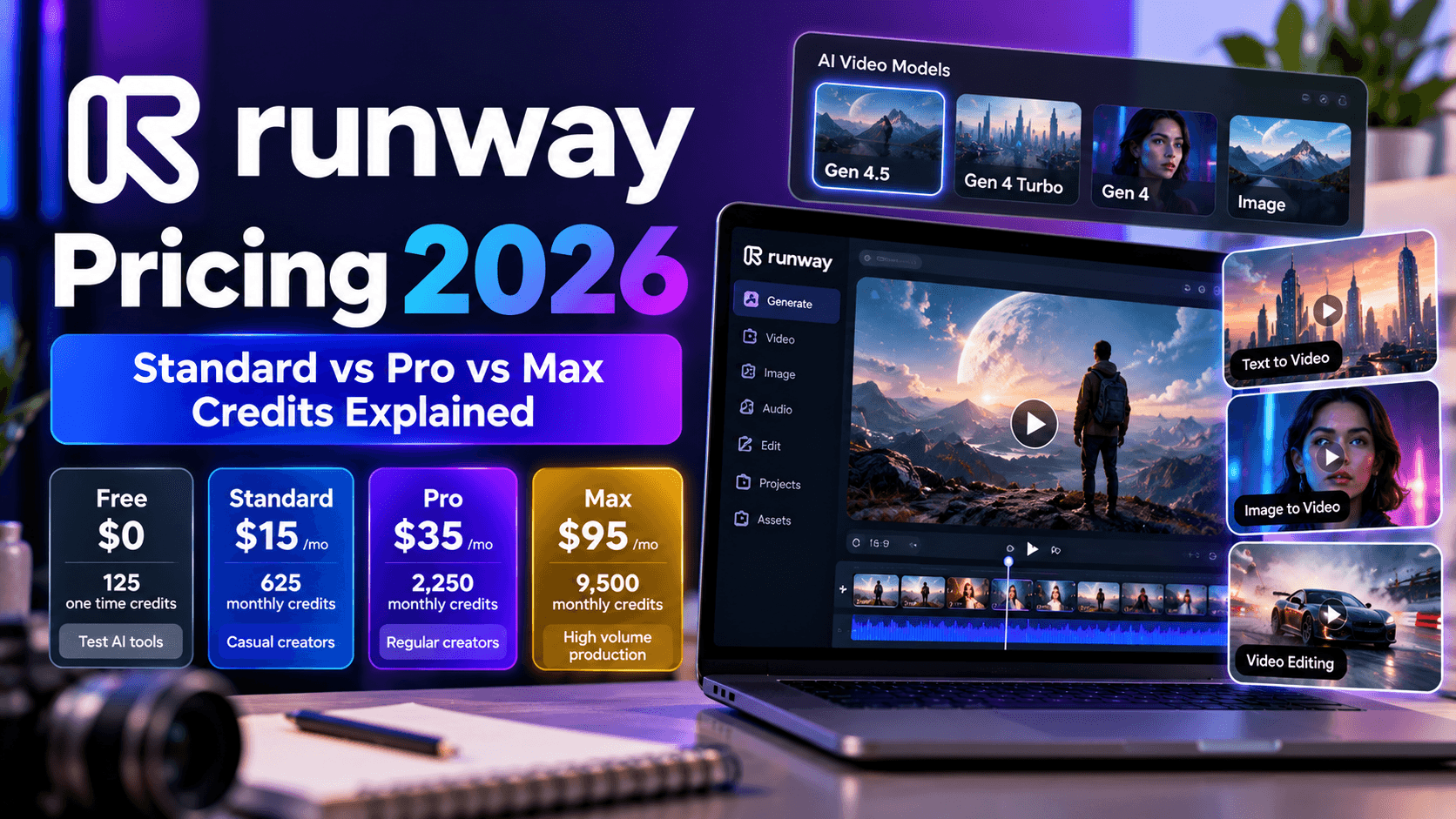
Runway Pricing
The supplied reference lists these indicative prices:
- Free: A limited allocation of one time credits for testing.
- Standard: $15 per month when billed annually.
- Pro: $35 per month in the supplied reference.
- Unlimited: $95 per month in the supplied reference.
- Enterprise: Custom pricing for larger organizations.
These figures should be treated as reference prices rather than verified current offers. Review the official Runway website for the latest subscription options, model access, and credit allowances.
Who Should Choose Runway?
Runway is a strong candidate for filmmakers, creative agencies, advertising teams, and creators who want to experiment with original generative footage.
If you need a straightforward workflow for turning a written script into a narrated video, InVideo may be more convenient. If you want to develop original scenes with a more creative, generative workflow, Runway is worth evaluating.