


Key Takeaways
- No plan we checked gives truly unlimited images on every model at full speed. Unlimited always comes with a catch: a slow relax queue, a short list of models, a resolution cap, or a fair-use policy.
- Midjourney Standard at $30 a month gives unlimited Relax mode images. Leonardo Premium at $30 gives unlimited relaxed images on 15 of its own and FLUX models. Ideogram Plus at $20 gives unlimited slow credits.
- Pixara Pro at $36 a month gives unlimited daily generations on 6 image models, including Nano Banana, GPT Image 2 and Midjourney, plus 36,000 credits for video. Hobby at $18 covers 2 image models.
- At 3,000 images a month, unlimited plans work out to about $3 to $20 per 1,000 images. Paying per image on credits costs $60 to $100 per 1,000 on the examples we priced.
- Skip unlimited plans if you make fewer than about 300 images a month, need one specific frontier model at 4K, or need fast turnaround on every single image.
In this article
- 01What does "unlimited" really mean on an AI image generator?
- 02Which unlimited AI image generator should you pick?
- 03What about ChatGPT, Adobe Firefly and OpenArt?
- 04How much do 1,000 images cost on each plan?
- 05Who should skip unlimited plans?
- 06How do you test an unlimited plan before you commit?
- 07How did we check these plans?
- 08Which plan is the final pick?
The best unlimited AI image generator for most buyers in late 2026 is a $20 to $36 a month plan, and every one of them has a catch: unlimited means a slow queue, a short model list or a fair-use policy, never every model at full speed. We checked 7 of them so you know which catch you are buying.
Updated 28 November 2026. We read the pricing pages of Pixara, Midjourney's plan comparison, Leonardo, Krea, Ideogram, Freepik (now branded Magnific), Higgsfield, OpenArt and ChatGPT on that date. Black Friday sales are live on several of them, so prices are as of 28 November 2026 and some will change in days.
When we asked ChatGPT, Gemini, Google AI Mode and Copilot which image tools are unlimited, the names that kept coming up were Leonardo, Krea and Freepik. They are on this list. So is Midjourney, because Relax mode is the original unlimited plan, and so is Pixara, because it puts 6 big image models on one unlimited plan.
Quick picks, based on what each plan's own page says:
- Best for most models on one unlimited plan: Pixara Pro, $36 a month, 6 image models unlimited daily plus 36,000 credits for video.
- Best for Midjourney's own look and community: Midjourney Standard, $30 a month, unlimited Relax images.
- Cheapest way to unlimited relaxed images: Krea Basic, $9 a month or $5 a month yearly.
- Best for text in images and design work: Ideogram Plus, $20 a month or $15 yearly, unlimited slow credits.
- Best for Leonardo's own fine-tuned models: Leonardo Premium, $30 a month, unlimited relaxed images on 15 models.
- Best if you also want stock and a design suite: Freepik (Magnific) Plus, $33.75 a month billed annually.
- Best for unlimited Nano Banana inside a video studio: Higgsfield Plus, $59 a month after the first month.

What does "unlimited" really mean on an AI image generator?
It means you can keep generating without spending credits, but only on named models and usually at a slower pace. Every plan we checked limits at least one of five things: speed, model list, resolution, concurrent jobs or where you can use it. None gives every model at full speed with no ceiling.
Here are the five catches, and where we saw each one on 28 November 2026:
- Relax or slow queues. Midjourney's unlimited images run in Relax mode, behind Fast jobs. Ideogram moves you to a slow queue once priority credits run out. Krea and Freepik (Magnific) also sell relaxed generations.
- Short model lists. Leonardo's unlimited covers 15 named models, mostly its own plus FLUX Dev and Schnell. Higgsfield's covers about 5 models permanently and a few more for 7 days.
- Resolution and quality caps. Higgsfield limits Flux.2 Pro unlimited to 1K on Starter and 2K on Plus, and GPT Image 2.6 is free only at low or medium quality.
- Concurrency and queue limits. Leonardo caps relaxed image queues at 5. Higgsfield's 7-day unlimited models allow up to 2 generations at a time.
- Fair use and platform limits. Leonardo says relaxed jobs "may be slowed" based on demand. Higgsfield's unlimited works only on its website, not in its MCP, CLI or Canvas. Pixara's pricing page calls its offer unlimited daily generations, and like any unlimited plan it sits under a fair-use expectation.
None of this makes unlimited plans bad. It means the useful question is not "is it unlimited" but "which models, how fast, and is that enough for my month".
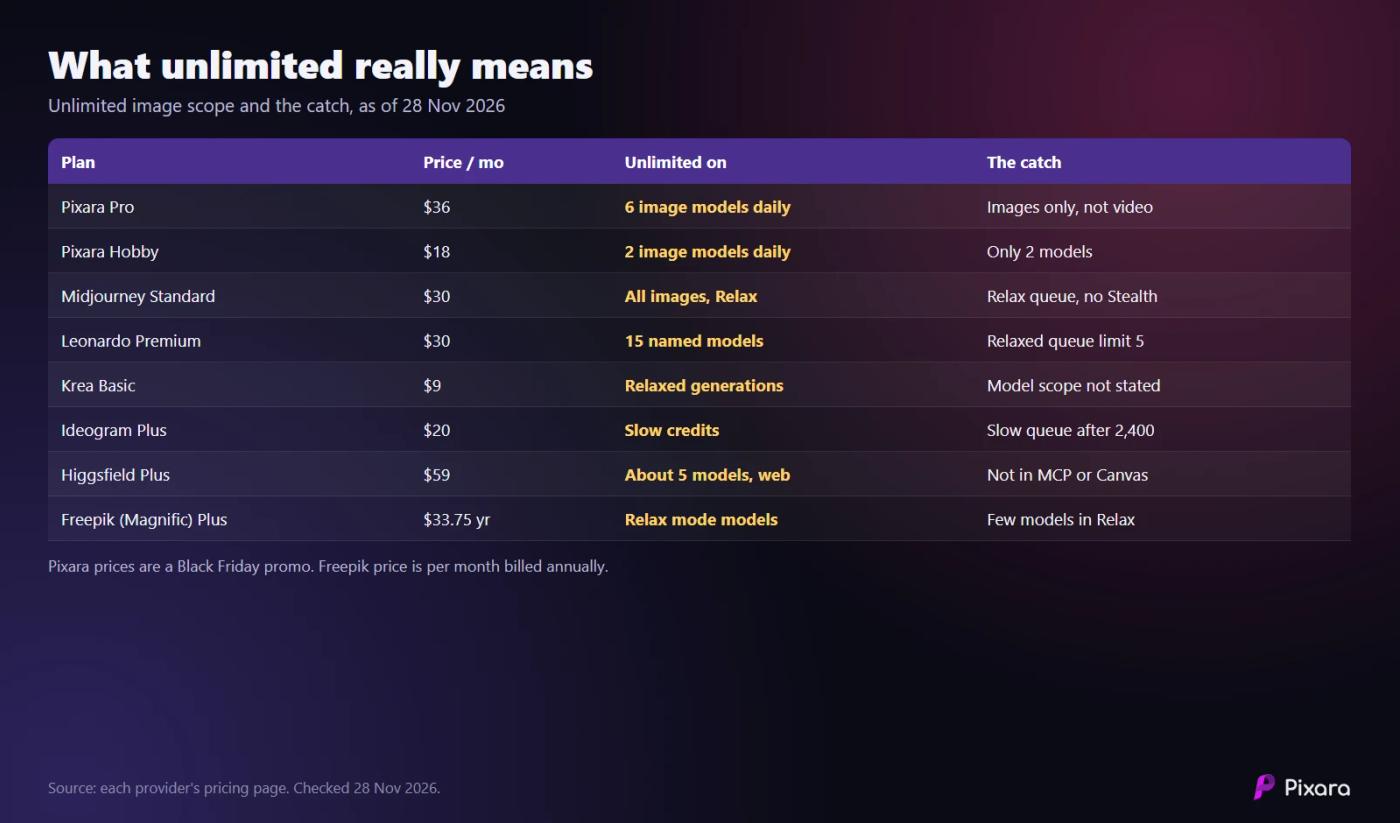
If your catch list says you need several big models without a credit meter, the quickest check is an account where all 6 sit on one plan.
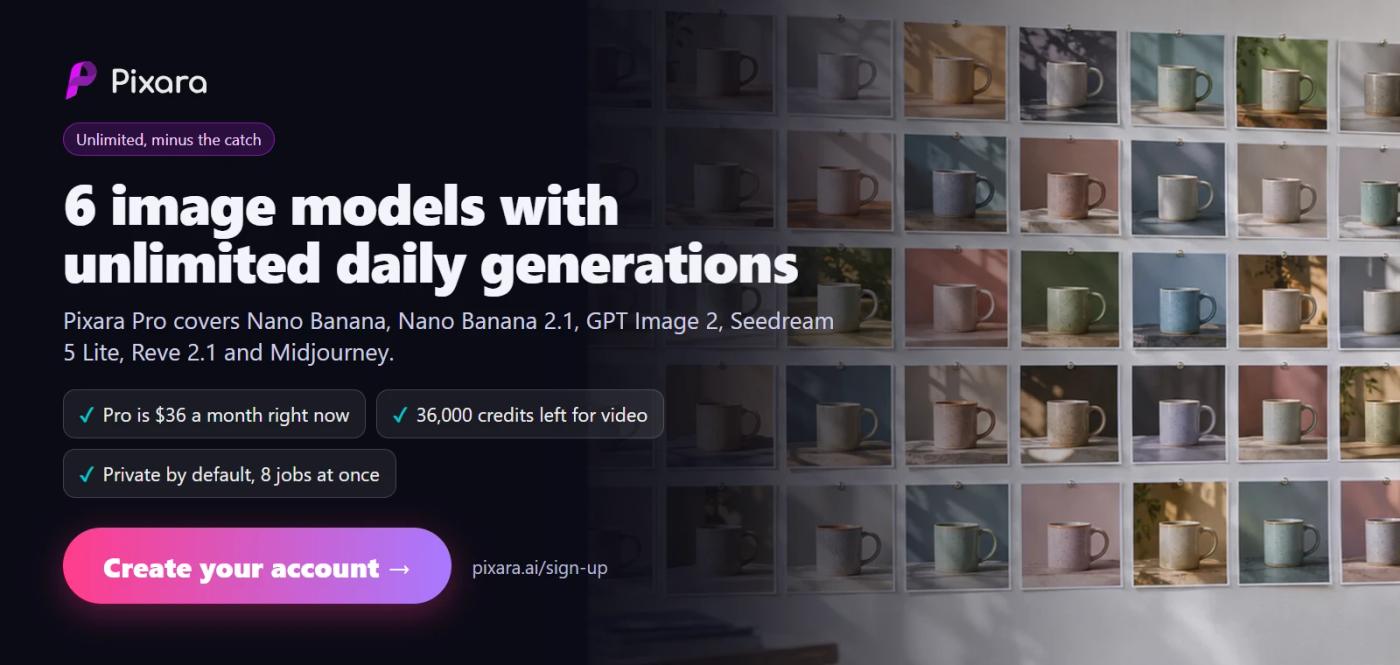
Which unlimited AI image generator should you pick?
Pick by the models you actually use. Pixara Pro if you want Nano Banana, GPT Image 2 and Midjourney on one plan. Midjourney Standard if you only want Midjourney. Krea Basic if price matters most. Ideogram for text in images. Leonardo for its own fine-tuned styles.
1. Pixara: most image models on one unlimited plan
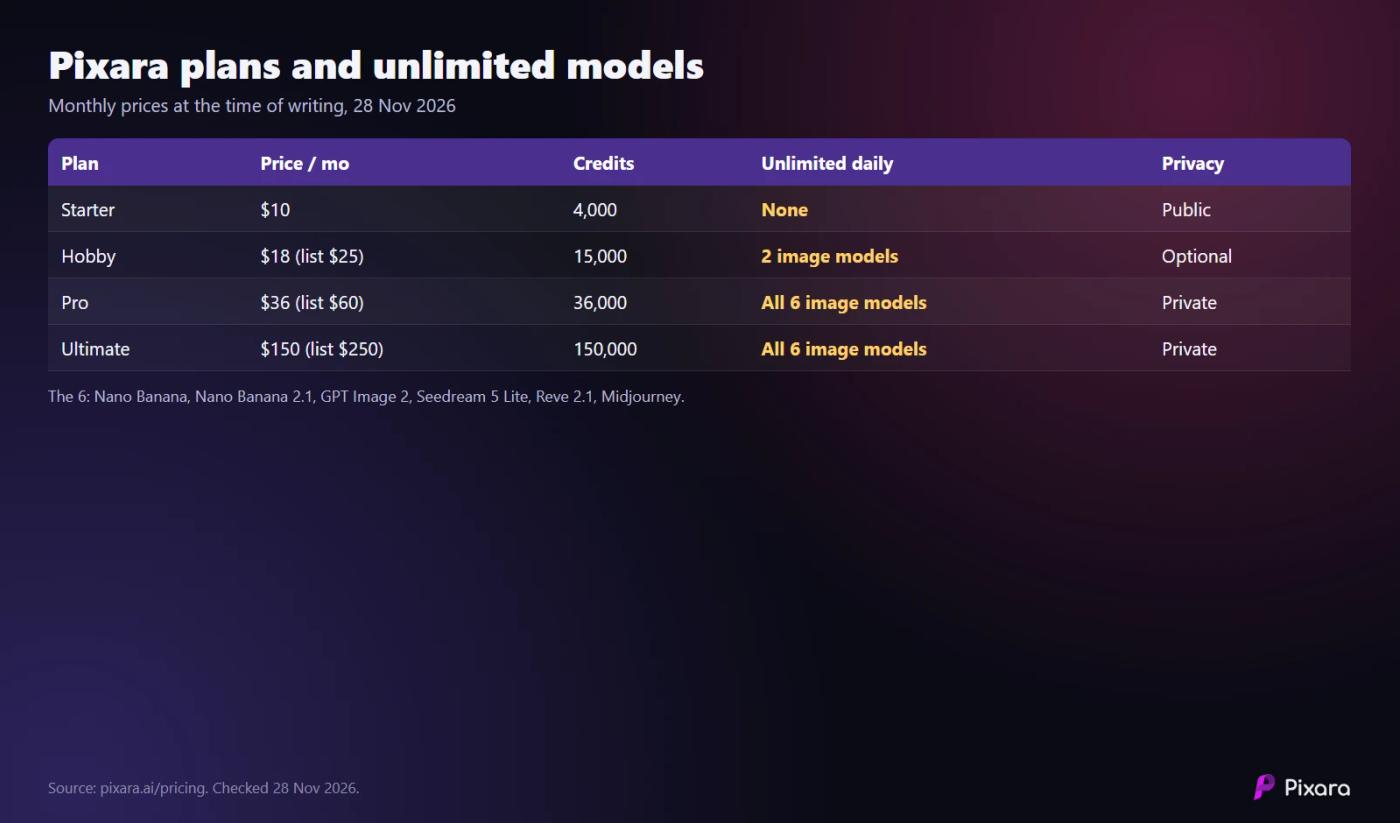
Pixara is a multi-model platform with 50+ models on every plan. The unlimited part is daily image generations on named models. Hobby, at $18 a month (list $25) at the time of writing, gives unlimited daily access to 2 image models. Pro at $36 (list $60) and Ultimate at $150 (list $250) give all 6: Nano Banana, Nano Banana 2.1, GPT Image 2, Seedream 5 Lite, Reve 2.1 and Midjourney.
What makes Pro good value is the second wallet. Images on those 6 models cost no credits, so the full 36,000 credits can go to video: about 75 Seedance 2.5 clips or 257 Seedance Mini clips a month by the pricing page's own math. Pro is private by default with 8 concurrent jobs.
The trade-offs are real. Starter at $10 has no unlimited models and its generations are public. Unlimited covers images only, and video burns credits fast: Veo 3.1 with audio is 3,200 credits for 8 seconds. Newer models such as Nano Banana Pro and GPT Image 2.6 are in the picker but are not on the unlimited list, so they cost credits.
Why 6 models matter on one plan: they are good at different jobs. Nano Banana and Nano Banana 2.1 are strong at editing and keeping a product or face consistent across shots. GPT Image 2 follows long, detailed prompts. Midjourney gives the painterly, styled look people pay Midjourney for. Seedream 5 Lite and Reve 2.1 give you two more looks to compare against. On a single-model unlimited plan, you get one of those. Here you can run the same prompt through all 6 and keep the best, without a credit meter running.
Our take: this is the one we'd pick if you use more than one image model and also make video. Read our Nano Banana model page, the Midjourney model page and the Reve model page to see what each looks like.
2. Midjourney: the original unlimited plan, through Relax mode
Midjourney's plan page is clear. Basic at $10 a month gives 3.3 Fast GPU hours (200 minutes) and no Relax mode. Standard at $30 ($24 a month yearly) adds unlimited Relax images and 15 Fast hours. Pro at $60 and Mega at $120 add unlimited Relax SD video and Stealth Mode, which keeps your work private.
The catch is pace and privacy. Relax jobs wait behind Fast jobs, and Standard allows 3 concurrent prompts. Stealth Mode is only on Pro and Mega, so Standard images are visible in the gallery. Extra Fast time is $4 an hour.
Midjourney is the better pick if you want its website, editor, personalization and community in one place. If you want Midjourney next to other models, Pro on Pixara includes Midjourney in its unlimited list. Our Midjourney pricing breakdown and is Midjourney worth it cover the plan maths in detail.

3. Leonardo: unlimited relaxed images on its own models
Leonardo's pricing page lists Premium at $30 a month with 25,000 Fast Tokens and unlimited relaxed image generation on 15 models: Lucid Origin, Lucid Realism, Phoenix 1.0 and 0.9, FLUX Dev, FLUX Schnell and its style presets such as Cinematic Kino and Stock Photography. Ultimate at $60 adds unlimited relaxed video on models such as Wan 2.6 and Hailuo 2.3. Essential at $12 has no unlimited.
The catch is the model list. Nano Banana and GPT Image are not on it, so the big third-party models still use tokens. Leonardo caps the relaxed image queue at 5 and says unlimited jobs may be slowed when demand is high. One plus: unused tokens roll into a bank, up to 75,000 on Premium.
Pick Leonardo if you like Lucid and Phoenix and want a token bank. Our Leonardo AI pricing guide has the token maths.
4. Krea: the cheapest door to unlimited relaxed generations
Krea's page lists Basic at $9 a month or $5 a month yearly with 5,000 compute units, about 200 Nano Banana 2.1 generations by Krea's own estimate. Pro is $21 a month yearly with 20,000 units. Every plan lists unlimited relaxed generations, and Pro and Max add unlimited concurrency.
The catch: Krea's page does not say which models relaxed generations cover, and Basic is limited to selected models and features with limited concurrency. During Black Friday, Pro and Max also show 7 days of unlimited Nano Banana Pro, 2.1 and 2, which is a promo, not the plan.
Krea is the right pick if price is the main filter and you can live with a slow lane. Our Krea AI pricing explainer breaks down compute units.
5. Ideogram: unlimited slow credits, best for text in images
Ideogram Plus is $20 a month or $15 yearly with 2,400 priority credits and unlimited slow credits. Pro is $60 or $42 yearly with 7,500 priority credits and batch generation. When priority credits run out, you keep generating in the slow queue, except for features that need priority credits.
On Ideogram 4.6 at 2K, a medium image costs 6 credits, so Plus gives about 400 priority images before you drop to slow. Ideogram is still the one we'd pick for posters, logos with words and anything where spelling matters. If you are shopping around, our Ideogram alternatives list compares it with others.
6. Freepik (Magnific): relaxed mode plus a stock library
Freepik now brands its pricing page as Magnific. Plus is $33.75 a month billed annually (list $45) and the page describes it as the plan for people who want Relax mode generations. Relax mode is marked on Flux.2 Pro, Flux.2 Max, Recraft V4.1, Grok and Kling 2.5 video. Premium, at $7.25 a month on the Black Friday annual deal, gives 240,000 credits a year without Relax mode.
The catch: Relax covers a handful of models, and Nano Banana and Seedream use credits. The upside is a stock library of 250M+ assets, editing tools and upscalers. Pick it if you need stock and AI together. See our Freepik alternatives for other options.
7. Higgsfield: unlimited Nano Banana, website only
Higgsfield's pricing file, updated 27 November 2026, lists Starter at $19 a month with unlimited Seedream 5.0 Lite and Flux.2 Pro at 1K. Plus at $59 a month after a $40 first month adds unlimited Nano Banana, Kling O1 Image, Seedream 4.5 and Flux.2 Pro at 2K, plus 7-day unlimited windows on Nano Banana Pro, Seedream 5.0 Pro and GPT Image 2.6.
The catch is in the small print: unlimited works only on higgsfield.ai, not in its MCP, CLI or Canvas, and the 7-day models allow 2 generations at a time. Plus carries only 1,200 credits for video. Our Higgsfield AI pricing guide has the full plan list.
If you are still torn between these 7, run the same prompt through Nano Banana, GPT Image 2 and Midjourney in one place and compare the results yourself.
What about ChatGPT, Adobe Firefly and OpenArt?
ChatGPT is unlimited only on Pro, listed from $100 a month. Adobe says paid Firefly plans include unlimited standard image generation, with credits for premium features. OpenArt has no unlimited plan; it sells credits. None made our 7 because the price, the model scope or the credit model does not fit an unlimited buyer.
- ChatGPT. OpenAI's pricing page lists limited image creation on Free, more on Go and Plus, and "unlimited and faster image creation" on Pro. OpenAI attaches abuse guardrails to its unlimited claims. At $100 a month you are paying for reasoning and agents, not just images.
- Adobe Firefly. Adobe's plan pages blocked our fetch on 28 November, so we quote no prices. Adobe's own plan copy says paid plans include unlimited standard image and vector generation, and generative credits pay for premium features such as video. Our Adobe Firefly alternatives covers the rest.
- OpenArt. Starter is $11 a month billed annually (list $14) for 4,000 credits, which OpenArt says is up to about 4,000 images on its cheapest models. That is cheap, but it is a budget, not unlimited. See our OpenArt pricing guide.
How much do 1,000 images cost on each plan?
On an unlimited plan, the cost per 1,000 images falls the more you make. At 3,000 images a month, the plans here cost about $3 to $20 per 1,000. Paying per image with credits, our two examples came to about $60 and $97.50 per 1,000. Volume decides which wins.
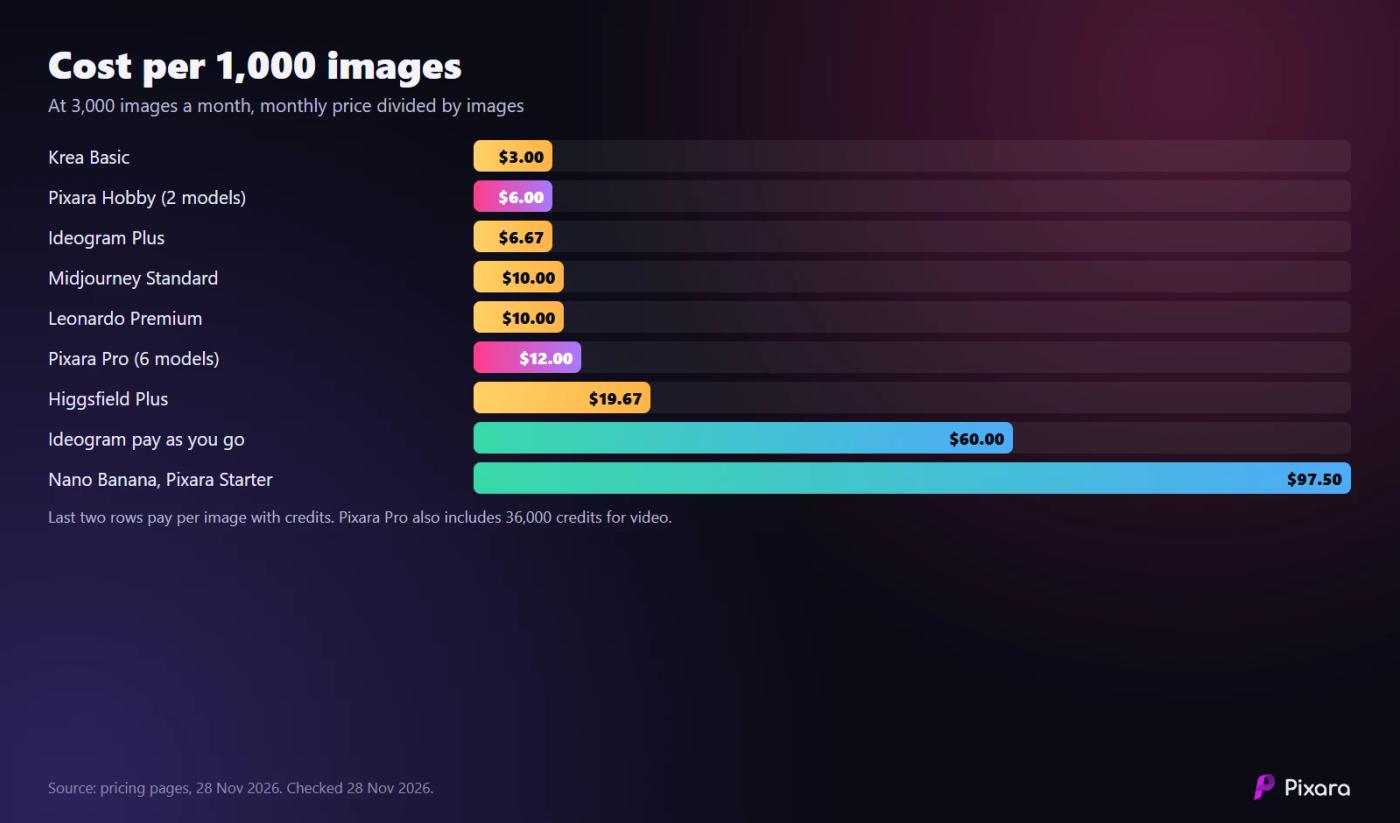
The maths is the monthly price divided by images made. At 3,000 images a month:
- Krea Basic ($9): $3.00 per 1,000.
- Pixara Hobby ($18): $6.00 per 1,000, on its 2 unlimited models.
- Ideogram Plus ($20): $6.67 per 1,000, mostly in the slow queue.
- Midjourney Standard ($30): $10.00 per 1,000 in Relax mode.
- Leonardo Premium ($30): $10.00 per 1,000 on its 15 relaxed models.
- Freepik (Magnific) Plus ($33.75 yearly): $11.25 per 1,000 on Relax models.
- Pixara Pro ($36): $12.00 per 1,000, and you still have 36,000 credits for video.
- Higgsfield Plus ($59): $19.67 per 1,000.
Now the pay-per-image side. Ideogram's pay-as-you-go is 1 cent a credit, so a 6-credit Ideogram 4.6 image is $0.06, or $60 per 1,000. Nano Banana on Pixara is 39 credits; on Starter at $0.0025 a credit that is about $0.0975 an image, or $97.50 per 1,000.
Three worked budgets
- Hobbyist, 200 images a month. Unlimited is overkill. Krea Basic or OpenArt Starter credits cover it for about $9 to $14.
- Social media manager, 1,500 images a month across Nano Banana and GPT Image 2. Pixara Pro at $36 is $24 per 1,000, with every image on one bill and credits left for 10 to 20 short videos.
- Agency, 5,000 Midjourney-style images a month plus client video. Pixara Pro or Ultimate if you also need private video; Midjourney Pro at $60 if you only need Midjourney and want Stealth Mode in its own app.
Who should skip unlimited plans?
Skip unlimited if you make fewer than about 300 images a month, need one newer model that is not on any unlimited list, or need every image back in seconds. In those cases a credit plan or a single fast plan is cheaper and less frustrating than a relax queue.
- Low-volume users. Below roughly 300 images a month, a $9 to $14 credit plan usually costs less than any unlimited tier.
- People who need the newest model. Nano Banana Pro, GPT Image 2.6 and 4K output sit outside most permanent unlimited lists, including Pixara's. You will pay credits anyway.
- Deadline work. Relax and slow queues are fine overnight, not 20 minutes before a client call. Budget for fast hours or priority credits.
- Video-first creators. Unlimited covers images. If 80% of your month is video, pick the plan with the best credit value, not the longest unlimited list. Our guide to Nano Banana pricing shows how credits stack up per image.
- Commercial work without reading terms. Rights differ by provider and plan. For Pixara, check the Terms or ask support before client or paid-ad use.
How do you test an unlimited plan before you commit?
Run one heavy week on a monthly plan before you buy a year. Generate your real workload on your top 2 or 3 models, time the relax queue at your busiest hour, and count how many images you keep. If the slow lane breaks your week, the plan is not unlimited for you.
A simple test plan we use:
- Day 1: list your models. Write down the 2 or 3 models you use most. Check each one is on the plan's unlimited list, not just in the picker.
- Days 2 to 4: run real volume. Make the images you would make in a normal week, not test prompts. Note how long relax or slow jobs take at peak hours.
- Day 5: count keepers. If you keep 1 image in 5, a 1,000-image month gives you 200 usable images. Price the plan per keeper, not per generation.
- Days 6 and 7: test the edges. Try the resolution you need, the aspect ratios you post in, and the number of jobs you run at once.
On Pixara, the $1 Starter trial gives 3 days with every model, so you can see how each model handles your prompts, though Starter has no unlimited models. Upgrade to Hobby or Pro for a month to test the unlimited part. Midjourney, Krea, Ideogram and Leonardo all sell monthly plans, so the same test works there. Buy the yearly price only after the week passes.
How did we check these plans?
We read each provider's own pricing page or plan documentation on 28 November 2026 and quoted only what those pages said. Where a page did not state a number, such as which models Krea's relaxed mode covers, we said so instead of guessing. We did not run speed tests or rate output quality.
Cost per 1,000 images is our arithmetic: monthly price divided by images made, using monthly billing except Freepik, whose Plus price we could only see on annual billing. Pixara figures come from its pricing page on the same day. Adobe Firefly's pages blocked our fetch, so we left out its numbers.
For prompting help once you pick a plan, see how to make AI art, our list of the best AI photo generators and our Nano Banana 2 image generator guide.
Which plan is the final pick?
If you use several image models and make some video, Pixara Pro at $36 a month is the plan we'd pick. If you only want Midjourney, buy Midjourney Standard. If budget is everything, Krea Basic. For text in images, Ideogram Plus. Match the plan to the models you use, not the word unlimited.
The short version: an unlimited AI image generator is only as good as its model list and its queue, so pick the plan whose unlimited list matches your top 2 or 3 models, then run a heavy week before you commit to a year.
Pros
- Six unlimited models on one plan: Pixara Pro covers Nano Banana, Nano Banana 2.1, GPT Image 2, Seedream 5 Lite, Reve 2.1 and Midjourney with unlimited daily generations.
- Credits stay free for video: Because images on those 6 models cost no credits, Pro's 36,000 monthly credits can go to Kling, Seedance or Veo clips.
- Cheap entry to unlimited: Hobby at $18 a month already includes unlimited daily access to 2 image models and optional private generations.
- Every model on every plan: The 50+ models, Workflows, the Ara agent and MCP come with every Pixara plan, so you can test a paid model without switching tools.
Cons
- Starter has no unlimited models: The $10 plan has 4,000 credits, public generations and no unlimited daily access.
- Unlimited is images only: Video still burns credits, and Veo 3.1 with audio costs 3,200 credits for an 8 second clip.
- Newest models cost credits: Nano Banana Pro and GPT Image 2.6 are in the picker but not on the unlimited list, so they draw on your credits.
- Usage terms need a check: Pixara's Terms say non-commercial use unless agreed, so check the Terms or ask support before client or paid-ad work.
Frequently asked questions
Is there a truly unlimited AI image generator?
Not in the sense most people mean. Every plan we checked on 28 November 2026 limits something: speed (relax or slow queues), which models count, resolution, concurrent jobs, or where you can use it. The honest version is unlimited generations on a named list of models, at a pace the provider controls. Read the model list before you pay.
What is Midjourney Relax mode?
Relax mode is Midjourney's slower queue that does not use your Fast GPU hours. On Midjourney's plan page, Standard ($30 a month), Pro ($60) and Mega ($120) include unlimited Relax image generations, and Pro and Mega add unlimited Relax SD video. The $10 Basic plan has no Relax mode, only 3.3 Fast hours a month.
Which Pixara plan has unlimited image generation?
Hobby ($18 a month at the time of writing, 28 November 2026) gives unlimited daily generations on 2 image models. Pro ($36) and Ultimate ($150) give unlimited daily generations on all 6: Nano Banana, Nano Banana 2.1, GPT Image 2, Seedream 5 Lite, Reve 2.1 and Midjourney. Starter at $10 has no unlimited models.
Does ChatGPT have unlimited image generation?
Only at the top. On OpenAI's pricing page, the Free plan has limited image creation, Go and Plus give more, and Pro, listed from $100 a month, says unlimited and faster image creation. OpenAI attaches abuse guardrails to its unlimited claims, so heavy automated use can still be limited. For most image makers, $100 a month is a lot.
Is unlimited cheaper than paying per image?
Only if you make enough images. A $30 unlimited plan costs $30 per 1,000 images at 1,000 a month and $10 per 1,000 at 3,000. Paying per image, we priced Ideogram's pay-as-you-go at about $60 per 1,000 and Nano Banana on Pixara Starter credits at about $97.50. Below roughly 300 images a month, credits usually win.
Can I use unlimited AI images commercially?
It depends on the provider and plan, so read the terms. Midjourney lists General Commercial Terms on all plans and requires Pro or Mega for companies above $1 million in yearly revenue. Freepik and Krea list a commercial license on paid plans. For Pixara, check the Terms or ask support before client or paid-ad use.
Why are my unlimited generations slow?
Because unlimited queues are the low-priority lane. Leonardo says relaxed generations may be slowed based on demand. Ideogram moves you to the slow queue once priority credits run out. Midjourney Relax sits behind Fast jobs. If speed matters, budget for fast hours, priority credits or a plan with more concurrent jobs, and generate in batches overnight.
Every model in this article, one credit balance
Every Pixara plan includes every model. See the credit cost before each generation and switch models without switching tools.
One click tells Google you prefer Pixara's coverage of AI video and image tools.

Umar Wazir
Umar Wazir is a full-stack software engineer with experience building modern web applications, AI-powered solutions, and scalable digital products. He has worked with startups and technology companies to create high-performance platforms, streamline development workflows, and deliver user-focused experiences. Recent highlights include leading the development of AI-driven applications, architecting scalable SaaS platforms, and helping businesses transform ideas into production-ready software.
More from UmarKeep reading
 Comparisons
Seedance 2.0 Price in India: Plans, Credits and Cheapest Way
Planning to use Seedance 2.0 in India? Compare annual subscriptions, credit costs, 1080p and 4K access, and affordable alternatives.
 Comparisons
Pixara vs OpenArt (2026): Which AI Generator Gives More for the Money
Discover whether Pixara or OpenArt offers better value in 2026 with a detailed comparison of pricing, generation costs, models, and creative tools.
 Comparisons
Pika vs Runway: Complete Comparison For Beginner Level Creators
Pika vs Runway comparison covering beginner usability, pricing, generation speed, photorealistic video, creative effects, editing, and production control.