Couple of weeks ago, I was deep in the trenches, going through all kinds of Ai content creation tools.
Why so?
Well, it’s part of the “occupational hazard,” if you care to put it that way, and yeah, I am curious by nature.
Not all of those programs were worth it. Some ai visual platforms didn’t work as advertised; others fell short by a few extra features. And of course, there’s the credits consumption issue too.
You don’t want to keep on recreating crappy visuals or go through failed attempts, only to find out that you have run out of credits. Then you need to buy more token, and some more afterward… I’d say that some websites intentionally churn out failed generations as part of their scammy work ethics; others simply fail to render requests because of maybe the prompt complexity, or low server response rates.
Anyhow, let’s move past that…

I decided to test them the way an agency would test them.
I signed up for the available free plans, generated videos using comparable prompts, timed the rendering process, checked output quality, looked at watermarks and resolution limits, and read through the licensing terms to see what you can and cannot do with the videos commercially.
I also paid close attention to something that gets overlooked in most AI video comparisons: how useful the tool remains once you move beyond a single short clip.
There is a big difference between generating an impressive ten second visual and handling long duration video creation for a campaign, training program, product walkthrough, social content series, or client project. A good long form ai video generator needs to give you enough control to build something that feels coherent from beginning to end.
That becomes even more important when you start looking at extended video synthesis, narrative video generation, documentary AI projects, and anything approaching a feature length AI video workflow.
After testing more than 30 platforms, I narrowed the list down to some of the best tools that gave me the best combination of visual quality, usable free features, speed, creative control, and practical value.
One important note before getting into the rankings: “free” means something different on every platform.
For one tool, free might mean a handful of credits that disappear after your first few experiments. Another might give you a daily allowance that refreshes tomorrow. Another may let you generate freely but put a watermark on every export. Some allow personal use while restricting commercial projects.
Those differences matter a lot if you are an agency.
If you are testing tools for yourself, a watermark may be a minor annoyance. If you are producing content for a paying client, licensing restrictions can make an otherwise impressive platform completely impractical.
That is why I looked beyond the demos and tested what you can realistically accomplish without pulling out a credit card.
How I Evaluated These Free AI Video Generators
I wanted the testing process to be as consistent as possible, so every platform was scored against the same six criteria.
The weighting also reflects what I think matters most when you are evaluating an AI video platform for serious content production. Pretty visuals matter, but they are only one piece of the puzzle. A tool that creates gorgeous footage but gives you two generations before the free allowance disappears is not terribly useful for an agency evaluating its options.
Output Quality: 25%
Visual quality received the biggest weighting because there is no getting around it: if the finished video looks artificial, everything else becomes less important.
I used comparable 30 second prompts across the platforms and looked at several things rather than judging the first impressive frame.
I checked how natural movement looked from beginning to end, how well the system handled lighting and reflections, how consistently characters maintained their appearance, and how believable hands, faces, objects, and physical interactions were.
For platforms offering AI presenters or avatars, I also looked at facial expressions, lip synchronization, voice matching, and the general impression of having a person on screen.
This matters particularly for narrative video generation. A beautiful opening shot does not mean much if the character's face changes halfway through the sequence or an object suddenly morphs between frames.
Free Tier Generosity: 20%
The next question was simple: how much can you genuinely create without paying?
I tracked the number of available credits, how frequently those credits reset, the number of exports permitted, resolution restrictions, watermarks, and any daily or weekly limits.
There is a major practical difference between receiving 100 credits once and receiving a smaller number of credits every day. The first option can be useful for evaluating a platform, but the second can be much more valuable for someone who creates content regularly.
I also looked at how quickly those credits disappear.
A platform might advertise a generous free allowance, but if one high quality generation consumes most of it, the headline number does not tell you much about the experience.
Ease of Use: 15%
AI video generation can become surprisingly complicated.
For each platform, I paid attention to how long it took to get from registration to a finished video. I looked at the prompt interface, generation controls, editing workflow, export process, and how much time I had to spend figuring out what each setting meant.
For agencies, this matters because your time has a cost.
If a tool takes five minutes to understand and another takes half an hour before you can produce something usable, that difference becomes significant when you are working across multiple clients and projects.
I also gave credit to platforms where the workflow felt intuitive without requiring users to understand technical AI terminology.
Feature Depth: 15%
A video generator rarely exists in isolation anymore.
Modern platforms can offer text to video generation, image to video, AI presenters, voiceovers, subtitles, translation, templates, editing, music, stock footage, scene creation, and various enhancement tools.
I looked at which of those capabilities were available on the free tier and how well they worked.
This category became particularly important when assessing long form ai video generator platforms. Creating one short clip is relatively simple. Building a complete piece of content requires far more than generating individual shots.
If you are producing a training video, documentary AI project, product presentation, or longer marketing asset, having multiple production capabilities under one roof can save a substantial amount of time.
Commercial Usability: 15%
This is one of the areas where I think many free AI video comparisons fall short.
If you are an agency, you need to know what you are legally allowed to do with the content you generate.
I checked the available terms and licensing information for each platform, paying attention to commercial usage restrictions, ownership language, watermarks, and limitations attached specifically to free accounts.
A free generator can be fantastic for experimenting and still be unsuitable for client work.
That difference is important enough that I treated commercial usability as its own scoring category rather than burying it somewhere in the limitations section.
Export and Format Options: 10%
Finally, I looked at what happens when you are ready to take the video out of the platform.
Resolution matters, particularly for client work. So do aspect ratios, file formats, watermark restrictions, and export limitations.
I checked support for common formats such as landscape, portrait, and square video because agencies rarely create content for one platform alone.
A social campaign might need a vertical Reel, a horizontal YouTube video, and a square version for another channel. A tool that makes you rebuild or heavily modify the project for each format can quickly become frustrating.
1. Google Veo 3 via AI Studio: Best Free Generative Video Quality

If your main priority is raw visual quality, Google Veo 3 through AI Studio deserves a serious look.
It is one of those tools that can be easy to overlook when searching for a free AI video generator because most people immediately think of the bigger standalone video platforms. After testing it, though, I found the output quality difficult to ignore.
I created a prompt around a rain soaked Tokyo alley at night, complete with cherry blossoms, wet pavement, reflections, atmospheric lighting, and natural movement.
The result looked remarkably cinematic.
The lighting behaved naturally, reflections on the pavement made sense, and the movement felt much more grounded than what I saw from many free alternatives. The generated audio was also particularly impressive. The clip included ambient rain that matched the visual environment without requiring me to add a separate audio track.
That last part is worth paying attention to.
A lot of AI video generators can create attractive visuals, but the moment you need sound, voice, music, or environmental audio, you have to move into another tool. Veo 3 can generate visual and audio elements together, which makes it much more interesting for anyone experimenting with longer sequences.
There is a catch, though.
Veo 3 is a generation engine, not a complete production environment. You give it a prompt, generate your clip, and then you still need another application for editing, sequencing, subtitles, branding, and final assembly.
So if you are looking for a platform that will take you from a blank page to a finished marketing video, this is probably not the complete solution.
If you need high quality individual shots for a larger production, however, it becomes much more compelling.
That makes Veo 3 particularly useful for B roll, cinematic inserts, campaign visuals, product scenes, establishing shots, and early experiments with extended video synthesis.
The free access model is also different from the traditional credit based system.
Rather than simply handing you a fixed pile of credits that disappears after a few generations, access is rate limited. As long as you remain within the applicable usage limits, you can continue experimenting.
For someone producing a few short clips each day, that can be considerably more useful than receiving a large looking credit balance that gets consumed almost immediately.
Free plan: Rate limited access, no watermark on output, up to 1080p
Paid access: Gemini plans or API access for higher throughput
Best for: Agencies and creators who need high fidelity B roll and cinematic footage and are comfortable handling the editing elsewhere
Where Veo 3 Falls Short
The biggest limitation is that Veo 3 does not try to be an all in one production suite.
There is no traditional editing timeline where you can assemble a complete campaign video. You do not get a large template library, a built in avatar system, or the kind of structured editing workflow you would expect from a dedicated video production platform.
Generation speed can also vary. During busy periods, some clips took around 60 to 90 seconds to render, which is not terrible, but it becomes noticeable when you are testing a large number of prompts.
Commercial licensing is another area that agencies should review carefully before putting Veo generated material into client deliverables. AI video licensing is evolving quickly, and the terms surrounding specific access methods and generated content can change.
You also need a Google account with access to AI Studio.
And while the generated audio is a major advantage, Veo 3 is not designed to replace a complete voiceover, subtitle, or presenter workflow.
My take: If you care primarily about the quality of the footage itself, Veo 3 is one of the first platforms I would test. It is particularly interesting for agencies building a larger production workflow where individual AI generated scenes can be edited together later.
2. CapCut: Best Free Plan for Social Media Creators

CapCut feels very different from Veo 3.
Where Veo 3 is primarily concerned with generating individual scenes, CapCut is much closer to a complete content creation workspace. That makes it particularly useful for agencies producing a high volume of social content.
The desktop application was one of the few free options I tested that could export without a watermark, which immediately gives it an advantage for creators producing content for TikTok, Instagram Reels, YouTube Shorts, and similar channels.
For my test, I entered a prompt describing a busy coffee shop in the morning. CapCut pulled together relevant footage, applied AI based transitions, and produced a short video in roughly 40 seconds.
The interesting part was not simply that it generated something quickly.
The entire workflow was fast.
I could move from an idea to an edited vertical video in less than three minutes. For an agency managing multiple social accounts, that kind of speed can matter more than having the most sophisticated generative model on the market.
The template library is another major advantage.
CapCut has a huge selection of templates designed around specific social formats, which means you are not spending unnecessary time figuring out dimensions, layouts, transitions, and basic presentation choices.
Its automatic captioning also performed well in my testing. English and Mandarin were handled particularly well, although accented Spanish gave it more trouble.
For everyday social content, that combination of AI tools and traditional editing features makes CapCut remarkably practical.
It is also useful when your workflow involves more than pure AI generation.
You can bring in existing footage, trim clips, add captions, apply effects, insert music, adjust transitions, and prepare the final export within the same environment.
That makes it much more suitable for agencies that need to turn raw material into finished social content quickly.
There are still some tradeoffs.
The AI generated footage itself does not reach the same cinematic level as Veo 3 or Runway. CapCut's biggest advantage is the overall workflow rather than having the most advanced generative model.
There are also privacy considerations surrounding ByteDance ownership that some enterprise teams may want to examine before using the platform for sensitive client projects.
Free plan: Full desktop editing suite, no watermark on supported free exports, up to 4K export on desktop
Paid access: CapCut Pro, starting around $9.99 per month for additional cloud storage and premium features
Best for: Agencies and creators producing frequent TikToks, Reels, Shorts, ads, and other social first content
Where CapCut Falls Short
CapCut is not the platform I would choose if your primary goal is cinematic AI filmmaking.
Its generative output sits below the quality you can get from the leading dedicated video generation models. You may also find that heavily relying on templates gives your content a familiar, somewhat generic appearance.
That is manageable if you customize the typography, footage, pacing, transitions, and branding. Agencies producing content at scale will probably want to establish their own templates rather than relying entirely on the default library.
The avatar and presenter capabilities are also limited compared with platforms built specifically around AI people.
Another thing worth remembering is that the web experience can be more restricted than the desktop application. If you are evaluating CapCut for an agency workflow, I would test the version your team will genuinely use rather than assuming the desktop and browser experiences are identical.
3. Seedance 2.0: Fastest Free AI Video Generator

Seedance 2.0 caught my attention for one very simple reason: speed.
ByteDance introduced the model in February 2026, and the AI video community started paying attention pretty quickly. After testing it myself, I understood why. If you spend a lot of time experimenting with prompts, generating variations, and trying different visual ideas, waiting around for every clip can become one of the most frustrating parts of AI video production.
Seedance makes that process considerably faster.
For one of my tests, I generated a 10 second video and had a usable result in roughly 30 seconds. That was noticeably faster than several competing platforms, where comparable generations regularly took somewhere around one to two minutes.
Thirty seconds may not sound like a massive difference when you are generating one video.
It becomes a very different story when you are testing ten or twenty ideas.
Imagine you are an agency developing creative concepts for a client campaign. You have one product, five different hooks, three visual styles, and several variations of the opening scene. With a slower generator, you can spend a large part of your working session simply waiting for renders.
With Seedance, you can move through those experiments much faster.
That makes it particularly interesting for creative teams that treat AI generation as an iterative process rather than expecting the first prompt to produce the finished result.
I tested 20 prompts and got usable results from roughly 17 of them. The consistency was impressive for a free tool, particularly when compared with some other platforms where a meaningful percentage of generations ended up with obvious visual artifacts, strange movements, or outright rendering failures.
Human movement also held up reasonably well.
Faces, body movement, environmental motion, and object interactions were generally coherent, although the quality can vary depending on how complicated the scene becomes.
This is important for narrative video generation because longer projects are rarely made from one perfect generation. You typically need several shots that can work together. A model that gives you more usable generations per hour can make the process of assembling those sequences considerably easier.
There is also an interesting advantage for agencies working through creative concepts.
You can generate several variations of the same idea quickly, compare them, and identify which direction is worth developing further. That makes the tool useful during the concept stage, before a project moves into a more expensive production workflow.
Where Seedance 2.0 Falls Short
The biggest concern is the free tier itself.
New AI video platforms often launch with generous access because they need people to test the product, create examples, and talk about it. Once usage increases and the economics of running the models become more apparent, those limits can tighten.
That makes the current free allowance useful for experimentation, but I would not build an agency workflow around today's limits without checking the current terms first.
The platform also lacks the broader production features you might want for a complete project.
There is no full editing environment, no mature avatar workflow, and no comprehensive voiceover system that turns the platform into a complete production suite.
Documentation can also be less straightforward for English speaking users, particularly when you are trying to understand newer features.
Commercial licensing deserves attention too. If the videos are going to appear in paid client campaigns, you need to verify the current licensing terms rather than assuming that free access automatically means commercial usage is permitted.
And because Seedance comes from ByteDance, agencies handling sensitive client information may want to review the applicable data policies before introducing it into their production pipeline.
Free plan: Free credits available at launch, high quality generation, fast rendering
Paid access: Pricing and availability can change as the product develops
Best for: Creators and agencies that need to generate and compare a large number of visual concepts quickly
My Take on Seedance 2.0
If speed is high on your priority list, Seedance is one of the first tools I would test.
It does not replace an editing platform, and I would not treat the current free access as a permanent promise of unlimited production. What it does extremely well is reduce the waiting time between an idea and a usable visual.
That makes it particularly valuable during ideation, creative testing, storyboarding, social media production, and early experiments with long duration video creation.
For an agency, that can translate into more creative iterations without spending hours waiting for individual renders.
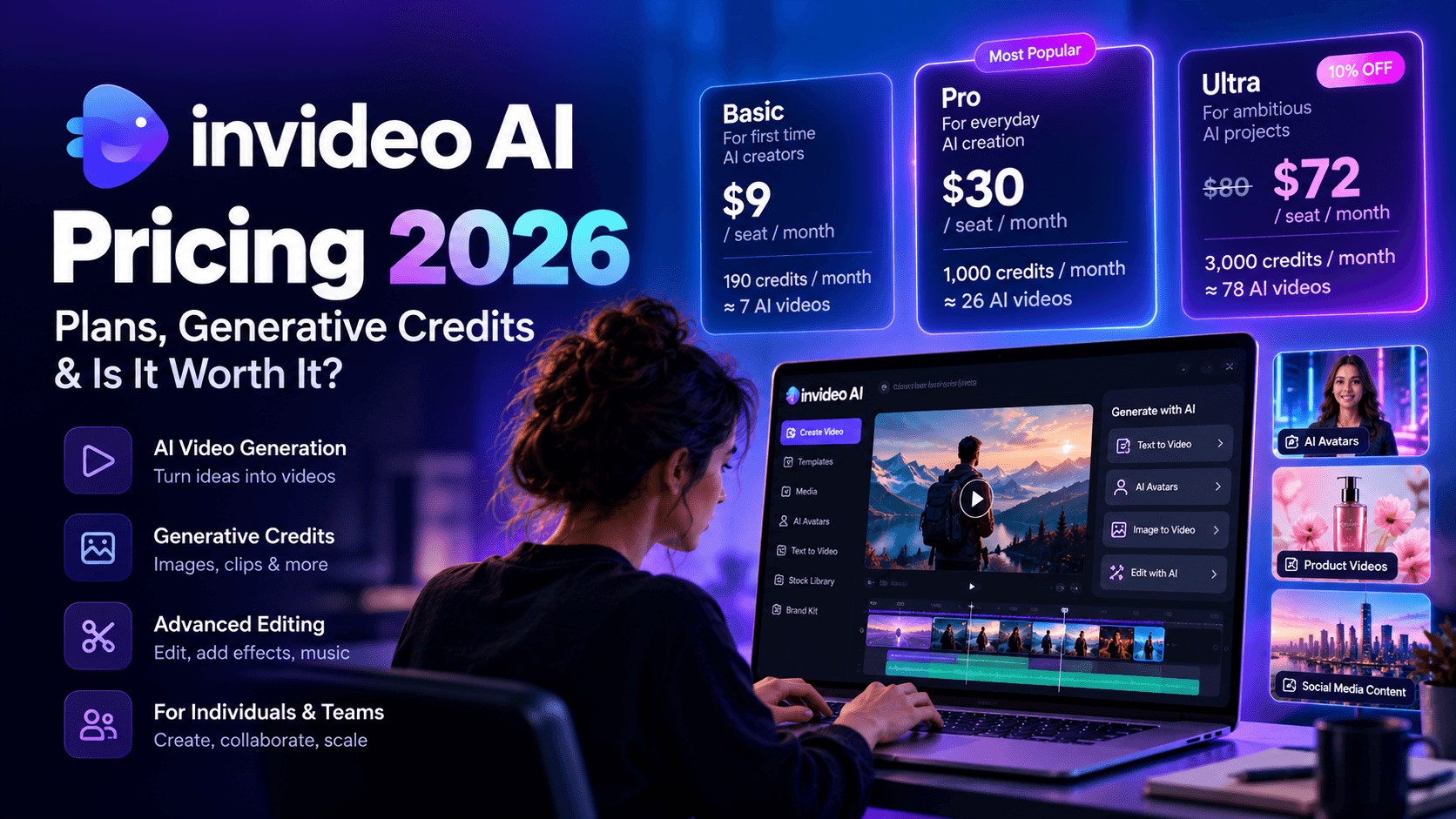
4. InVideo AI: Best Free Stock Footage Video Builder

InVideo AI takes a completely different route to AI video creation.
Rather than trying to generate every frame from scratch, it works more like an automated video production assistant. You give it a topic or a description, and the platform can assemble stock footage, voiceovers, music, transitions, captions, and other elements into a finished video.
That may sound less exciting than generating an entirely artificial cinematic scene, but there is a practical reason this model works so well for marketing content.
Most marketing videos do not need every frame to be AI generated.
A company explainer, educational video, listicle, promotional video, industry presentation, or social media post often benefits more from having relevant professional footage, a clear voiceover, readable captions, and sensible pacing than from having spectacular AI generated visuals.
That is where InVideo AI becomes useful.
For my test, I entered a prompt describing a busy coffee shop during a morning rush, with steam rising from coffee cups and several slow motion moments.
InVideo pulled relevant stock footage, created a voiceover, selected background music, and assembled the pieces into a finished video in around 90 seconds.
The stock footage was one of the more impressive parts of the result.
The system did not simply throw random café footage into the project. It generally matched the mood and subject of the prompt, which meant the finished video felt closer to something a marketing team could publish.
This makes InVideo particularly useful for agencies producing content where speed and structure matter more than cutting edge generative visuals.
Think about a client that wants five educational videos every week.
You could generate every scene from scratch with a generative model, but that can require considerable experimentation. You also need to worry about continuity between shots, visual consistency, voiceovers, captions, music, and editing.
InVideo can handle much of that production work for you.
It is particularly useful for content marketers who want to turn written material into video.
A blog post, product description, educational topic, or short script can become the starting point for a structured video. That makes the platform interesting for agencies running content programs where video needs to be produced alongside written content.
For longer projects, however, there are some limitations.
The platform's strength comes from assembling existing media and automated production elements. It is not designed to give you the same level of control over original visual generation that you would get from a dedicated generative model.
Where InVideo AI Falls Short
The free plan is where things get complicated.
You receive around 10 AI generation minutes per week and four exports per week, depending on the current plan and applicable restrictions.
Those exports carry an InVideo watermark and are limited to 720p.
For testing the platform, that is perfectly reasonable.
For an agency delivering finished client work, it is another matter.
The free plan also does not provide commercial rights for the generated exports, meaning you cannot simply create a client video for free and publish it as a commercial asset.
That makes the free tier much more useful as a testing environment than as a production plan.
The 720p limit is also noticeable.
Most modern marketing channels can accommodate higher resolution video, and clients are increasingly accustomed to polished 1080p or 4K content. A 720p export can look dated, particularly when viewed on larger screens.
There are also moments when the AI selects stock footage that is technically related to the prompt but does not quite communicate the intended idea.
That is one of the unavoidable issues with automated stock based production.
The system can understand that you want a business meeting, for example, but it cannot always understand the exact emotional tone, composition, or visual storytelling choice you had in mind.
The generation allowance also resets weekly, so unused minutes do not simply accumulate for a larger production later.
Free plan: Around 10 AI generation minutes per week, four exports per week, watermark, 720p
Paid access: Plus plan from around $25 per month when billed annually, with higher limits and watermark removal
Best for: Agencies creating explainers, educational content, marketing videos, social posts, and stock footage based content
My Take on InVideo AI
InVideo makes the most sense when you care about getting a complete marketing video rather than generating individual cinematic shots.
If your agency needs to turn written ideas into structured videos quickly, it is worth testing.
It also makes a useful companion to generative video tools. You can generate custom footage elsewhere, bring those assets into an InVideo workflow, and use the platform's editing and assembly capabilities to build the final piece.
That combination can become particularly useful for long form ai video generator workflows where you need both original AI footage and conventional stock based content.
5. Kling 3.0: Best Free Generator for Human Motion

Kling 3.0 is the tool I would look at first when human movement is central to the video.
AI video models have improved dramatically, but people remain difficult.
Walking, running, dancing, picking something up, turning around, gesturing while speaking, interacting with another person, and handling objects all require the model to understand a surprisingly complicated combination of anatomy, physics, timing, and spatial relationships.
Kling performed particularly well in my testing.
I created a scene involving a woman walking through a market and picking up a piece of fruit.
The hand interaction was one of the details that stood out.
Her fingers wrapped around the object naturally rather than producing the familiar distorted hands that have plagued AI generated video for years. The face remained reasonably consistent throughout the sequence, and the body movement felt physically believable.
That matters a lot if you are creating narrative content.
A model can produce a gorgeous landscape with relatively little trouble because the scene does not require complex human interaction. Put a person into that same scene and ask them to walk, turn, pick something up, speak, and interact with another character, and the difficulty increases considerably.
Kling handles those situations better than many of the free alternatives I tested.
It is also useful for agencies producing lifestyle advertising.
A fashion brand might need a person walking through a city. A food company might want someone picking up a product. A travel company could need a person moving through a destination. A fitness brand might need realistic body movement.
Those are exactly the situations where human motion quality becomes more important than simply producing a visually attractive frame.
Kling's credit structure is fairly straightforward, although you need to pay attention to how quickly higher quality generations consume those credits.
The free plan provides a limited number of standard generations each month. Higher quality modes require substantially more credits, so heavy experimentation can use the monthly allowance surprisingly quickly.
That is one of the reasons I would treat the free plan as a testing resource rather than assuming it can support unlimited agency production.
Where Kling 3.0 Falls Short
The first problem is credit consumption.
A platform can advertise a decent number of monthly generations, but the calculation changes once you start using higher quality settings or longer clips.
For serious experimentation, those credits disappear quickly.
I also encountered failed generations and visible artifacts. Roughly speaking, a meaningful percentage of complex prompts still needed another attempt before I got something I would consider usable.
That is normal for current AI video technology, but it becomes expensive when every failed attempt consumes credits.
There are also considerations around data ownership and enterprise use. Kling is developed by Kuaishou, and agencies working with sensitive client material may want to examine its current data policies before using it for confidential projects.
Customer support has also received mixed feedback from users, particularly around response times and subscription related issues.
For an individual creator, that may be frustrating.
For an agency managing multiple client accounts and production deadlines, support quality can become a much bigger operational concern.
Kling also does not function as a complete production suite.
You will not get a mature combination of avatars, voiceovers, translation, editing, and structured video assembly in the same way you might from a broader marketing video platform.
Free plan: Limited monthly standard generations, watermarked output, 720p
Paid access: Standard plans from around $8 per month, depending on current pricing
Best for: Human focused scenes, lifestyle advertising, character movement, product interactions, and realistic physical motion
My Take on Kling 3.0
Kling earns its place on the list because human movement is still one of the hardest problems in AI video, and Kling handles it well.
If your project depends heavily on people moving naturally through a scene, I would test Kling alongside Veo and the other major generators rather than relying on generic benchmarks.
For an agency building narrative video generation workflows, Kling can be particularly useful for individual character scenes that will later be assembled into a larger production.
The free tier is not generous enough for unlimited experimentation, but it gives you enough access to understand what the model can do before committing to a paid plan.
For projects where realistic human motion matters, those initial generations can tell you very quickly if Kling belongs in your production stack.
6. Pika: Best for Video Enhancement and Quick Edits

Pika is one of those AI video tools that makes more sense once you stop thinking of it as a traditional text to video generator.
It can generate video from prompts, but its more interesting use case is taking footage you already have and turning it into something more creative.
That makes Pika particularly useful for agencies that already have product footage, UGC, brand assets, or short social clips sitting around and want to add an AI powered creative layer.
For one test, I uploaded a five second product clip and used Pika's lip sync capability to add a voiceover with matching mouth movement. The finished result was usable for a social media concept within a couple of minutes.
I also tested the video extension feature.
The original clip was only five seconds long, and Pika extended it to roughly 12 seconds while keeping the movement reasonably coherent with the original footage.
That kind of functionality can be surprisingly useful.
A social media team might have a great product shot that ends too quickly. A creative team might have a clip that needs a few more seconds to accommodate a voiceover. An agency might want to turn a short piece of UGC into a longer creative variation without sending the project back to a traditional editing workflow.
Pika can help with those situations.
The effects library is where the platform gets particularly interesting.
I tested effects such as inflate and melt on product footage and brand assets. The results were not always perfect, but the successful generations produced the sort of visual effects that would traditionally require considerably more manual work.
For advertisers testing creative hooks, that can be valuable.
You could take the same product image and create several visually different openings, then see which version performs better on social platforms.
That makes Pika less interesting as a complete long form ai video generator and more interesting as a creative production tool that sits somewhere inside a larger workflow.
It can contribute individual scenes, transitions, effects, extensions, and variations that eventually become part of a longer video.
Where Pika Falls Short
Pika is not the platform I would choose if I needed to create an entire documentary or feature length AI video from a single workflow.
Its strongest capabilities are centered around short form creation and modification.
The free credit system also requires some discipline. Credits reset daily, which sounds generous, but longer or more complicated generations can consume them quickly.
You can get several short experiments out of the free allocation, but you should not expect unlimited production.
Resolution is another limitation.
Free outputs are restricted below the quality you would normally want for premium client work, and the difference becomes noticeable when the footage is displayed on larger screens.
Consistency can also vary.
An effect might look excellent on one generation and considerably less convincing on the next. That is fine for experimentation, but agencies producing repeatable client deliverables need to allow time for failed generations and revisions.
Pika also has fewer structured editing capabilities than a platform such as CapCut.
You can modify and enhance footage, but it is not designed to replace a conventional video editing environment.
Free plan: Daily credits, watermarked output, limited resolution
Paid access: Standard plans from around $8 per month, depending on current pricing
Best for: AI effects, video extension, lip sync, creative variations, and enhancing existing footage
My Take on Pika
Pika is worth keeping in an agency's AI video toolkit, particularly if your team produces a lot of short form advertising.
I would not treat it as your primary long form ai video generator.
Think of it more as a creative utility.
You can create a base video somewhere else, bring it into Pika, experiment with effects or extensions, and then take the result into your normal editing workflow.
For agencies testing dozens of social creative variations, that can be more valuable than having another platform that simply generates generic text to video clips.
7. Runway Gen 4 & 4.5: Best Professional Creative Control

Runway is one of the platforms that makes it obvious how far AI video has moved beyond simple text prompts.
The Gen 4 generation system gives creators considerably more control over how scenes look and move. If you are producing cinematic content and want to influence camera movement, subject motion, composition, and visual continuity, Runway provides tools that go far beyond pressing a generate button.
The problem is the free plan.
It is extremely limited.
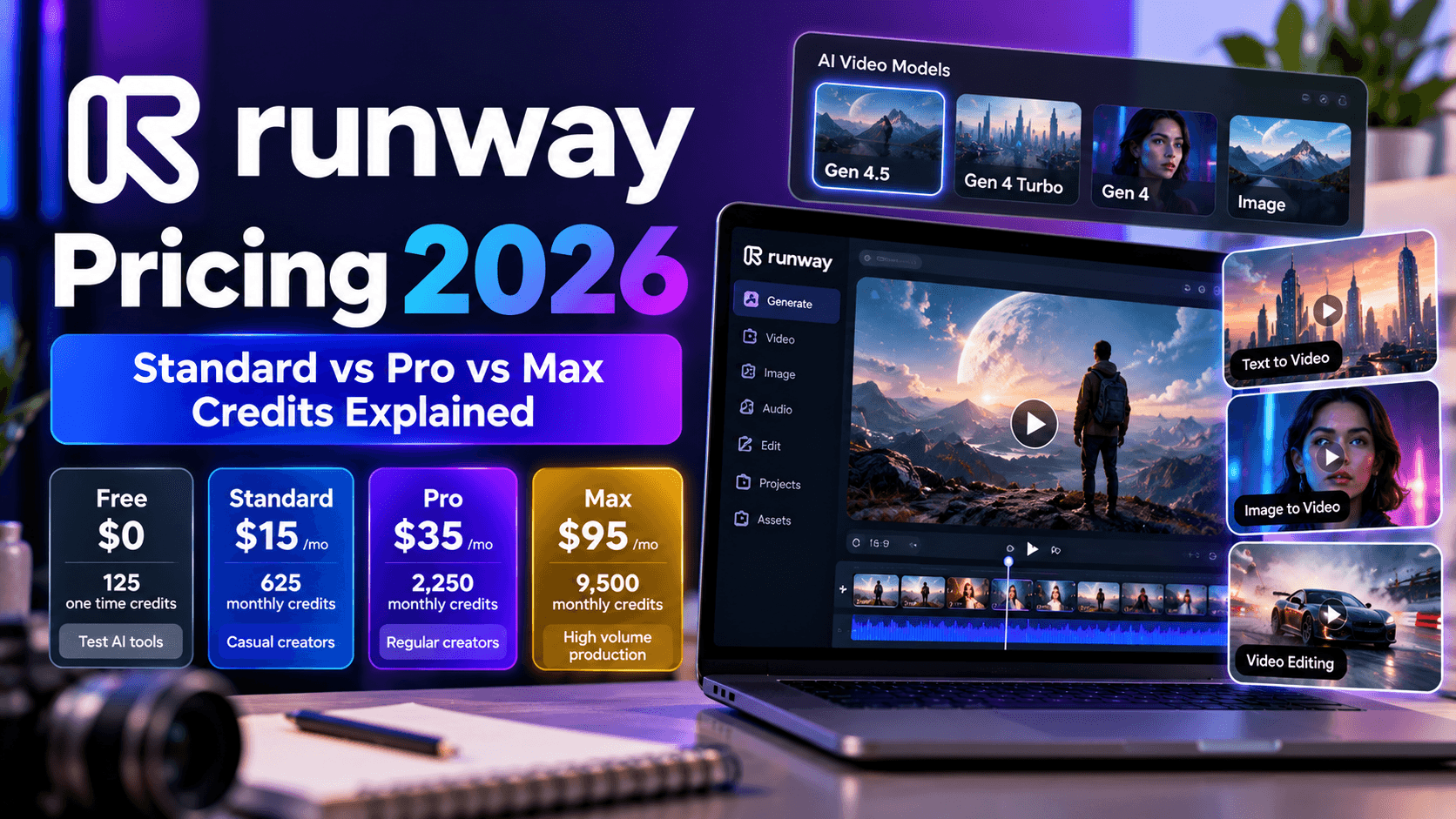
When I tested the free account, it provided 125 one time credits. That sounds reasonably generous until you start looking at how quickly video generations consume those credits.
In practical terms, you get only a handful of meaningful experiments before the free allocation disappears.
Once those credits are gone, they do not refresh.
So while Runway technically has a free plan, I would describe it more as a trial of the platform than a genuinely sustainable free production tier.
That does not make Runway unimportant.
Quite the opposite.
The quality and creative control are good enough that I still think it is worth testing if you are considering professional AI video production.
The camera controls were particularly impressive.
I tested movements such as pans, tilts, and zooms and found that Runway generally followed those instructions with a level of precision that made the generated footage feel more intentional.
The multi motion brush is another useful capability.
Rather than asking the model to animate an entire image in one broad instruction, you can direct movement toward specific areas. That opens up more controlled animation possibilities and gives creative teams more room to experiment.
For filmmakers, advertising agencies, visual artists, and VFX teams, that level of control matters.
AI video becomes much more useful when you can tell the system not only what should appear in the scene, but how the scene should behave.
That is also important for longer projects.
When you are working toward narrative video generation, you need individual shots to have a purpose. Camera direction, character movement, framing, and visual continuity become part of the storytelling process.
Runway gives you more control over those elements than many consumer focused platforms.
Where Runway Gen 4 Falls Short
The free tier is the obvious problem.
You receive 125 credits once, and once those credits are gone, there is no automatic monthly refresh.
For someone who simply wants to see what Runway can do, that is enough.
For someone hoping to create videos every week without paying, it is not.
The paid plans are also credit based, so heavy users need to keep an eye on consumption.
Another consideration is the learning curve.
Runway provides more controls because it is designed for creators who want control. That also means there are more settings and concepts to understand.
Someone creating their first social media video may find a simpler platform easier to learn.
Runway also does not provide the complete avatar, voiceover, translation, and presenter ecosystem found in some dedicated marketing video platforms.
It is much more oriented toward visual creation and creative production.
Free plan: 125 one time credits, limited model access
Paid access: Standard plan from around $15 per month with a larger monthly credit allocation
Best for: Professional creative work, cinematic scenes, controlled camera movement, VFX experimentation, and filmmakers
My Take on Runway Gen 4
If you want to see what professional AI video production looks like, Runway is worth testing.
Just do not confuse the free credits with an ongoing free plan.
I would use the free allocation to test your specific workflows, particularly the type of scenes and camera movements your agency produces most often.
If the results justify the cost, Runway becomes much more interesting at the paid level.
For longer projects, it can serve as a high control generation engine while another platform handles editing, voiceover, music, subtitles, and final assembly.
That combination can work particularly well when you are experimenting with extended video synthesis rather than expecting one model to generate an entire finished production.
8. Luma Dream Machine: Best for Cinematic Speed

Luma Dream Machine sits in an interesting position.
It is not the most feature packed platform on this list, and its free plan is not particularly generous, but it can produce attractive cinematic footage quickly.
For my testing, I created a mountain flyover scene with a cinematic camera movement.
The result arrived in under 30 seconds.
The camera motion was smooth, the lighting looked natural, and the overall clip had the visual quality I would expect from a serious generative video platform.
Speed matters more than it sounds.
If you are generating B roll, you are rarely going to accept the first clip you get. You may want to try a different camera angle, change the weather, alter the lighting, move the subject, or adjust the pacing.
Fast generation makes that experimentation much less painful.
Luma is also useful for creating visual transitions.
Its keyframe functionality allows you to define a starting image and an ending image, with the model generating the movement between them.
I tested a sunrise image as the starting frame and a sunset image as the ending frame.
The resulting transition created a convincing time lapse style sequence.
That kind of control becomes useful when you are trying to create a visual story rather than a collection of disconnected clips.
For marketing agencies, Luma can be particularly useful for B roll.
Imagine a travel campaign where you need atmospheric shots of mountains, cities, beaches, architecture, or landscapes. You do not necessarily need a presenter or a long script. You need visually attractive footage that can sit behind narration or accompany other content.
Luma fits that use case well.
It can also work nicely for social media creatives where cinematic visuals need to capture attention within the first few seconds.
Where Luma Dream Machine Falls Short
The free plan gives you only a limited number of draft generations each month.
At the level I tested, that meant around eight free videos per month.
That is enough to evaluate the system.
It is not enough for a regular content production schedule.
The draft mode also produces lower quality output than the paid experience, and free generations carry a watermark.
Human characters are another weak point.
Luma can produce attractive people in some scenes, but facial consistency and complex human movement are less reliable than what you can get from tools specifically designed around human motion.
It also lacks a complete editing suite.
There is no built in environment for turning a collection of generations into a polished documentary, marketing presentation, or long form narrative.
Commercial usage also needs attention. If you plan to use the generated footage in client campaigns, check the current licensing requirements for your specific plan.
Free plan: Around eight draft generations per month, watermarked, limited resolution
Paid access: Lite plan from around $9.99 per month, depending on current pricing
Best for: Cinematic B roll, visual transitions, landscapes, atmospheric scenes, and social media visuals
My Take on Luma Dream Machine
Luma is a good example of why you should not judge an AI video platform solely by the number of features it has.
It does a relatively focused job and does it well.
If you need cinematic B roll quickly, it is worth testing.
For long duration video creation, I would use Luma as one component of a broader workflow rather than expecting it to generate an entire long form production.
9. Hailuo AI: Best Free Tier for Volume

Hailuo takes a very different position from Runway.
Runway gives you professional creative controls but a tiny free allowance.
Hailuo is much more interesting if your priority is simply getting more generations to experiment with.
The platform became particularly popular among creators looking for affordable access to AI generated video, and its free access has historically been more generous than many competitors.
The exact limits have changed over time, which is something you should keep in mind when evaluating the platform.
At the time of testing, free users could get roughly three to five generations per day, with the allowance resetting daily.
That model works well for social media creators.
If you only need a few clips every day, you can come back tomorrow and continue experimenting without having to purchase a subscription.
I tested Hailuo with several social media concepts, including product rotations, lifestyle scenes, and abstract visual sequences.
The output quality was below Veo 3 and Runway, but it was still good enough for many social applications.
Generation speed averaged around 45 seconds per clip, which made it reasonably comfortable to work with.
One of the more interesting features was character consistency.
I generated two related clips and asked the system to maintain the same character. The face remained consistent across the sequences around 70 percent of the time in my testing.
That is not perfect.
For a long narrative production, 70 percent consistency would create too many continuity problems.
For short social videos, however, it can be good enough.
That makes Hailuo interesting for agencies that need volume more than cinematic perfection.
You might use it for quick concept tests, social hooks, product visuals, mood clips, background footage, or creative experiments where you do not know yet which idea deserves a larger production budget.
Where Hailuo AI Falls Short
The first issue is visual quality.
Hailuo can produce very good clips, but it does not consistently reach the quality level of the highest end models.
That becomes more noticeable when you ask for complicated scenes, realistic human interactions, or highly controlled camera movements.
Character consistency also becomes less reliable as the project gets longer.
A two clip sequence may work well. A sequence containing dozens of scenes is a different challenge.
That is why I would be cautious about using Hailuo as the core engine for a documentary AI project or feature length AI video.
It can generate useful pieces of those projects, but maintaining visual and character continuity across a long production requires a more controlled workflow.
Documentation and support can also be less convenient for English speaking teams.
And there is an important pattern worth watching with the free plan.
Hailuo originally offered considerably more generous access and later tightened the limits.
That means you should not assume today's free allowance will remain unchanged for the next year.
Free plan: Roughly three to five generations per day, daily reset, watermarked output
Paid access: Plans around $10 per month depending on current pricing and available features
Best for: High volume social content, prompt experimentation, quick visual concepts, and creators who prefer daily rather than one time allowances
My Take on Hailuo AI
Hailuo is a practical option when quantity matters.
If you are an agency testing dozens of concepts and need a free platform that lets you keep coming back every day, the daily reset system is useful.
The quality is good enough for plenty of social applications, but I would not rely on it alone for a major long form production.
Use it as a high volume generation resource, then move your strongest concepts into a more controlled production environment when a project becomes serious.
Pixara.ai: A Practical Choice for Creators and Agencies

Finding an AI video platform that works well for a solo creator is one thing. Finding one that can also fit into an agency workflow is considerably harder.
Individual creators typically want speed, simplicity, creative flexibility, and enough functionality to produce polished content without assembling five different tools. Agencies have a longer list of concerns. They need repeatable workflows, faster production, client ready output, and enough creative control to produce different types of content without rebuilding the entire process for every project.
That is where Pixara.ai becomes an interesting option.
Rather than treating AI video generation as a novelty where you create a short clip, download it, and move on, the platform fits more naturally into a broader content production workflow. That matters for anyone working toward long duration video creation, where individual scenes need to become part of a larger visual story.
For a solo visual content creator, the appeal is fairly straightforward. You can spend less time wrestling with complicated production processes and more time developing the actual creative idea. That can be particularly useful when you are producing social content regularly and need a reliable way to turn concepts into visual assets without a large production team behind you.
The agency use case is even more interesting.
An agency may be producing promotional videos for one client, educational content for another, product visuals for a third, and social media creatives for several others. Those projects can have completely different visual requirements. A platform that can support different creative directions gives a small team more room to handle that variety without dramatically increasing production overhead.
Why It Makes Sense for Solo Creators
Solo creators usually have to wear every hat.
You are the creative director, writer, editor, producer, and sometimes even the person managing client communication. Spending hours figuring out technical workflows can quickly become a bigger problem than the actual video production.
A useful AI video platform should reduce some of that friction.
For someone producing visual content independently, the value comes from being able to move from an idea toward a usable video without needing an elaborate production setup. That makes it useful for creators working on social media campaigns, YouTube content, promotional videos, visual storytelling, product content, and other formats where consistent output matters.
It is also particularly relevant when experimenting with narrative video generation.
You might have an idea for a short story, a branded sequence, an educational concept, or a series of connected scenes. Rather than treating every generation as an isolated experiment, you can think about the individual visuals as components of a larger piece of content.
That is an important difference when moving toward longer productions.
A creator experimenting with a feature length AI video probably does not need every scene to be generated in one click. What matters more is having a workflow where individual scenes can be created, refined, organized, and eventually assembled into a coherent production.
Why Agencies Should Pay Attention
For agencies, the calculation is slightly different.
Production efficiency matters because every additional hour spent creating a deliverable affects margins. If a team can reduce repetitive production work while still maintaining creative quality, that creates room for more client projects without requiring a proportional increase in headcount.
AI video can help with that, but only when the workflow is practical.
An agency could use the platform for early creative concepts, campaign visuals, social media content, product presentations, promotional sequences, and other client assets where traditional production would require more time or resources.
It can also make creative testing easier.
Suppose a client has one product and wants several advertising concepts. A conventional workflow might require separate shoots, edits, or extensive post production for every variation. AI generated video can make it easier to test different visual directions before deciding which concepts deserve further investment.
That is particularly useful for performance marketing teams.
Instead of putting the entire production budget behind one creative idea, an agency can generate multiple concepts, identify the ones with the most potential, and develop those further.
The result is a workflow that treats AI video as part of the creative development process rather than simply as a replacement for traditional footage.
A Useful Fit for Long Form AI Video Workflows
There is also a bigger reason to consider a platform like this in the context of long form AI video.
Long form production is not simply about making one unusually long AI generated clip.
A documentary, training program, branded story, educational series, or feature length AI video is built from many individual components. You need establishing shots, transitions, supporting visuals, product scenes, character moments, B roll, and other pieces that can eventually be edited into a complete narrative.
That is where the idea of extended video synthesis becomes important.
Current AI video systems still have limitations when you ask them to maintain perfect consistency across very long sequences. Characters can change, environments can drift, and visual details can become inconsistent from one generation to another.
A more practical workflow is to treat AI generation as a way to produce the building blocks of the final production.
You generate the scenes you need, refine the strongest results, and bring those assets together during editing.
For documentary AI projects, this can mean generating historical recreations, conceptual visuals, atmospheric B roll, maps, environments, or scenes that would be difficult or expensive to capture traditionally.
For branded content, it can mean creating product environments, lifestyle sequences, campaign visuals, or alternate creative directions.
For educational content, it can help turn abstract concepts into visual sequences that make longer explanations easier to follow.
That makes a capable platform useful even when it is not responsible for generating every second of the final video.
The Bigger Value for Small Creative Teams
The most compelling part of this category is accessibility.
A few years ago, creating polished video content generally meant having access to cameras, editing software, motion graphics expertise, voice talent, stock footage libraries, and a production team.
AI has changed the economics of that process.
A solo creator can now experiment with visual concepts that previously required several specialists. A small agency can offer more creative variations without building a massive production department. A marketing team can produce visual assets internally instead of outsourcing every small video requirement.
That does not mean traditional production has become irrelevant.
For high budget commercial work, professional filming, editing, sound design, and post production still have an important place.
AI video simply gives smaller teams another option.
For individuals and agencies that need to produce more visual content without making every project a major production exercise, Pixara.ai fits naturally into that middle ground.
It gives creators a way to experiment quickly, while agencies can look at it as part of a broader production stack for generating the visual assets needed across multiple client projects.
Who Should Consider It?
If you are a solo creator who needs to turn ideas into visual content without spending most of your time on technical production, this type of workflow can be particularly useful.
If you run a small or mid sized agency, the bigger benefit is production scalability. You can experiment with more creative directions, produce more variations, and support a wider range of client requirements without every project demanding a completely separate production process.
And if your longer term goal is moving into feature length AI video, documentary AI, or other forms of narrative production, it can serve as one component of a workflow where individual AI generated scenes eventually become part of a much larger finished piece.
That is ultimately how I would look at Pixara.ai in the context of this list.
It does not need to be the only tool in your stack.
The most useful AI video workflow may involve several specialized platforms, with each one handling the part of production it is best suited for. A platform that makes visual creation accessible to an individual creator while remaining useful inside an agency workflow has a particularly practical role to play.
For creators, that means fewer barriers between an idea and a finished visual.
For agencies, it means another way to increase creative output without increasing production complexity at the same rate.
New MCP Agent and Ready to Use Online Workflows
One of the more interesting developments around Pixara.ai is the recent launch of its MCP agent, which takes the platform beyond a traditional AI video creation interface.
For creators and agencies, the appeal of an MCP based workflow is simple: you can bring AI powered video capabilities closer to the way you already work, rather than treating video generation as an isolated task that requires you to jump between multiple applications.
The MCP agent is designed to make those capabilities accessible through workflows that can be used directly online from the Pixara website. That opens up a more practical way to work with AI video, particularly for people who want to move from an idea to a specific production task without having to figure out an elaborate technical setup first.
This is useful because AI video production can involve a surprisingly long chain of individual tasks.
You might need to develop a concept, generate visual scenes, create variations, prepare supporting assets, structure content, and eventually turn those pieces into a finished video. When every step requires a different platform, the creative process can become fragmented very quickly.
The MCP agent and online workflows are designed to reduce some of that friction.
What Makes the MCP Agent Interesting for Creators
For an individual creator, the biggest advantage is accessibility.
You do not necessarily need to understand how the underlying AI systems communicate with one another to take advantage of a workflow. The experience can be much closer to selecting what you want to accomplish and letting the workflow handle the underlying steps.
That is particularly useful for creators who are more interested in storytelling and visual production than in learning technical AI infrastructure.
Imagine you have an idea for a short promotional video.
Rather than starting with a blank editor and manually figuring out every production step, you can use an online workflow as a starting point, develop the required visual content, and then continue refining the output.
The same principle becomes even more useful when you are creating content repeatedly.
A creator producing videos every week benefits from repeatable workflows because you do not have to reinvent the production process every time a new idea comes along.
That repeatability becomes increasingly important as you move from individual clips toward long duration video creation.
Why MCP Workflows Matter for Agencies
For agencies, the potential value is broader.
An agency rarely creates one type of video. Different clients can have completely different requirements, from social media ads and product videos to educational content, promotional campaigns, explainers, and longer narrative productions.
A workflow based environment can make it easier to standardize recurring production tasks without forcing every project into exactly the same creative template.
That distinction matters.
Standardization should remove repetitive work, not remove creativity.
An agency can establish repeatable processes for common production requirements while still giving its creative team room to customize the final result around each client.
This can be particularly valuable for teams producing content at scale.
If a workflow can take care of some of the repetitive steps involved in preparing AI generated video assets, creative professionals can spend more of their time on scripting, storytelling, art direction, messaging, and client specific decisions.
That is where the MCP agent becomes more than another AI feature.
It can become part of the operational layer behind an agency's creative workflow.
Accessing Workflows Directly Online
Another practical advantage is that these workflows are available directly through the Pixara website.
That lowers the barrier to experimentation.
You do not necessarily need to build a custom technical environment before trying a workflow. You can access the available experiences online and see how they fit into your existing production process.
For solo creators, this can mean getting from concept to experimentation faster.
For agencies, it provides a way to evaluate AI powered workflows before deciding how deeply they should be incorporated into a larger production stack.
This is particularly relevant for teams that are still figuring out where AI belongs in their workflow.
You may not need to replace your existing editing software, production tools, or creative processes. The more useful question is where an AI workflow can remove unnecessary manual work or make a previously expensive creative task easier to produce.
From Individual AI Clips to Larger Productions
The MCP agent also becomes more interesting when viewed alongside the broader development of long form AI video.
Generating one impressive clip is relatively easy compared with producing an entire structured video.
A longer production needs multiple scenes, supporting visuals, variations, transitions, and a coherent narrative. A documentary AI project might require dozens or hundreds of individual visual assets. A feature length AI video could require an even larger production pipeline.
That makes workflow automation increasingly important.
Rather than expecting one model to create an entire long form production from a single prompt, creators can think of AI video as a collection of connected production tasks.
The MCP agent and online workflows provide a way to make those tasks more accessible and repeatable.
For agencies, that can mean a more scalable foundation for narrative video generation.
For solo creators, it can mean taking on projects that previously required a larger production team.
And for teams experimenting with extended video synthesis, it provides another way to connect individual AI generated assets into a broader creative process.
Why This Matters Right Now
AI video is moving beyond the novelty of generating a short clip from a text prompt.
Creators are starting to ask more practical questions.
- Can I produce content regularly?
- Can I create multiple versions of the same campaign?
- Can I handle a longer narrative?
- Can I build a repeatable workflow for client projects?
- Can I connect different AI capabilities without spending half my day moving files between platforms?
Those questions are much closer to how agencies and professional creators operate.
That is why the MCP agent and online workflow ecosystem is worth paying attention to. The value is not simply another way to generate a video. It is the possibility of making AI video capabilities easier to access as part of an ongoing production workflow.
For someone experimenting with a few social clips, that can save time.
For a solo visual creator building a regular content pipeline, it can reduce repetitive production work.
For an agency, the larger opportunity is scalability: more creative experimentation, more repeatable processes, and a more accessible way to bring AI powered production into everyday client work.